How to integrate E2b MCP with Grok Build

Connect Grok Build to E2b MCP. Run a python script to analyze csv data, execute javascript code to validate user input, and more from your terminal, with authentication handled for you.

E2b logoE2b
Api Key

E2b is an open-source platform for running code in secure, sandboxed environments. It enables safe multi-language code execution for AI-powered apps.

27 Tools

How to integrate E2b MCP with Grok Build

Grok Build is xAI's terminal coding agent. It runs on Grok 4.5, plans its work before it acts, and can run multiple sub-agents in parallel. It also reads Claude Code's MCP configuration, so any server you already have in a .mcp.json is picked up with no changes.

In this guide, I will show you how to connect your E2b account to Grok Build through Composio, so it can run a Python script to analyze CSV data, execute JavaScript code to validate user input, start a sandbox and list installed packages, and more without leaving the terminal. Composio holds the OAuth tokens for you, and Grok Build only calls the tools you approve.
Also integrate E2b with

Why use Composio over a standalone MCP server?

  • Read and write access. Composio's E2b integration lets Grok Build take real actions like creating drafts, sending updates, and labeling records, not just reading data.
  • 1,000+ SaaS toolkits out of the box. One endpoint gives you a full catalog of pre-built connectors, from Gmail and Slack to Notion, Linear, and Salesforce.
  • One MCP server for every app. Wire up a single Composio server instead of maintaining a separate MCP entry for each app.
  • Smart, context-aware tool loading. Grok Build caps how many tools it holds in a single request. Composio loads only the tools a task needs, so you do not spend that budget on tools you are not using.
  • Cross-app automation. Chain actions across apps in one run. Pull a thread, summarize it in Notion, and post the highlights to Slack from a single prompt.

Prerequisites

  • Grok Build installed and signed in. Install with curl -fsSL https://x.ai/cli/install.sh | bash on macOS or Linux, or irm https://x.ai/cli/install.ps1 | iex on Windows PowerShell. On first launch Grok opens a browser to authenticate; for headless or CI use, set an XAI_API_KEY environment variable instead (create the key at console.x.ai).
  • Access to the E2b account you want to connect.
  • The Composio MCP endpoint. Composio's server is remote and hosted, so there is nothing to run locally and no tunnel to set up.

Step-by-step: Connect E2b to Grok Build

1. Install and verify Grok Build

Install the CLI, then restart your shell so the grok binary lands on your PATH:

bash
curl -fsSL https://x.ai/cli/install.sh | bash
which grok

On Windows, install with PowerShell instead: irm https://x.ai/cli/install.ps1 | iex. If which grok returns a path, you are set. Grok Build runs on Grok 4.5 by default; you can switch models inside the session with /model <name>.

2. Add the Composio server

Add Composio as a remote HTTP MCP server with the grok mcp add command:

bash
grok mcp add --transport http composio https://connect.composio.dev/mcp

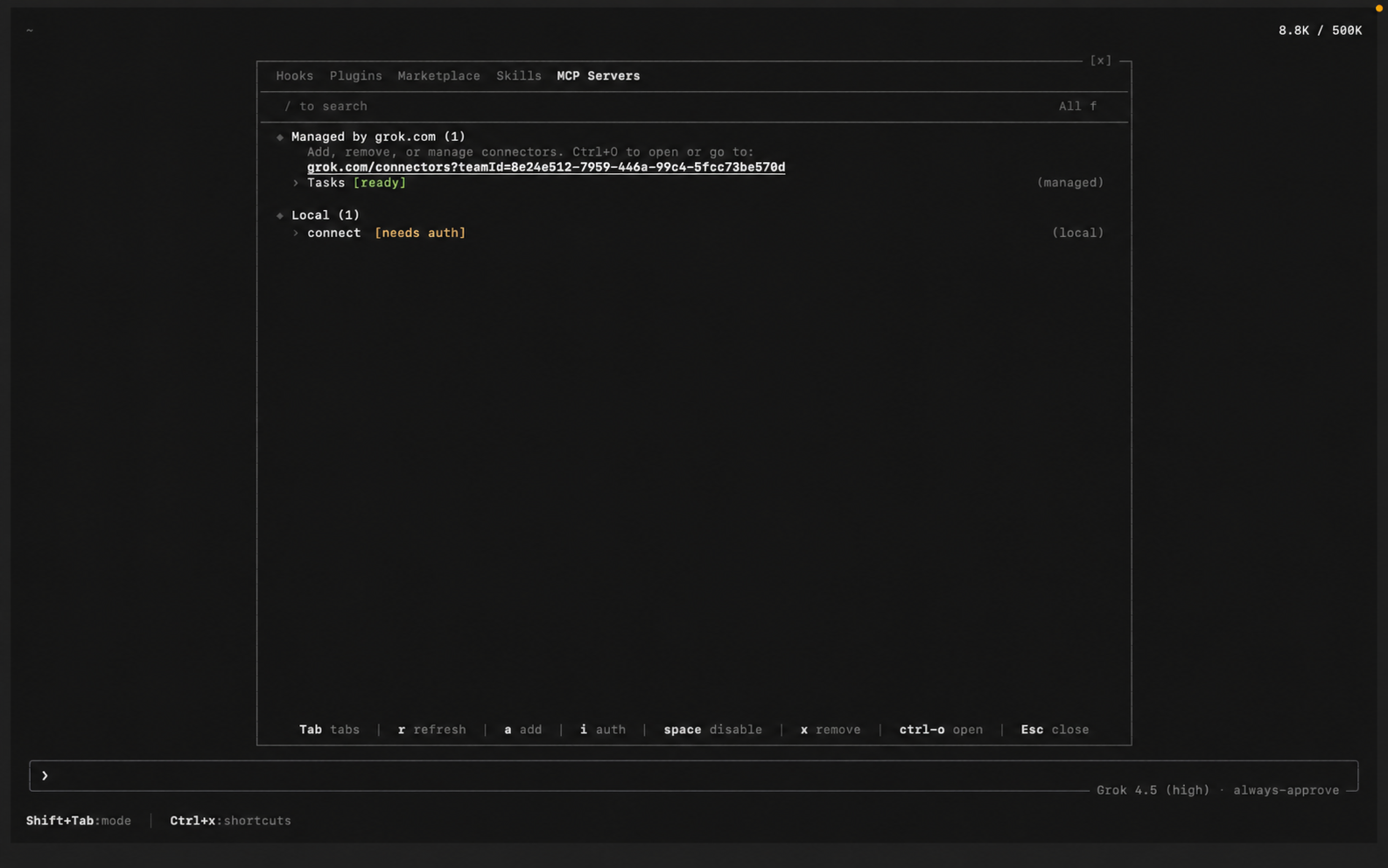
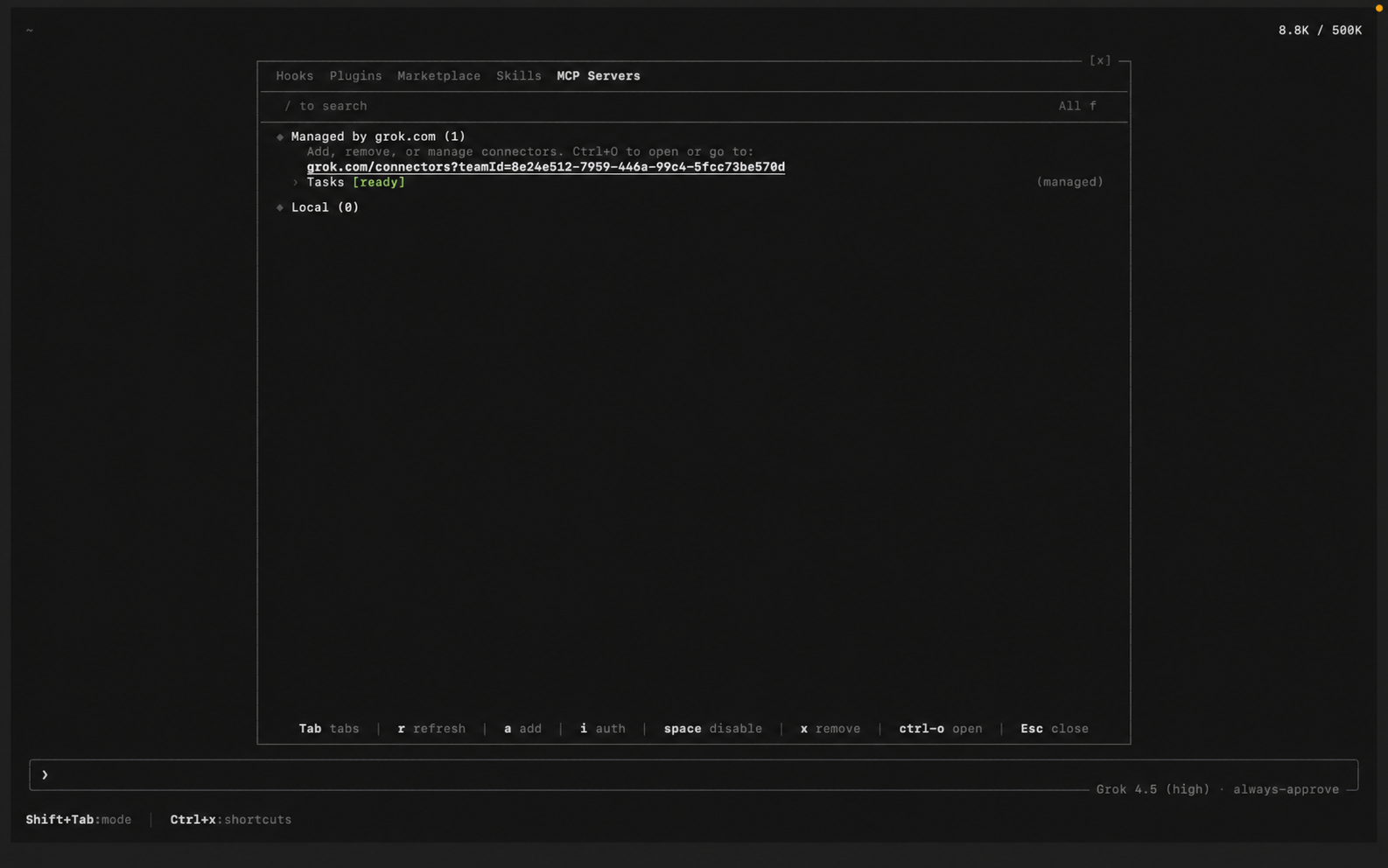
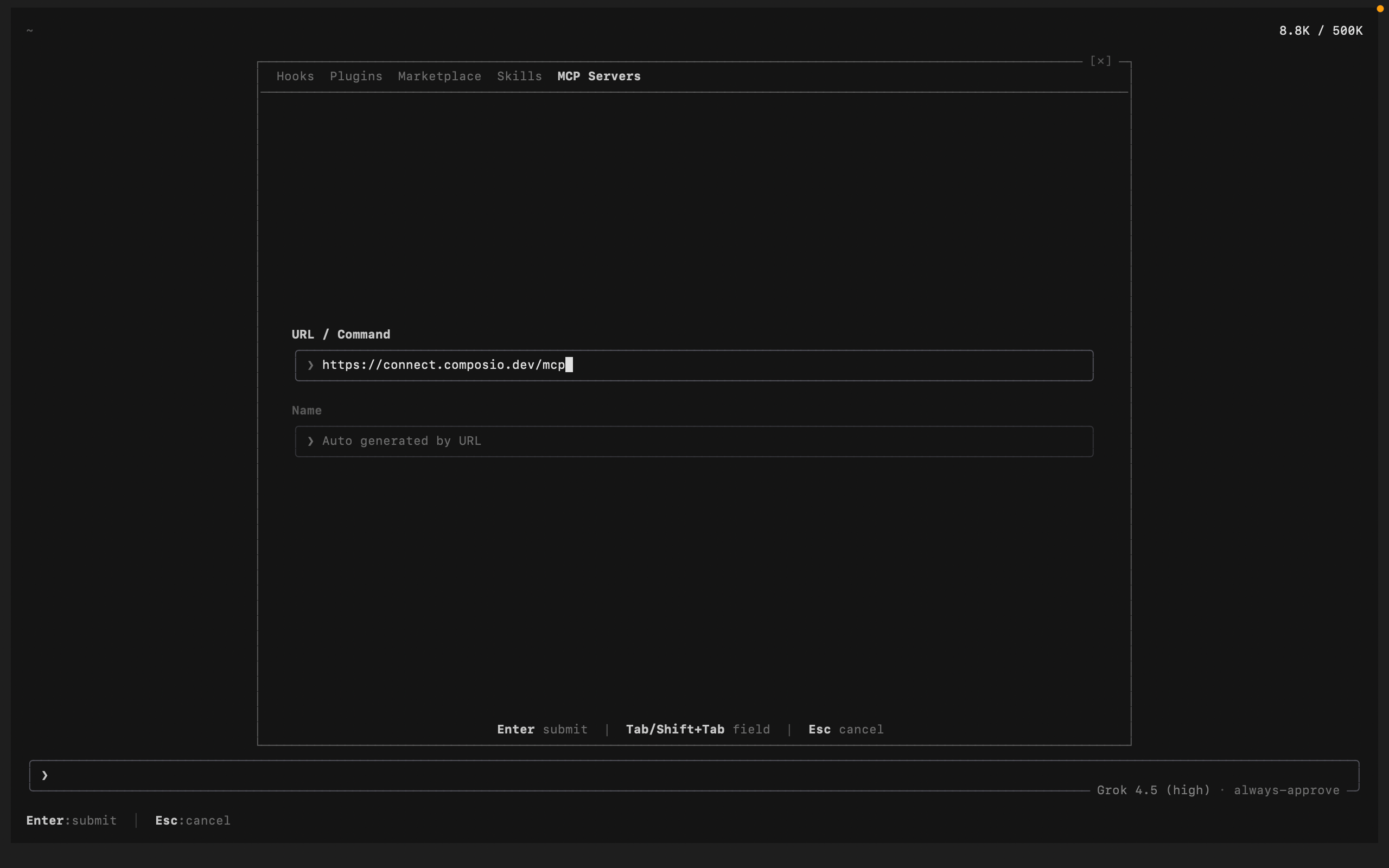
You can also add and manage servers from inside a session. Run /mcps to open the extensions modal on the MCP tab, then add a new server and paste the Composio URL. Added this way, Grok auto-detects the name from the URL and lists the server as connect:

bash
https://connect.composio.dev/mcp
Grok Build /mcps extensions modal listing MCP servers Grok Build adding the Composio MCP server with its URL

Grok also reads Claude Code-style config, so an entry in ~/.grok/config.toml or a project .mcp.json works the same way.

3. Authenticate

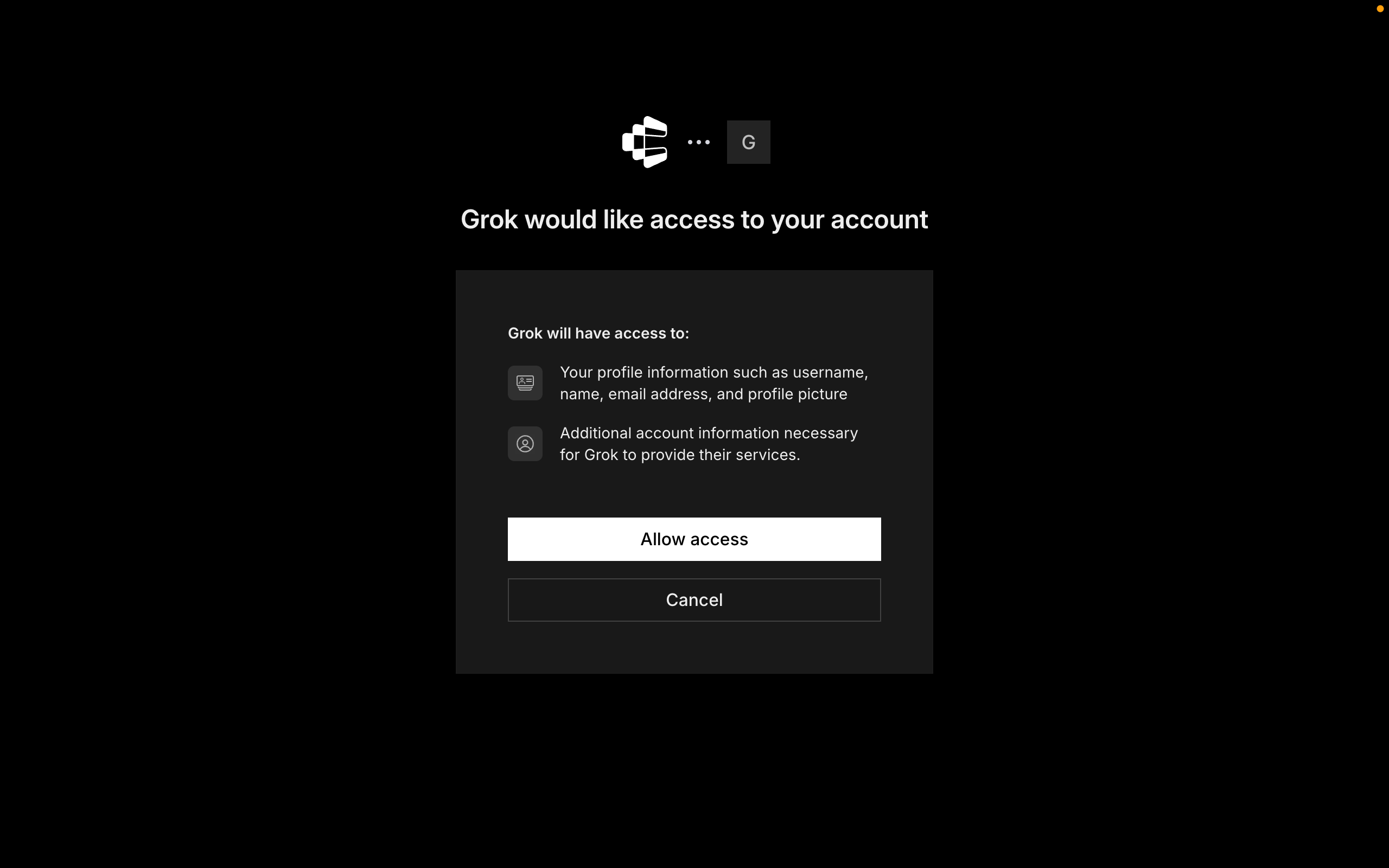
Composio uses OAuth. In the /mcps modal, select the Composio server and press i to authenticate (Grok also triggers this browser flow automatically the first time it uses a Composio tool). Click Allow to authorize access. Grok stores the tokens under ~/.grok/mcp_credentials.json, and /mcps shows Composio as connected.

Grok Build prompting to authenticate the Composio MCP server Composio authorization screen with the Allow button for Grok Build

4. Start building

Ask Grok to work with your E2b account through Composio. On the first E2b action, Composio prompts you to connect the account through OAuth. Approve the scopes once, and Composio handles token refresh from there.

What you can do after connecting E2b

  • Run a Python script to analyze CSV data
  • Execute JavaScript code to validate user input
  • Start a sandbox and list installed packages

Security + privacy notes (important)

  • Use least-privilege access. Grant only the E2b scopes you actually need.
  • Review OAuth scopes before approving. Check that the requested scopes match what you expect Composio and Grok Build to do.
  • Keep write actions human-reviewed. Grok Build proposes a plan before it acts. Leave that approval step on for actions like sending messages or editing records.
  • Keep secrets out of version control. Your XAI_API_KEY and any tokens should never be committed. Use environment variables or a secrets manager.
TOOLS

Supported Tools

Every E2b action and event your agent gets out of the box.

Connect to Sandbox

Tool to connect to an existing E2B sandbox and retrieve its details.

Create Template

Tool to create a new E2B template with specified configuration.

Create Webhook

Tool to register a new webhook to receive sandbox lifecycle events for the team.

Delete Sandbox

Tool to terminate and permanently delete a running E2B sandbox instance.

Delete Webhook

Tool to unregister a webhook and stop receiving lifecycle events.

Check API Health

Tool to check the health status of the E2B API.

Get Sandbox

Tool to retrieve detailed information about a specific sandbox by its ID.

Get Sandbox Logs

Tool to retrieve logs from a specific E2B sandbox instance.

Get Sandbox Lifecycle Events

Tool to retrieve the latest lifecycle events for a particular sandbox instance.

Get Sandbox Metrics

Tool to retrieve timestamped CPU, memory, and disk usage metrics for a sandbox.

Get Team Metrics

Tool to retrieve timestamped CPU, memory, and disk usage metrics for a team.

Get Team Maximum Metrics

Tool to retrieve the maximum value for a specific team metric in a given interval.

Get Template Build Status

Tool to get the status of a template build.

Get Template Files

Tool to get an upload link for a tar file containing build layer files.

Get Webhook Configuration

Tool to retrieve the current webhook configuration for a specific webhook.

List All Sandboxes

Tool to list all running and paused sandboxes associated with your team.

List Sandboxes Metrics

Tool to retrieve timestamped CPU, memory, and disk usage metrics for multiple sandboxes.

List Team Sandbox Lifecycle Events

Tool to retrieve the latest lifecycle events across all sandboxes associated with the team.

List All Templates

Tool to list all available E2B templates for your team.

List All Webhooks

Tool to retrieve all registered webhooks for your team.

Pause Sandbox

Tool to pause a running E2B sandbox preserving its filesystem and memory state.

Create Sandbox

Tool to create a new E2B sandbox from a template.

Set Sandbox Timeout

Tool to set the timeout for an E2B sandbox.

Refresh Sandbox

Tool to refresh an E2B sandbox and extend its time to live.

Start Template Build

Tool to start a build for an E2B template.

Update Template

Tool to update an E2B template configuration.

Update Webhook Configuration

Tool to update an existing webhook configuration including URL, enabled status, and subscribed events.

FAQ

Frequently asked questions

A standalone E2b MCP server gives Grok Build a fixed set of E2b tools tied to that one server. The Composio Tool Router lets Grok Build load tools from E2b and many other apps on demand, based on the task, all through a single endpoint.

Yes. Grok Build ships with native MCP support. Add a server with the grok mcp add command, from the in-session /mcps modal, or by editing ~/.grok/config.toml. It also reads Claude Code-style .mcp.json files, so Grok Build discovers the tools automatically.

Yes. Grok Build has zero-migration compatibility with Claude Code's configuration, so the same Composio server entry works in both without edits.

Tokens, keys, and configuration are encrypted at rest and in transit. Composio is SOC 2 Type 2 compliant, so your E2b data and credentials are handled to that standard.

Start with E2b.It takes 30 seconds.

Managed auth, hosted MCP servers, and every E2b tool your agent needs.Free to start.

Start building