How to connect Dadata ru to Claude

Connect Claude Web, Desktop and Cowork to Dadata ru MCP. Clean and standardize this russian address, validate and parse a user's full name, and more using natural language, with authentication handled for you.

Dadata ru logoDadata ru
Api Key

Dadata ru is a data validation and enrichment API for Russian addresses, companies, and personal data. It helps automate data entry, reduce errors, and standardize records across your workflows.

63 Tools

Introduction

Claude is Anthropic's AI assistant, available on the web, in the desktop app, and on mobile. Cowork is its agent for knowledge work, and it runs on all of those surfaces too. Connected to your apps, Claude can work with your files and services to accomplish complex tasks on your behalf.

This guide walks you through the easiest and most secure way to connect your Dadata ru account to Claude via Composio Connect, enabling it to clean and standardize this Russian address, validate and parse a user's full name, check if this passport number is valid, and more such actions on your behalf without compromising your account security.

Setup is the same on Claude Web, Desktop, and Cowork, and you only need to do it once. The connector is tied to your account, so it's available in all three.

Also integrate Dadata ru with

Connecting Dadata ru to Claude Web, Desktop, and Cowork

Two ways to add the Composio connector. Pick whichever you prefer.

1. Add with one click

Click the button. Claude opens with the Composio connector filled in. Click Add, then go to step 2.

Add to Claude

Add manually

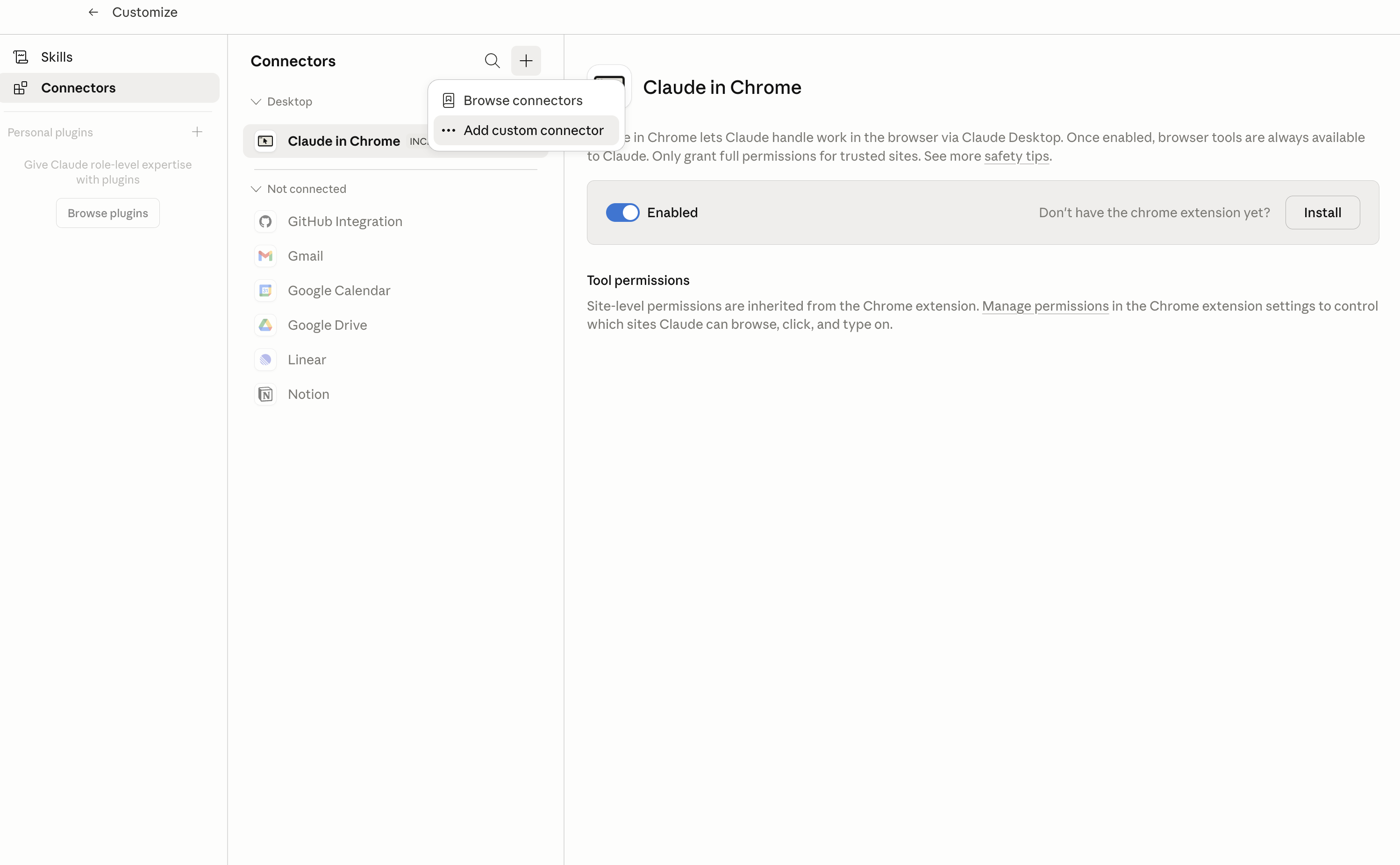
In Claude Desktop, click Customize in the left sidebar, then select Connectors and click the + icon at the top.

Claude Desktop connectors screen with Add custom connector selected

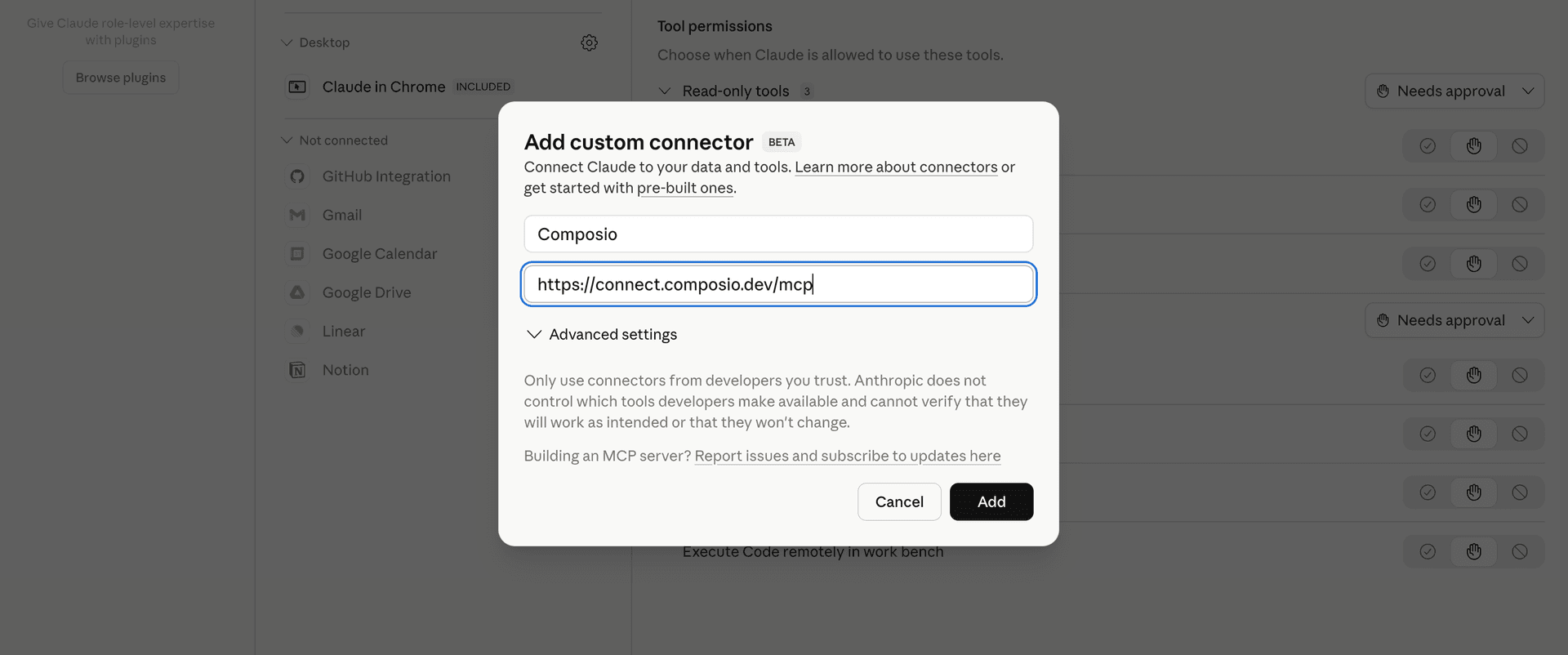
Click Add custom connector and paste in the Composio MCP server URL:

bash
https://connect.composio.dev/mcp
Add custom connector dialog with Composio MCP server URL

2. Authorize in your browser

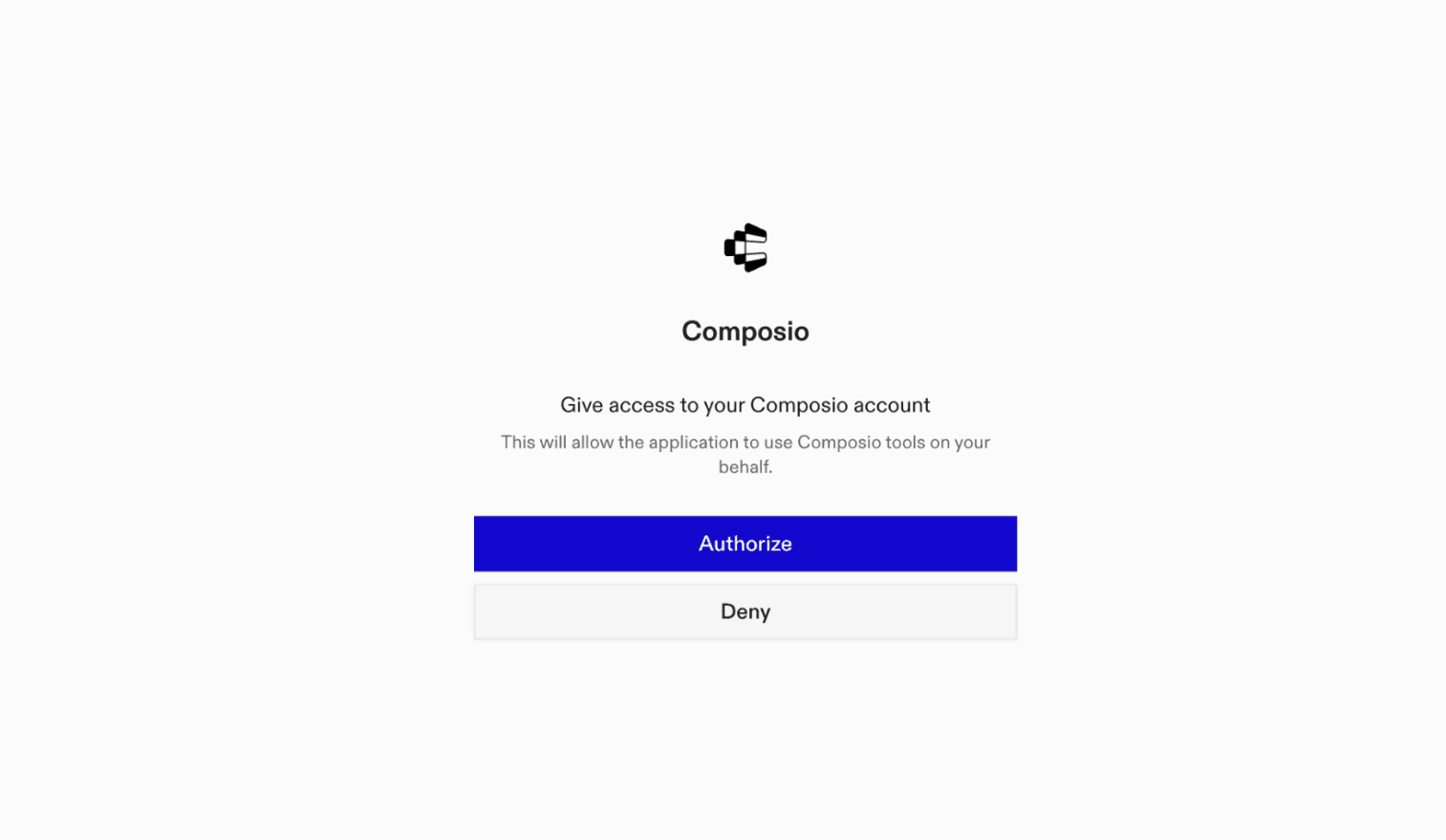
Click Connect. You'll be redirected to a browser window where you can authorize Composio to continue.

Composio authorization screen for Claude Web, Desktop, and Cowork

3. Connect your Dadata ru account

Back in Claude, ask it to connect to Dadata ru or give it any Dadata ru-related task.

For example, ask Claude to:

  • "Clean and standardize this Russian address"
  • "Validate and parse a user's full name"
  • "Check if this passport number is valid"

It will prompt you to authenticate and authorize access.

That's it. Composio's tools are now available in Claude, and your Dadata ru account is ready to use.

What is the Dadata ru Claude Connector, and what's possible with it?

The Dadata ru MCP server is an implementation of the Model Context Protocol that connects your AI agent and assistants like Claude, Cursor, etc directly to your Dadata ru account. It provides structured and secure access to DaData’s powerful data validation and enrichment APIs, so your agent can perform actions like standardizing addresses, cleaning contact details, parsing names, and retrieving company or bank information on your behalf.

  • Accurate address standardization and parsing: Instantly clean and structure messy Russian addresses or retrieve address details using identifiers like cadastral numbers or FIAS IDs.
  • Email, phone, and passport validation: Let your agent validate and clean raw email addresses, phone numbers, or Russian passport numbers to ensure your data is correct and safe to use.
  • Full name parsing and gender detection: Automatically break down full names (FIO), identify gender, and get grammatical declensions to power advanced personalization or document processing.
  • Vehicle and car brand data enrichment: Extract structured vehicle details and fetch comprehensive car brand information by code for registration or verification workflows.
  • Bank information retrieval: Quickly find complete bank details by BIC, SWIFT, INN, or registration numbers, streamlining financial processes and verifications.

Troubleshooting

1. Why does Claude not use the Composio connector for Dadata ru?

The connector can show as connected, but Claude must use it in each Dadata ru conversation.

  • Click + at the lower left of the chat, or type /.
  • Hover Connectors.
  • Turn on Composio.
  • Ask Claude to connect to Dadata ru again.

2. Why does Claude show an MCP server error before Dadata ru connects?

Claude can show Couldn't reach the MCP server or Authorization with the MCP server failed when you add the connector for Dadata ru.

  • Check that the connector URL is https://connect.composio.dev/mcp.
  • Connectors run from Anthropic's cloud, so your device network is usually not the problem.
  • Add the connector again from Customize > Connectors, then ask Claude to connect Dadata ru.
  • If it fails again, send the error and the ofid_ reference id to support@composio.dev.

3. Why does the Dadata ru authorization link not work?

The Composio connector is one server. Your Dadata ru account connects separately when Claude asks for it.

  • If the browser does not open, or the link expires, ask Claude to retry the Dadata ru connection.
  • Composio creates a fresh Dadata ru authorization link.
  • Open that link in your browser and finish the Dadata ru sign-in.

4. Why do Dadata ru actions fail after they worked before?

The Dadata ru connection can expire or lose permission.

  • Ask Claude to inspect the Dadata ru connection.
  • If the connection is unhealthy, disconnect it when Claude prompts you.
  • Reconnect the Dadata ru account and retry the action.
  • If Claude shows a permission prompt, approve it before Claude changes data in Dadata ru.
  • If the action still fails with a permission error, check that the connected account has that permission in Dadata ru itself.

5. How do I switch to a different Dadata ru account?

Claude can manage the Dadata ru connection for you.

  • Ask Claude to disconnect or delete the current Dadata ru account.
  • Ask Claude to connect Dadata ru again.
  • Open the new Composio authorization link for Dadata ru.
  • Sign in with the other Dadata ru account in the browser.
  • After the account connects, ask Claude to retry the Dadata ru task.

6. Why is my Dadata ru connection missing in Claude Desktop or on a Team plan?

The connector belongs to your Claude account, so your Dadata ru connection works in Claude Web, Desktop, and Cowork.

  • In Claude Desktop, open Customize > Connectors.
  • Next to Composio, click and click Clear cache.
  • If Dadata ru tools still do not appear, click , disconnect, remove the connector, and add it again.
  • On Team or Enterprise, an Owner or Primary Owner must enable the connector before you can connect Dadata ru.
TOOLS

Supported Tools

Every Dadata ru action and event your agent gets out of the box.

Clean Address

Clean and standardize a Russian postal address.

Clean Birthdate

Standardize and validate birthdate strings.

Clean Email

Standardize and validate an email address.

Clean Name (FIO)

Tool to standardize and parse full names (FIO), detect gender, and return grammatical cases.

Clean Passport

Tool to validate a Russian passport number against the official registry.

Clean Phone

Tool to standardize and validate phone numbers.

Clean Composite Record

Tool to standardize composite records with multiple contact data fields in a single request.

Clean Vehicle

Standardize and recognize vehicle make/model from free-form text input.

Find Address

Retrieve full Russian address details by FIAS ID, KLADR code, or cadastral number.

Find Bank

Tool to find bank by BIC, SWIFT, INN, or registration number.

Find Car Brand

Find car brand details by identifier.

Find Company By Email

Find companies by corporate email address domain.

Find Country

Tool to find country details by ISO or numeric code.

Find Court by ID

Find court by ID or code.

Find Currency

Tool to find currency details by ISO 4217 code.

Find Delivery City IDs

Retrieves delivery service city identifiers (CDEK, Boxberry, DPD) for a given Russian city by KLADR code or FIAS ID.

Find Address by FIAS ID

Find address by FIAS ID from the Federal Information Address System (FIAS/GAR).

Find FMS Unit

Look up Russian passport issuing authority (FMS unit) by subdivision code.

Find FNS Unit by Code

Find Russian tax inspection (FNS unit) by exact code or INN.

Find FTS Unit

Find a Russian Federal Customs Service (FTS) unit by its 8-digit code.

Find Medical Position By ID

Tool to find medical position by ID code.

Find MKTU

Look up MKTU (International Classification of Goods and Services/Nice Classification) items by their numeric code.

Find OKPD2 by ID

Look up OKPD2 (Russian Classification of Products by Economic Activity) entries by their exact code.

Find OKPDTR Position

Find job position by OKPDTR code.

Find OKPDTR Profession

Tool to find profession details by OKPDTR code.

Find Territory by OKTMO

Find Russian municipal territory by OKTMO code.

Find OKVED2

Look up OKVED2 (Russian Classification of Economic Activities) entries by their exact code.

Find Company or Entrepreneur

Find company or individual entrepreneur details by INN or OGRN from the Russian Federal Tax Service registry.

Find Belarus Party by UNP

Tool to find a Belarusian company or entrepreneur by UNP.

Find Kazakhstan Company by BIN

Look up Kazakhstan company or entrepreneur details by BIN (Business Identification Number).

Find Postal Office

Find Russian postal office details by postal code (index).

Find Postal Unit By ID

Find postal unit by postal code.

Geolocate Address

Tool to find nearest addresses by geographic coordinates.

Geolocate Postal Unit

Tool to find nearest postal units by geographic coordinates.

Get Profile Balance

Tool to retrieve current DaData account balance.

Get Profile Statistics

Tool to get daily aggregated usage statistics per DaData API service.

Get Reference Versions

Tool to retrieve the last update dates for DaData reference datasets (FIAS, EGRUL, banks, etc.

IP Locate Address

Geolocate a Russian IP address to determine its city/region.

Suggest Address

Tool to autocomplete and suggest addresses.

Suggest Bank

Tool to autocomplete and suggest banks by partial details.

Suggest Car Brand

Tool to suggest car brands.

Suggest Country

Tool to suggest countries based on user input.

Suggest Court

Tool to suggest Russian courts by name or location.

Suggest Currency

Tool to suggest currencies by ISO 4217 code or name.

Suggest Email

Tool to autocomplete and suggest email addresses.

Suggest FIAS Address

Tool to suggest addresses from FIAS/GAR database.

Suggest FMS Unit

Tool to autocomplete and suggest passport issuing authorities.

Suggest FNS Unit

Tool to suggest Russian tax inspection units by partial name or code.

Suggest FTS Unit

Tool to autocomplete and suggest Russian customs (FTS) units.

Suggest Medical Position

Tool to autocomplete and suggest medical positions and specialties.

Suggest Metro

Tool to suggest metro stations.

Suggest MKTU

Autocomplete and search for MKTU (Nice Classification) codes used for trademark registration.

Suggest Name

Tool to autocomplete and suggest full names (FIO).

Suggest OKPD2

Tool to autocomplete and suggest Russian product classification codes (OKPD2).

Suggest OKPDTR Position

Tool to autocomplete and suggest Russian job positions from OKPDTR classifier.

Suggest OKPDTR Profession

Tool to autocomplete and suggest professions from OKPDTR classifier.

Suggest OKTMO

Suggest Russian municipal territory codes (OKTMO) by code prefix or partial name.

Suggest OKVED2

Tool to suggest OKVED2 codes by text query.

Suggest Party

Tool to autocomplete and suggest Russian companies or entrepreneurs.

Suggest Belarus Party

Tool to autocomplete and suggest Belarusian companies or entrepreneurs.

Suggest Kazakhstan Company

Tool to autocomplete and suggest Kazakhstan companies or entrepreneurs.

Suggest Postal Office

Suggests Russian Post offices by postal code or address.

Suggest Postal Unit

Suggests Russian Post offices (Почта России) by postal code or address.

FAQ

Frequently asked questions

With a standalone Dadata ru MCP server, the agents and LLMs can only access a fixed set of Dadata ru tools tied to that server. However, with the Composio Tool Router, agents can dynamically load tools from Dadata ru and many other apps based on the task at hand, all through a single MCP endpoint.

Yes, you can. Claude Cowork fully supports MCP integration. You get structured tool calling, message history handling, and model orchestration while Tool Router takes care of discovering and serving the right Dadata ru tools.

Yes, absolutely. You can configure which Dadata ru scopes and actions are allowed when connecting your account to Composio. You can also bring your own OAuth credentials or API configuration so you keep full control over what the agent can do.

All sensitive data such as tokens, keys, and configuration is fully encrypted at rest and in transit. Composio is SOC 2 Type 2 compliant and follows strict security practices so your Dadata ru data and credentials are handled as safely as possible.

Start with Dadata ru.It takes 30 seconds.

Managed auth, hosted MCP servers, and every Dadata ru tool your agent needs.Free to start.

Start building