How to connect Cloudinary Analysis with ChatGPT

Connect ChatGPT to Cloudinary Analysis MCP. Caption product images from a url, detect logos and text in images, and more using natural language, with authentication handled for you.

Cloudinary Analysis MCP logoCloudinary Analysis MCP
Dcr Oauth

Cloudinary Analysis MCP is a hosted server for Cloudinary's AI image analysis tools. It provides structured access to captioning, tagging, moderation, and visual detection.

16 Tools

How to connect Cloudinary Analysis MCP with ChatGPT

ChatGPT can take action across your apps and files, stay with a project for hours, and turn a goal into finished materials like sheets, slides, and docs, not just answers.

In this guide, I will explain the easiest and most secure way to connect your Cloudinary Analysis account to ChatGPT via Composio Connect, so it can caption images, detect objects and logos, flag unsafe content, detect text, and check task status through natural language commands without ever putting your account credentials at risk.

For exact tool slugs and parameter tables, see the tool catalog in the Composio docs.

Also integrate Cloudinary Analysis MCP with

Why use Composio over default connectors?

  • Apps with read and write access. Default connectors mostly can read your data. Composio's Cloudinary Analysis integration lets ChatGPT take actions like creating drafts, sending updates, labeling records, and more.
  • 2,000+ SaaS toolkits out of the box. Composio gives you instant access to a vast catalog of pre-built connectors, from Gmail and Slack to Notion, Linear, and Salesforce.
  • One MCP server for every app. Connect any of your applications on demand through a single endpoint, rather than juggling a separate server for each app.
  • Smart, context-aware tool loading. Unlike traditional MCP servers that dump every available tool into the LLM context window, Composio searches for and loads only the tools relevant to the task at hand.
  • Cross-app automation. Chain actions across multiple apps in a single run - fetch a thread, summarize it in Notion, and post highlights to Slack without leaving the conversation.

Prerequisites

  • A ChatGPT account. We will use the ChatGPT desktop app, and the steps are the same on the web.
  • Access to the Cloudinary Analysis workspace you want to connect.
  • Composio plugin.

Note: Composio connects through OAuth. You will be asked to sign in and approve specific permissions. Review the permission screen carefully if you are using a work account.

Step-by-step: Connect Cloudinary Analysis to ChatGPT

1. Install the Composio plugin

Click the button. ChatGPT opens the Composio plugin page. Click Install plugin.

Install in ChatGPT
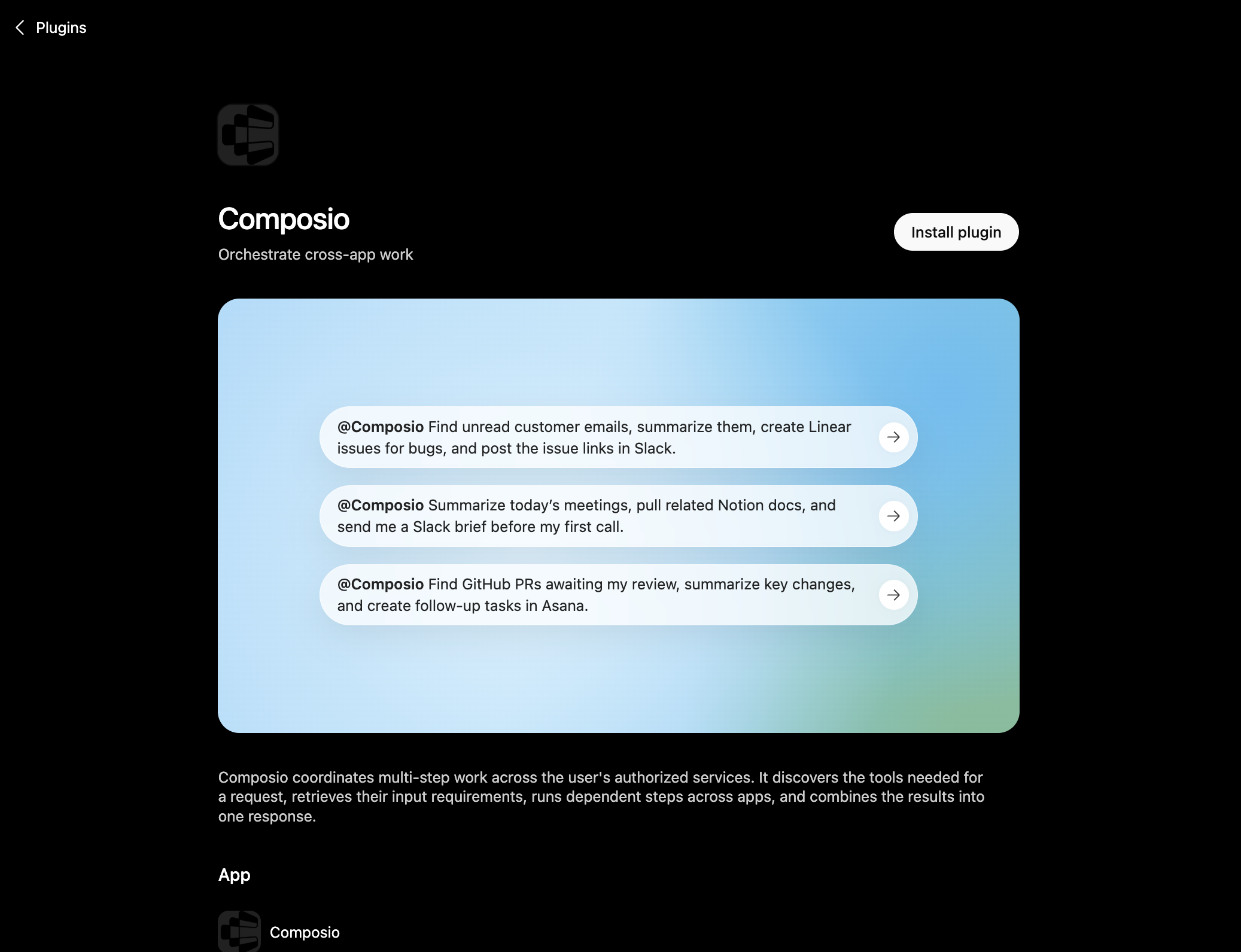
Composio plugin page in ChatGPT with the Install plugin button

You can also find it inside ChatGPT: go to Settings, open Plugins, search the marketplace for Composio, and click Install plugin.

2. Authenticate

After you install, ChatGPT asks you to authenticate with Composio. Log in and click Allow access to authorize ChatGPT to use your Composio account.
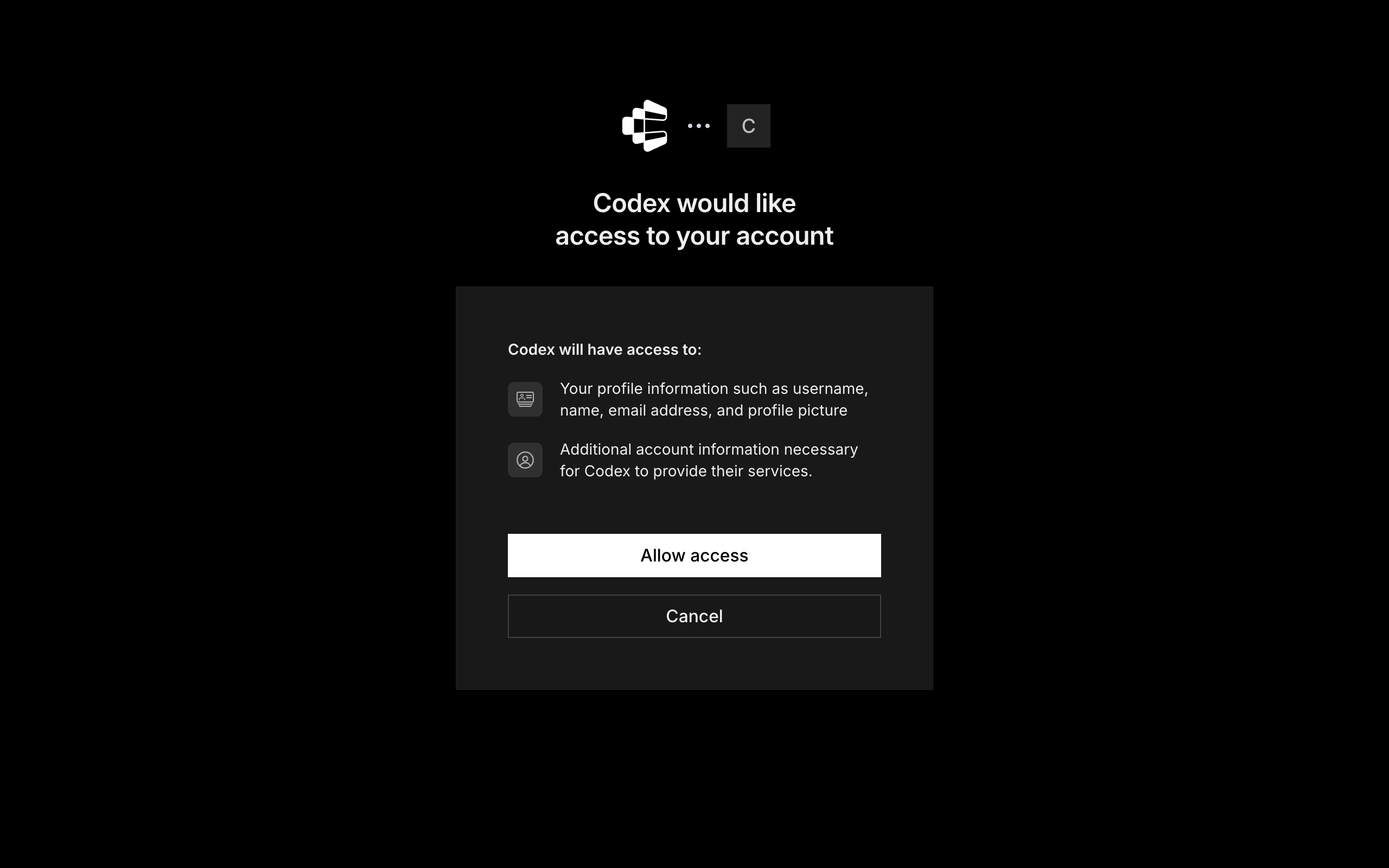
Composio login and Allow access screen for ChatGPT

3. Start using Composio

That is it. Composio tools are now available in ChatGPT. Type @Composio followed by your request, for example @Composio find unread Cloudinary Analysis messages and summarize them, and it will run the actions you authorize. On first use it asks you to authorize Cloudinary Analysis.

Option 2: Add Composio as an MCP server

If you cannot use the plugin marketplace, add Composio as a custom MCP server instead.

1. Open the MCP settings

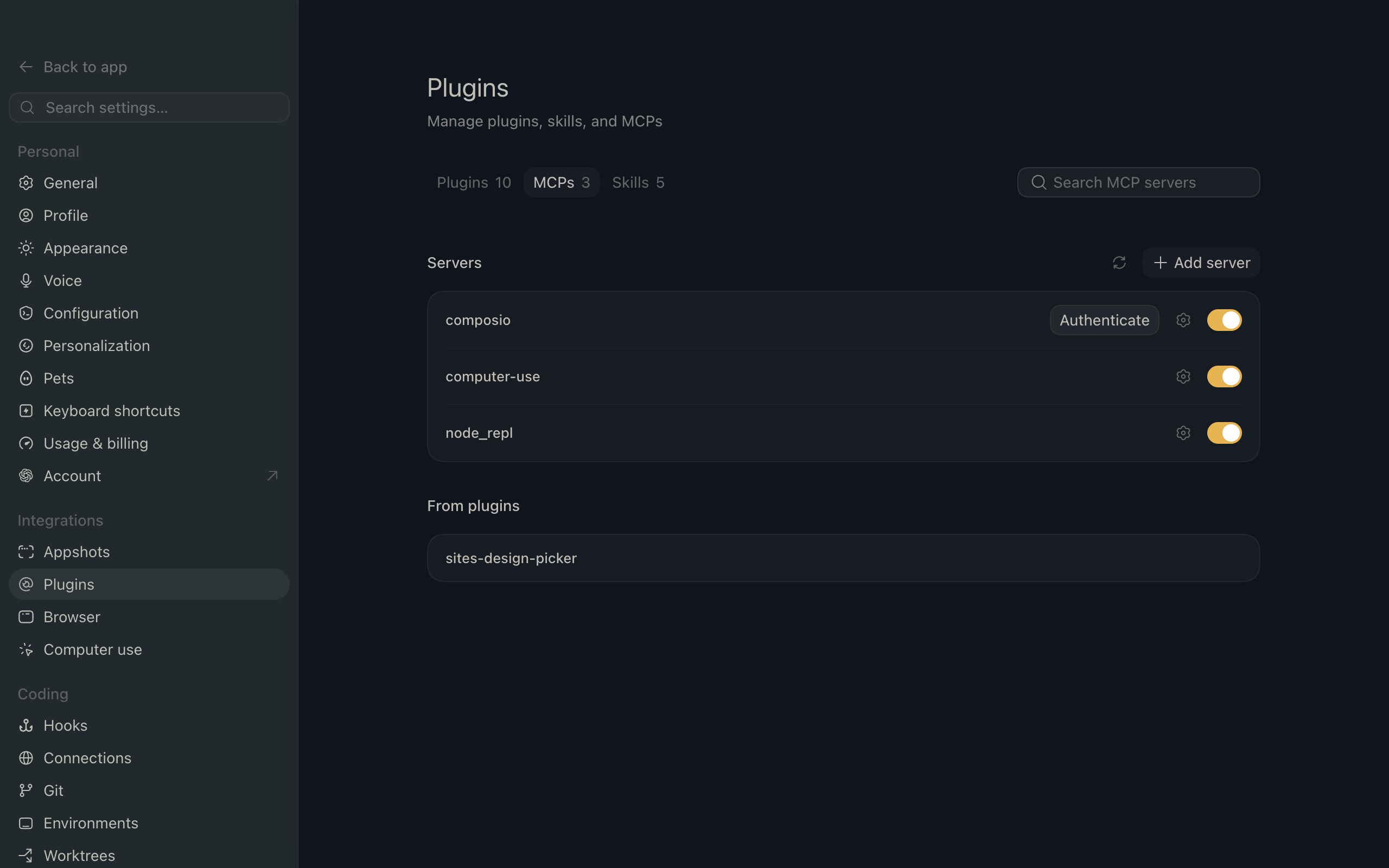
In ChatGPT, go to Settings and open the Plugins section. Inside the Plugins page, click the MCP tab.
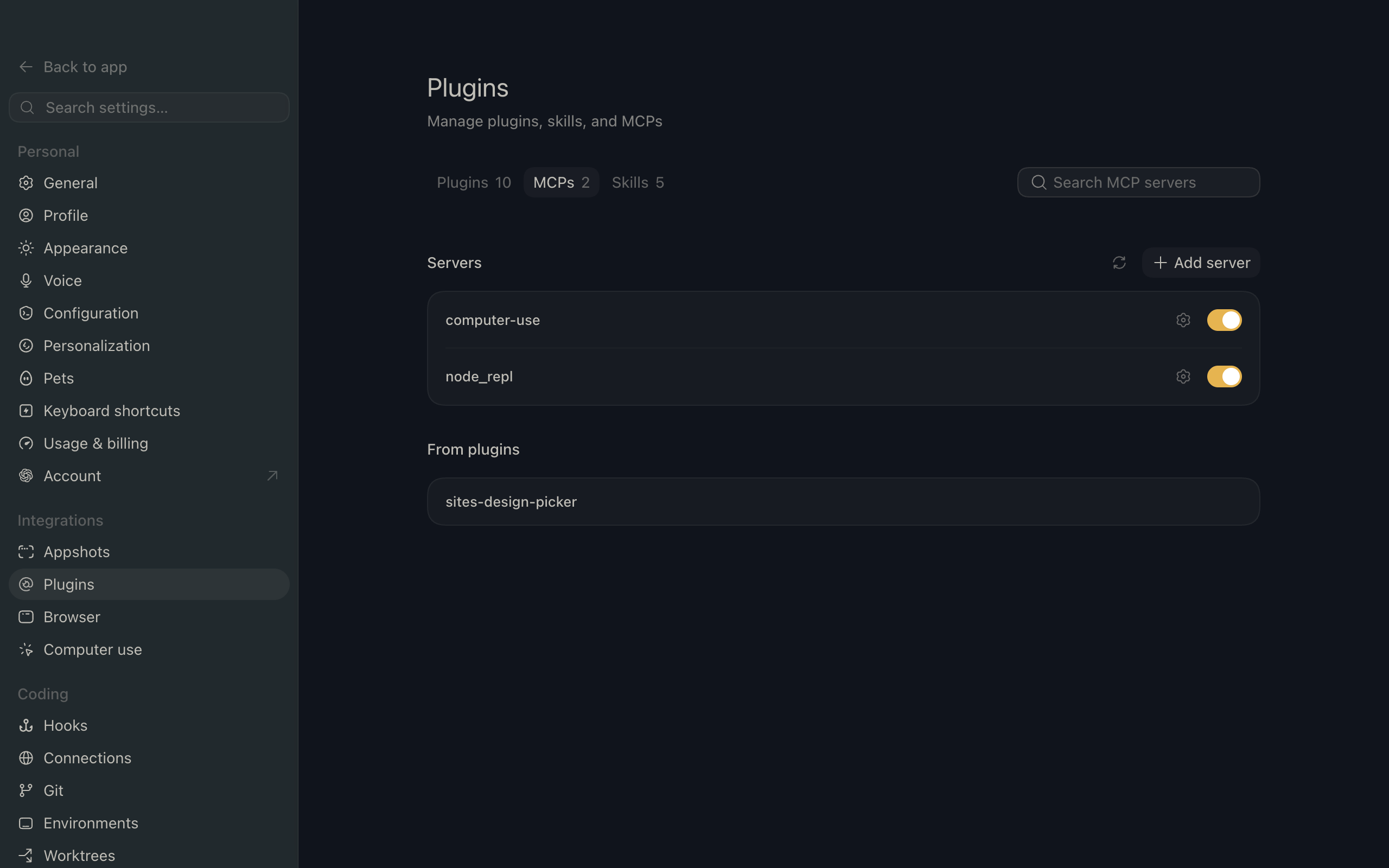
ChatGPT settings showing the Plugins page with the MCP tab selected

2. Add the server

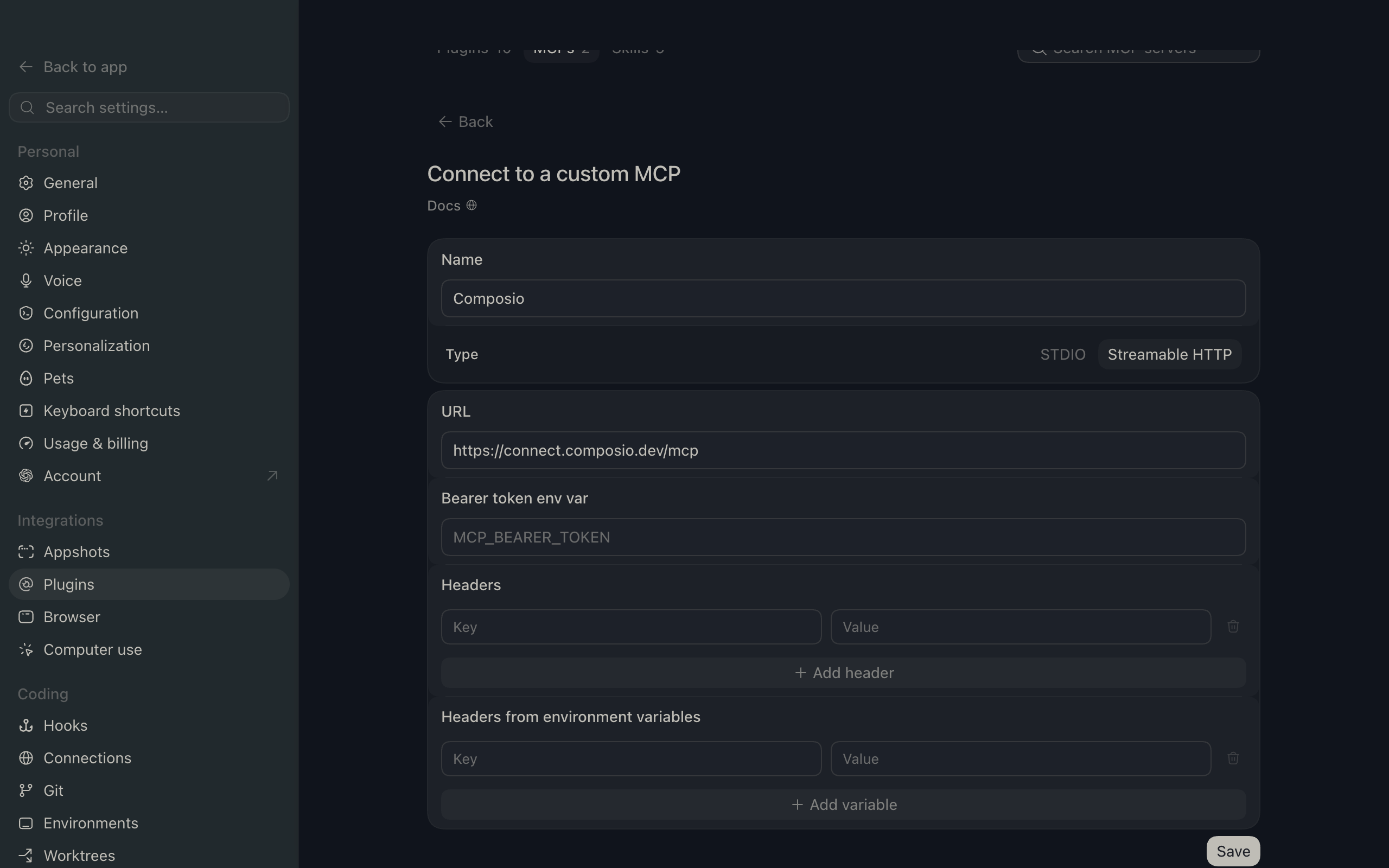
Click Add server. In the Name field enter Composio, for Type select Streamable HTTP, and in the URL field paste the Composio MCP server URL:

bash
https://connect.composio.dev/mcp
ChatGPT Add server dialog with the name Composio, type Streamable HTTP, and the Composio MCP URL

Then click Save. The Composio server now appears in your MCP plugins list.

ChatGPT Plugins page showing the Composio MCP server added to the list

3. Authenticate

Click Authenticate on the Composio entry, log in via Composio, and click Allow access. Composio tools are then available in ChatGPT the same way as with the plugin.

What you can do after connecting Cloudinary Analysis

  • Caption product images from a URL
  • Detect logos and text in images
  • Check image analysis task status

Security + privacy notes (important)

  • Use least-privilege access: Only grant permissions you actually need.
  • Review OAuth permissions before approving: Make sure requested scopes match what you expect Composio and ChatGPT to do.
  • Keep write actions human-reviewed: For actions like sending messages, creating labels, or editing drafts, keep manual confirmation enabled.
  • Be careful with sensitive data: Avoid using this setup with highly sensitive information unless allowed by your personal, company, or client policies.
TOOLS

Supported Tools

Every Cloudinary Analysis MCP action and event your agent gets out of the box.

Analyze ai vision general

Analyze - AI Vision General The General mode serves a wide array of applications by providing detailed answers to diverse questions about an image.

Analyze ai vision moderation

Analyze - AI Vision Moderation The Moderation mode accepts multiple questions about an image, to which the response provides concise answers of "yes," "no," or "unknown." This functionality allows for a nuanced evaluation of whether the image adheres to specific content policies, creative specs, or aesthetic criteria.

Analyze ai vision tagging

Analyze - AI Vision Tagging The Tagging mode accepts a list of tag names along with their corresponding descriptions.

Analyze captioning

Analyze - Captioning Provides a caption for an image.

Analyze cld fashion

Analyze - Cld-Fashion Analyze an image using the [Cld-Fashion](https://cloudinary.com/documentation/cloudinary_ai_content_analysis_addon#ai_based_image_captioning) content-aware detection model.

Analyze cld text

Analyze - Cld-Text Analyze an image using the [Cld-Text](https://cloudinary.com/documentation/cloudinary_ai_content_analysis_addon#ai_based_image_captioning) content-aware detection model.

Analyze coco

Analyze - Coco Analyze an image using the [Coco](https://cloudinary.com/documentation/cloudinary_ai_content_analysis_addon#ai_based_image_captioning) content-aware detection model.

Analyze google logo detection

Analyze - Google Logo Detection Detects popular product logos within an image.

Analyze google tagging

Analyze - Google Tagging Provides tags for an image using Google's tagging service.

Analyze human anatomy

Analyze - Human Anatomy Analyze an image using the [Human Anatomy](https://cloudinary.com/documentation/cloudinary_ai_content_analysis_addon#ai_based_image_captioning) content-aware detection model.

Analyze image quality

Analyze - Image Quality Analysis Analyze an image using the [Image Quality Analysis](https://cloudinary.com/documentation/cloudinary_ai_content_analysis_addon#image_quality_analysis) model.

Analyze lvis

Analyze - Lvis Analyze an image using the [Lvis](https://cloudinary.com/documentation/cloudinary_ai_content_analysis_addon#ai_based_image_captioning) content-aware detection model.

Analyze shop classifier

Analyze - Shop Classifier Analyze an image using the [Shop Classifier](https://cloudinary.com/documentation/cloudinary_ai_content_analysis_addon#ai_based_image_captioning) content-aware detection model.

Analyze unidet

Analyze - Unidet Analyze an image using the [Unidet](https://cloudinary.com/documentation/cloudinary_ai_content_analysis_addon#ai_based_image_captioning) content-aware detection model.

Analyze watermark detection

Analyze - Watermark Detection Analyze an image using the [Watermark Detection](https://cloudinary.com/documentation/cloudinary_ai_content_analysis_addon#watermark_detection) detection model.

Tasks get status

Get analysis task status Get the status of an analysis task.

FRAMEWORKS

How to build Cloudinary Analysis MCP Agent with another framework

FAQ

Frequently asked questions

Start with Cloudinary Analysis MCP.It takes 30 seconds.

Managed auth, hosted MCP servers, and every Cloudinary Analysis MCP tool your agent needs.Free to start.

Start building