How to connect Cashfree Payments MCP to Claude Cowork

Connect Claude Cowork to Cashfree Payments MCP. Collect pending payment for order 12345, initiate vendor payout for invoice inv9876, and more using natural language, with authentication handled for you.

Cashfree Payments MCP logoCashfree Payments MCP
Dcr Oauth

Cashfree Payments MCP is a merchant payments platform that handles collection, payouts, subscriptions, settlements, refunds, and identity verification. Simplifies merchant money lifecycle management with unified, API-driven workflows.

66 Tools

Introduction

Cowork is Anthropic's AI agent for knowledge work. Think of it as Claude Code for everything else. It works autonomously with your computer, local files, and applications to accomplish complex tasks.

This guide walks you through the easiest and most secure way to connect your Cashfree Payments account to Cowork via Composio Connect, enabling it to collect pending payment for order 12345, initiate vendor payout for invoice INV9876, list recent settlements for merchant account, and more such actions on your behalf without compromising your account security.

Also integrate Cashfree Payments MCP with

Connecting Cashfree Payments to Claude Cowork

1. Open Customize

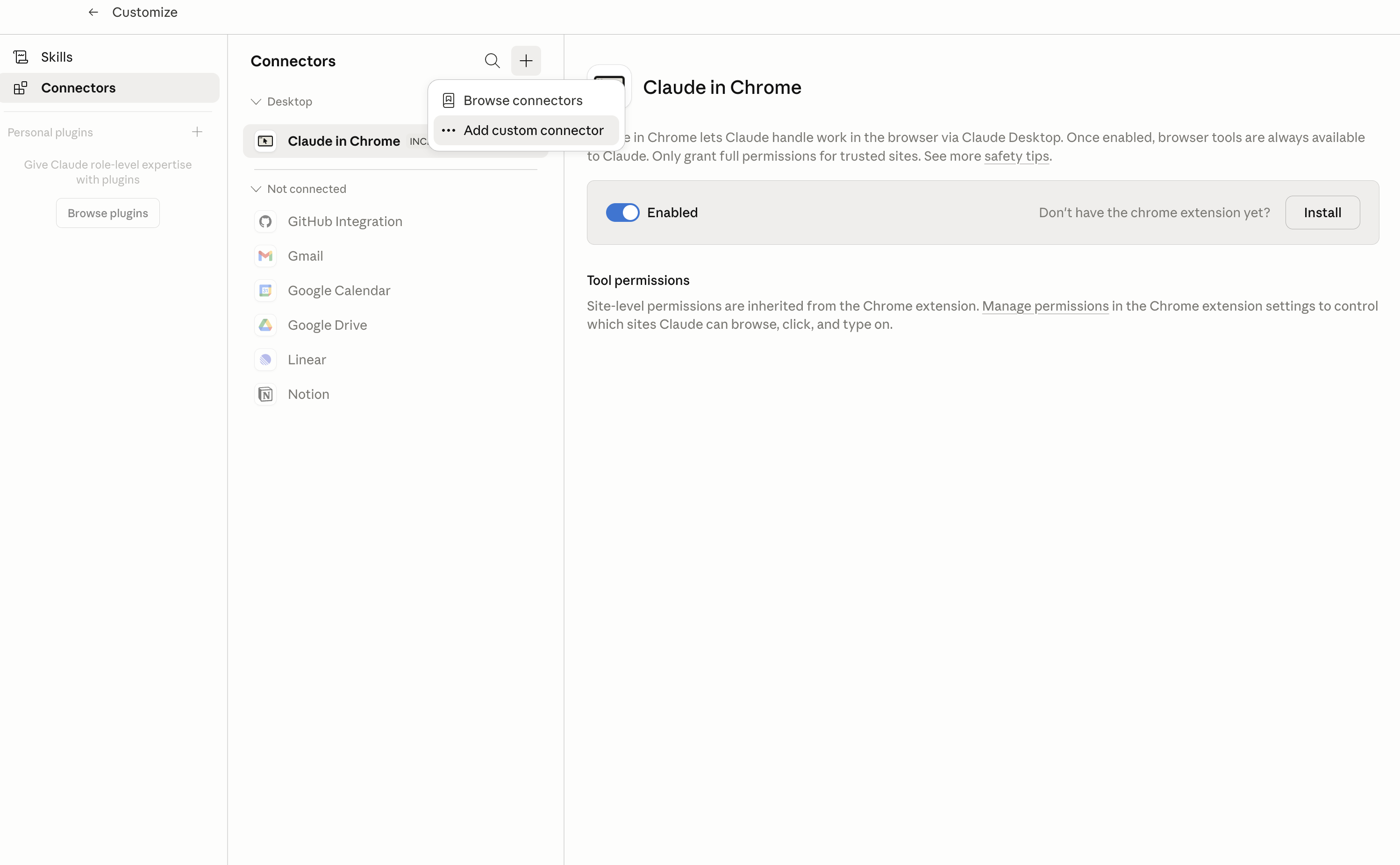
In Claude Desktop, click Customize in the left sidebar, then select Connectors and click the + icon at the top.

Claude Desktop connectors screen with Add custom connector selected

2. Add the Composio MCP server

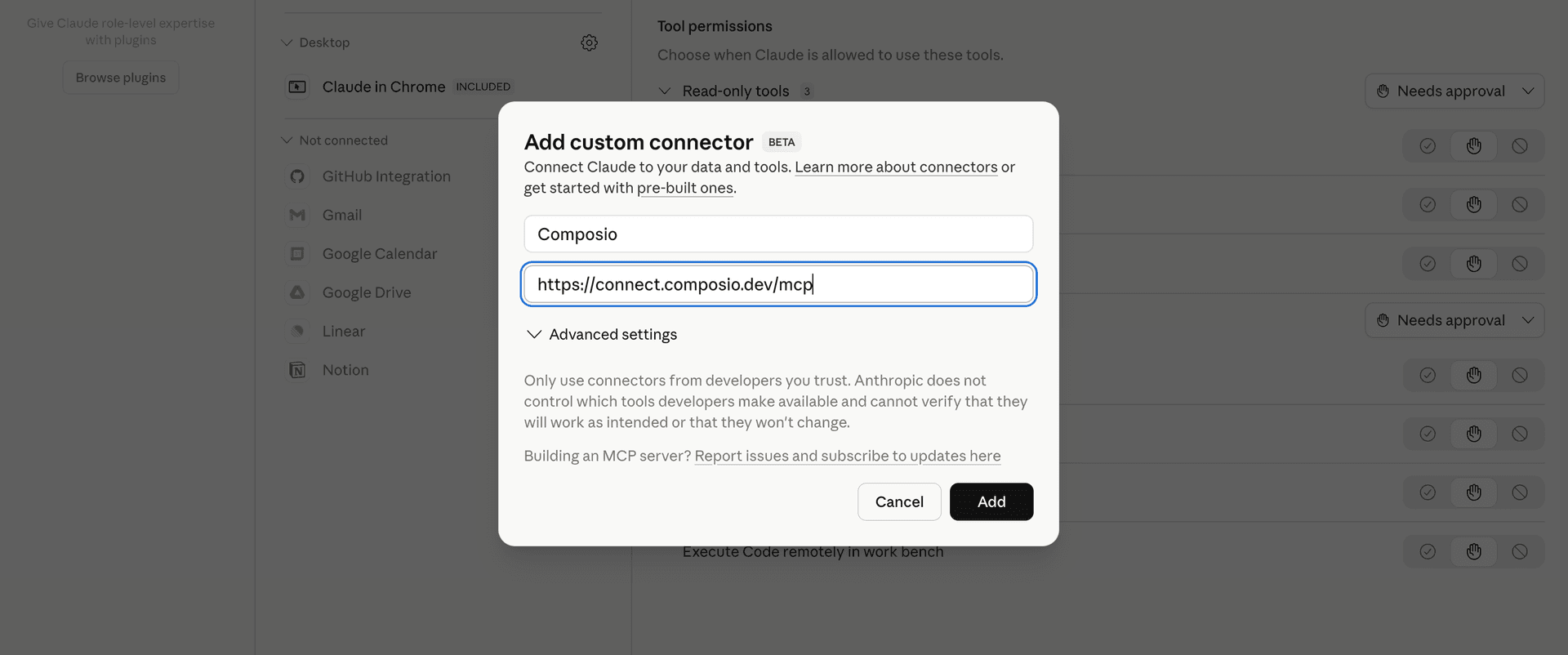
Click Add custom connector and paste in the Composio MCP server URL:

bash
https://connect.composio.dev/mcp
Add custom connector dialog with Composio MCP server URL

3. Authorize in your browser

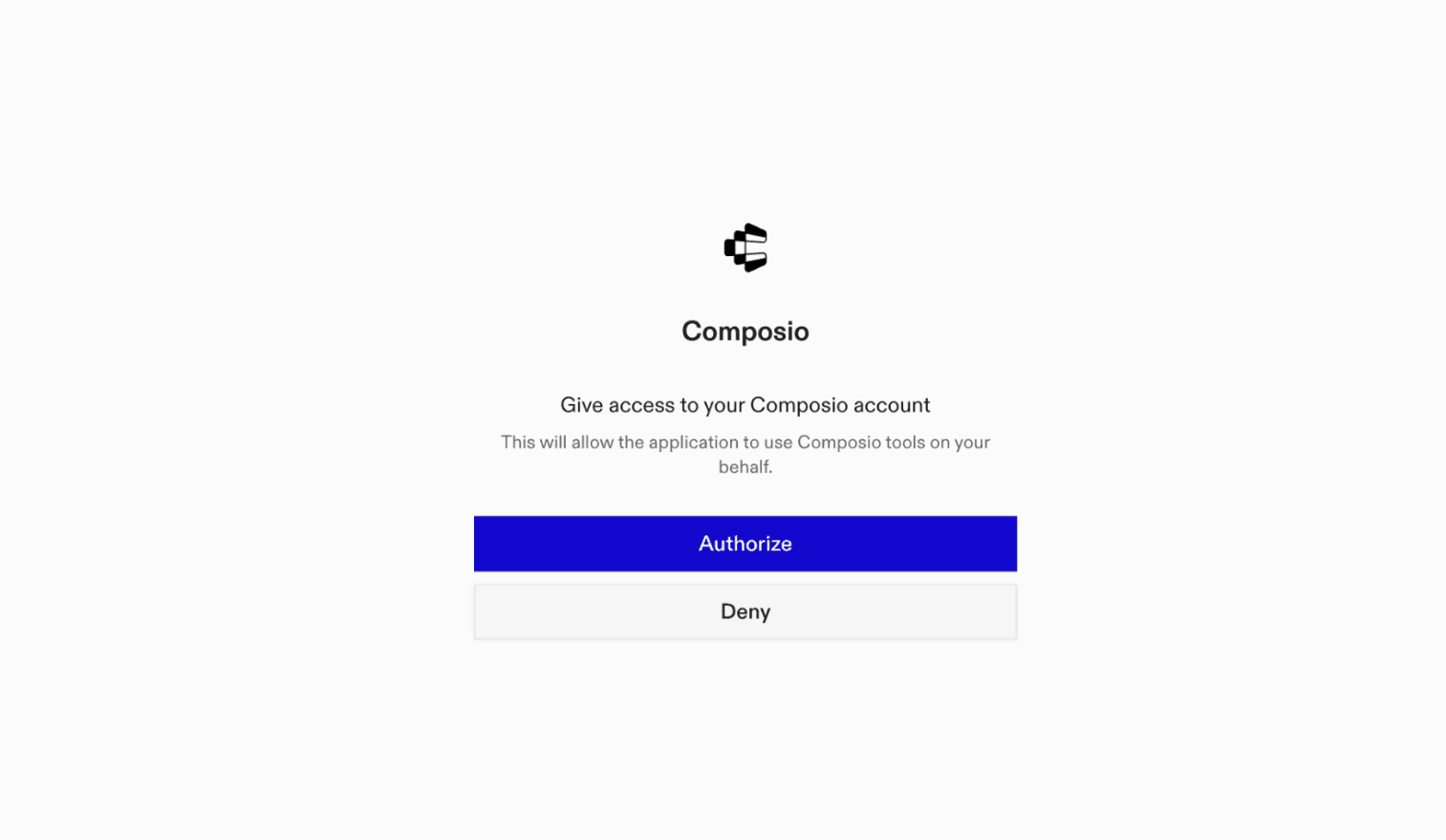
Click Connect. You'll be redirected to a browser window where you can authorize Composio to continue.

Composio authorization screen for Claude Cowork

4. Connect your Cashfree Payments account

Back in Cowork, ask the agent to connect to Cashfree Payments or give it any Cashfree Payments-related task.

For example, ask Cowork to:

  • "Collect pending payment for order 12345"
  • "Initiate vendor payout for invoice INV9876"
  • "List recent settlements for merchant account"

It will prompt you to authenticate and authorize access.

That's it. Composio's tools are now available in Cowork, and your Cashfree Payments account is ready to use.

What is Claude Cowork?

Claude Cowork is Anthropic's agent for general knowledge work. It can use your computer, files, and connected applications to complete longer-running tasks across your work tools.

With Composio Connect, Cowork can securely access apps like Cashfree Payments through MCP without you sharing account credentials directly with the agent.

What is the Cashfree Payments MCP server, and what's possible with it?

The Cashfree Payments MCP server is an implementation of the Model Context Protocol that connects your AI agent and assistants like Claude, Cursor, etc directly to your Cashfree Payments account. It provides structured and secure access so your agent can perform Cashfree Payments operations on your behalf.

TOOLS

Supported Tools

Every Cashfree Payments MCP action and event your agent gets out of the box.

Activate workflow

USE WHEN: A workflow has been tested via test_and_register_workflow() and is ready to go live.

Build and save workflow

USE WHEN: You have gathered all workflow configuration from tool calls and the user, and need to construct and save the DSL.

Cancel payment link

USE WHEN: The user wants to cancel/deactivate an existing payment link so no further payments can be made.

Create order

USE WHEN: The user wants to create a payment order to accept a payment.

Create payment link

USE WHEN: The user wants to create a shareable payment link to collect money from customers.

Create refund

USE WHEN: The user wants to initiate a refund for a payment.

Create workflow

USE WHEN: The user wants to create a new workflow/automation.

Download report

USE WHEN: A report has reached DONE status and the user wants the download URL.

Fetch payment link details

USE WHEN: The user wants to check the status or details of an existing payment link.

Fetch simulation

USE WHEN: The user wants to check the result of a simulated payment.

Generate recon report

USE WHEN: The user wants to generate a settlement reconciliation report.

Generate summary report

USE WHEN: The user wants to generate a transaction summary, settlement, refund, or ledger report.

Get connection setup link

USE WHEN: The merchant needs to add a new connection/credential for an app (Gmail, Slack, etc.

Get credential

USE WHEN: You need to verify a specific credential's metadata or status.

Get data fetcher template

USE WHEN: The user picked a data fetcher template and you need its configuration detail.

Get execution details

USE WHEN: The user wants to debug a specific workflow execution — see per-node inputs, outputs, and errors.

Get instant settlement rates

USE WHEN: The user asks about the charge rate for instant/on-demand settlements.

Get merchant free trial credits

USE WHEN: The user asks about free trial credits for on-demand settlements.

Get next settlement date

USE WHEN: The user asks when the next settlement will happen or about settlement schedule.

Get node action schema

USE WHEN: The user has chosen an action and you need the full input field schema to configure it.

Get node field options

USE WHEN: You need to populate dropdown or dynamic field values for a node action (e.

Get on demand charges

USE WHEN: The user wants to preview charges/fees for an on-demand settlement withdrawal.

Get on demand daily limit

USE WHEN: The user asks about on-demand settlement withdrawal limits.

Get on demand eligible funds

USE WHEN: The user wants to know how much money can be withdrawn via on-demand settlement.

Get on demand settlement activation status

USE WHEN: The user asks if on-demand/instant settlements are available or activated.

Get order

USE WHEN: The user wants to check the status of an order or retrieve its payment session details.

Get order extended

USE WHEN: The user needs extended order information including address, cart items, offers, and customer details.

Get orders for a payment link

USE WHEN: The user wants to see all orders created against a specific payment link.

Get payment by

USE WHEN: The user wants to view details of a specific payment attempt on an order.

Get payment modes

USE WHEN: The user wants to filter transactions by payment method but you need the numeric code.

Get payments for an order

USE WHEN: The user wants to see all payment attempts made against a specific order.

Get refund

USE WHEN: The user wants to check the status of a specific refund.

Get report status

USE WHEN: You need to check if a report is ready for download.

Get settlement recon routes

USE WHEN: The user wants to generate a Flowwise Recon report and you need the gateway route names.

Get standard settlement details

USE WHEN: The user wants to track where settlement money is in the banking pipeline.

Get tool guide

USE WHEN: You are about to perform a multi-step task and need to know which tools to call and in what order.

Get transaction details

USE WHEN: The user wants to see the full details of a specific transaction including timeline, settlement, and gateway response.

Get trigger event

USE WHEN: The user has picked a trigger event and you need its configurable fields and conditions.

Get trigger sample payload

USE WHEN: You need the sample payload for a trigger event — used for test execution and to show injectable fields.

Get unsettled amount

USE WHEN: The user asks about unsettled balance, money held by Cashfree, or pending settlements.

Get vendor settlement details

USE WHEN: The user wants to track where vendor settlement money is in the banking pipeline.

Get workflow

USE WHEN: You need to view or edit a specific workflow's details and DSL.

Get workflow template

USE WHEN: The user picked a template from search_workflow_templates results and you need the full DSL.

List catalog nodes

USE WHEN: The user hasn't specified which app/integration to use and you need to show available options.

List credentials

USE WHEN: You need to check if a connection/credential exists for an app before building a workflow.

List data fetcher templates

USE WHEN: Building a schedule-based workflow and you need to show available data source options.

List node actions

USE WHEN: You know which integration node to use and need to discover its available actions.

List recent executions

USE WHEN: The user wants to see recent workflow runs across all workflows.

List reports

USE WHEN: The user wants to see previously generated reports or check if a report exists.

List trigger events

USE WHEN: You need to show the user what trigger events are available at the start of workflow creation.

List workflow executions

USE WHEN: The user wants to see execution history for a specific workflow.

List workflows

USE WHEN: The user wants to see all their workflows or find a specific workflow by status.

List workflow versions

USE WHEN: The user wants to see the version history of a workflow.

Search on demand settlements

USE WHEN: The user wants to search past on-demand/instant withdrawal settlements.

Search orders

Search for orders with filters OR fetch a specific order by ID

Search product docs

USE WHEN: The user asks about Cashfree Payments Developer Documentation product features, API usage, integration guides, or how something works.

Search standard settlements

USE WHEN: The user wants to search settlement history, check settlement status, or find a specific settlement by UTR.

Search transactions

USE WHEN: The user wants to find, search, filter, or list payment transactions.

Search vendor settlements

USE WHEN: The user wants to search vendor split (Easy Split) settlement payouts.

Search workflow templates

USE WHEN: The user wants to find a pre-built workflow template.

Simulate payment

USE WHEN: The user wants to test/simulate a payment in sandbox mode.

Test action node

USE WHEN: You want to validate an action node's connection and field values before saving the workflow.

Test and register workflow

USE WHEN: A workflow DSL has been saved via update_workflow() or build_and_save_workflow() and needs testing before activation.

Test data fetcher

USE WHEN: You want to validate what data a data fetcher template would return before saving the workflow.

Toggle workflow status

USE WHEN: The user wants to pause a running workflow or resume a paused one.

Update workflow

USE WHEN: You have a complete workflow DSL and need to save it to the draft.

FRAMEWORKS

How to build Cashfree Payments MCP Agent with another framework

FAQ

Frequently asked questions

With a standalone Cashfree Payments MCP server, the agents and LLMs can only access a fixed set of Cashfree Payments tools tied to that server. However, with the Composio Tool Router, agents can dynamically load tools from Cashfree Payments and many other apps based on the task at hand, all through a single MCP endpoint.

Yes, you can. Claude Cowork fully supports MCP integration. You get structured tool calling, message history handling, and model orchestration while Tool Router takes care of discovering and serving the right Cashfree Payments tools.

Yes, absolutely. You can configure which Cashfree Payments scopes and actions are allowed when connecting your account to Composio. You can also bring your own OAuth credentials or API configuration so you keep full control over what the agent can do.

All sensitive data such as tokens, keys, and configuration is fully encrypted at rest and in transit. Composio is SOC 2 Type 2 compliant and follows strict security practices so your Cashfree Payments data and credentials are handled as safely as possible.

Start with Cashfree Payments MCP.It takes 30 seconds.

Managed auth, hosted MCP servers, and every Cashfree Payments MCP tool your agent needs.Free to start.

Start building