How to connect Azure Blob Storage to Claude

Connect Claude Web, Desktop and Cowork to Azure Blob Storage MCP. List containers in your azure storage account, upload a report to the finance container, and more using natural language, with authentication handled for you.

Azure Blob Storage logoAzure Blob Storage
Oauth2

Azure Blob Storage is Microsoft's cloud object storage service for unstructured data. It offers durable, scalable storage for files, backups, media, and application data.

57 Tools

Introduction

Claude is Anthropic's AI assistant, available on the web, in the desktop app, and on mobile. Cowork is its agent for knowledge work, and it runs on all of those surfaces too. Connected to your apps, Claude can work with your files and services to accomplish complex tasks on your behalf.

This guide walks you through the easiest and most secure way to connect your Azure Blob Storage account to Claude via Composio Connect, enabling it to list containers in your Azure Storage account, upload a report to the finance container, download the latest blob from backups, and more such actions on your behalf without compromising your account security.

Setup is the same on Claude Web, Desktop, and Cowork, and you only need to do it once. The connector is tied to your account, so it's available in all three.

For exact tool slugs and parameter tables, see the tool catalog in the Composio docs.

Also integrate Azure Blob Storage with

Connecting Azure Blob Storage to Claude Web, Desktop, and Cowork

Two ways to add the Composio connector. Pick whichever you prefer.

1. Add with one click

Click the button. Claude opens with the Composio connector filled in. Click Add, then go to step 2.

Add to Claude

Add manually

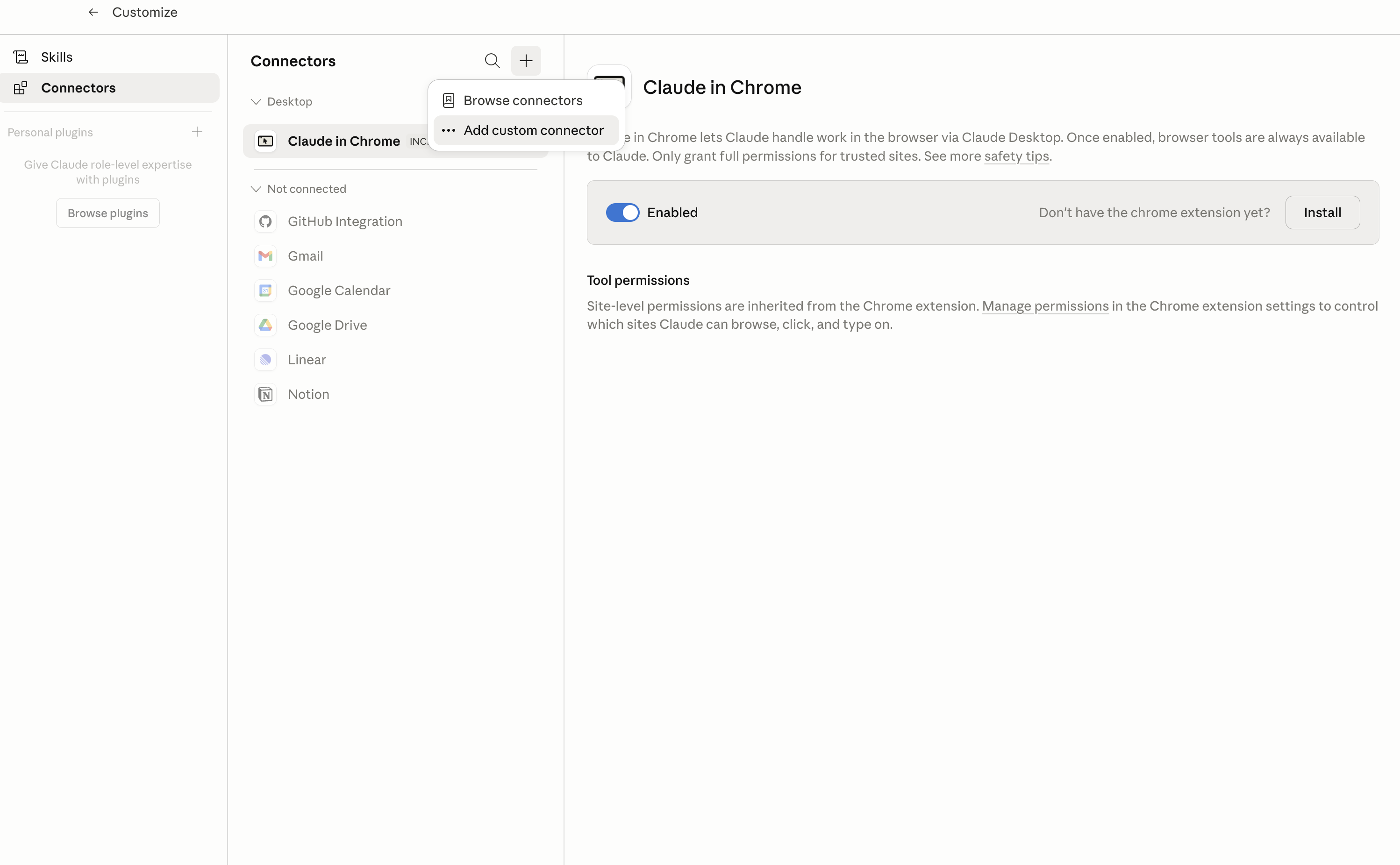
In Claude Desktop, click Customize in the left sidebar, then select Connectors and click the + icon at the top.

Claude Desktop connectors screen with Add custom connector selected

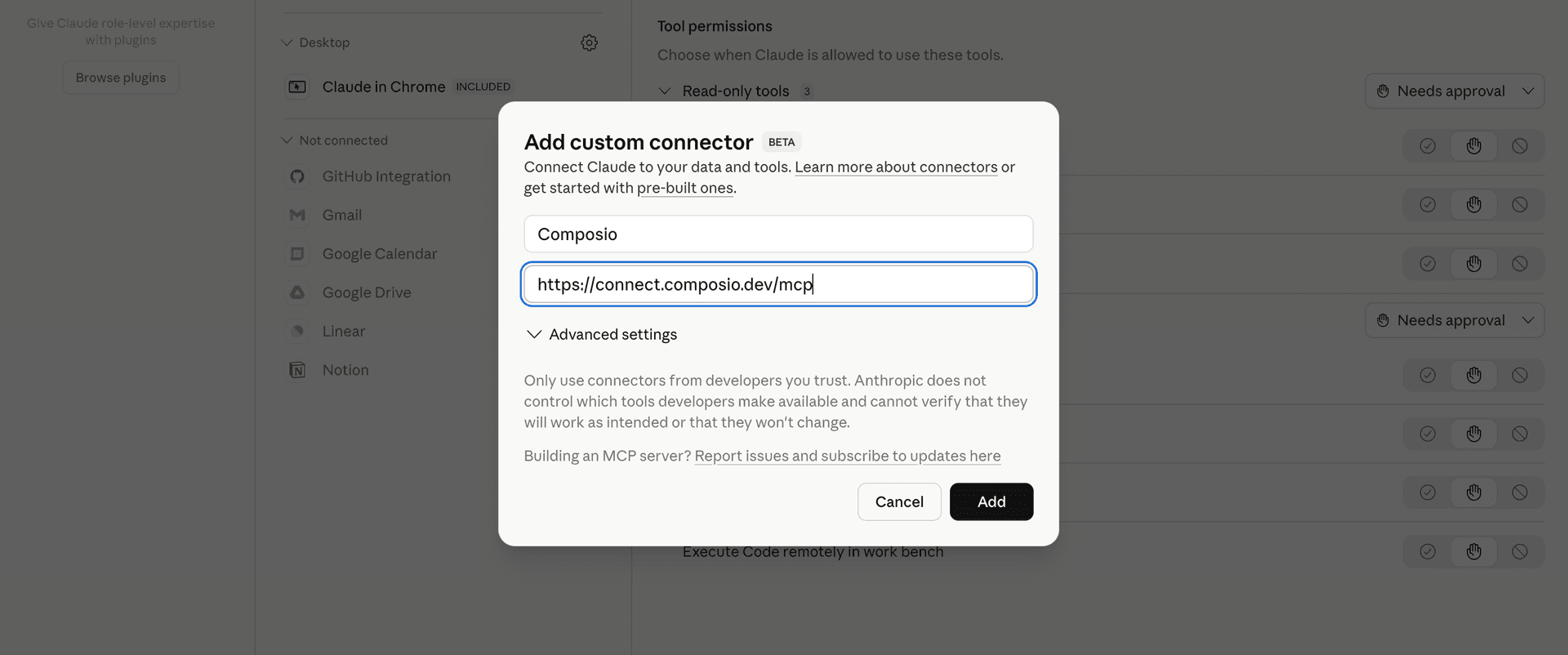
Click Add custom connector and paste in the Composio MCP server URL:

bash
https://connect.composio.dev/mcp
Add custom connector dialog with Composio MCP server URL

2. Authorize in your browser

Click Connect. You'll be redirected to a browser window where you can authorize Composio to continue.

Composio authorization screen for Claude Web, Desktop, and Cowork

3. Connect your Azure Blob Storage account

Back in Claude, ask it to connect to Azure Blob Storage or give it any Azure Blob Storage-related task.

For example, ask Claude to:

  • "List containers in your Azure Storage account"
  • "Upload a report to the finance container"
  • "Download the latest blob from backups"

It will prompt you to authenticate and authorize access.

That's it. Composio's tools are now available in Claude, and your Azure Blob Storage account is ready to use.

What is the Azure Blob Storage Claude Connector, and what's possible with it?

The Azure Blob Storage MCP server is an implementation of the Model Context Protocol that connects your AI agent and assistants like Claude, Cursor, etc directly to your Azure Blob Storage account. It provides structured and secure access to containers, blobs, their content, metadata, properties, and access settings, so your agent can list, retrieve, create, update, and manage storage resources on your behalf.

  • Container management: Have your agent list containers, create new private containers with metadata, inspect their properties and access policies, rename eligible containers, or delete them and their contents.
  • Blob discovery and retrieval: Instruct your agent to find blobs by container, name prefix, or index tags, download blob content or byte ranges, and inspect metadata, properties, tags, and block status.
  • Blob creation and updates: Let the agent create append and page blobs, add content to append blobs, commit block lists, resize page blobs, clear page ranges, or seal append blobs when no more writes are needed.
  • Blob copying and version protection: Direct your agent to copy blobs from accessible HTTPS sources, create read-only snapshots, manage leases, and apply or remove supported expiry and immutability policies.
  • Storage account insights: Have your agent check storage account details, review service properties and geo-replication statistics, query supported blob content, and inspect allocated page blob ranges.

Troubleshooting

1. Why does Claude not use the Composio connector for Azure Blob Storage?

The connector can show as connected, but Claude must use it in each Azure Blob Storage conversation.

  • Click + at the lower left of the chat, or type /.
  • Hover Connectors.
  • Turn on Composio.
  • Ask Claude to connect to Azure Blob Storage again.

2. Why does Claude show an MCP server error before Azure Blob Storage connects?

Claude can show Couldn't reach the MCP server or Authorization with the MCP server failed when you add the connector for Azure Blob Storage.

  • Check that the connector URL is https://connect.composio.dev/mcp.
  • Connectors run from Anthropic's cloud, so your device network is usually not the problem.
  • Add the connector again from Customize > Connectors, then ask Claude to connect Azure Blob Storage.
  • If it fails again, send the error and the ofid_ reference id to support@composio.dev.

3. Why does the Azure Blob Storage authorization link not work?

The Composio connector is one server. Your Azure Blob Storage account connects separately when Claude asks for it.

  • If the browser does not open, or the link expires, ask Claude to retry the Azure Blob Storage connection.
  • Composio creates a fresh Azure Blob Storage authorization link.
  • Open that link in your browser and finish the Azure Blob Storage sign-in.

4. Why do Azure Blob Storage actions fail after they worked before?

The Azure Blob Storage connection can expire or lose permission.

  • Ask Claude to inspect the Azure Blob Storage connection.
  • If the connection is unhealthy, disconnect it when Claude prompts you.
  • Reconnect the Azure Blob Storage account and retry the action.
  • If Claude shows a permission prompt, approve it before Claude changes data in Azure Blob Storage.
  • If the action still fails with a permission error, check that the connected account has that permission in Azure Blob Storage itself.

5. How do I switch to a different Azure Blob Storage account?

Claude can manage the Azure Blob Storage connection for you.

  • Ask Claude to disconnect or delete the current Azure Blob Storage account.
  • Ask Claude to connect Azure Blob Storage again.
  • Open the new Composio authorization link for Azure Blob Storage.
  • Sign in with the other Azure Blob Storage account in the browser.
  • After the account connects, ask Claude to retry the Azure Blob Storage task.

6. Why is my Azure Blob Storage connection missing in Claude Desktop or on a Team plan?

The connector belongs to your Claude account, so your Azure Blob Storage connection works in Claude Web, Desktop, and Cowork.

  • In Claude Desktop, open Customize > Connectors.
  • Next to Composio, click ⋮ and click Clear cache.
  • If Azure Blob Storage tools still do not appear, click ⋮, disconnect, remove the connector, and add it again.
  • On Team or Enterprise, an Owner or Primary Owner must enable the connector before you can connect Azure Blob Storage.
TOOLS

Supported Tools

Every Azure Blob Storage action and event your agent gets out of the box.

Abort Blob Copy

Abort one known pending asynchronous copy.

Append Block

Append file or base64 content to an existing append blob with optional exact-position and maximum-final-size guards.

Append Block from URL

Ask Azure to append an independently readable HTTPS source URL or byte range to an existing append blob.

Clear Page Blob Pages

Clear and deallocate one aligned range of an Azure page blob.

Commit Block List

Create or replace a block blob by committing an ordered list of staged or existing block IDs.

Copy Blob from URL

Copy any Azure-fetchable HTTPS source into a blob.

Copy Page Blob Incrementally

Start an asynchronous incremental copy from an independently authorized Azure page blob snapshot URL.

Create Append Blob

Create or replace an empty Azure append blob for ordered append-only writes.

Create Blob Snapshot

Create a read-only timestamped snapshot of a base Azure blob, optionally replacing metadata on the snapshot.

Create Container

Create a private Azure Blob Storage container with optional user-defined metadata.

Create Page Blob

Create or replace an empty fixed-capacity Azure page blob for aligned random-access writes.

Delete Blob

Delete an Azure Blob Storage base blob, one snapshot, one version, or only the base blob's snapshots.

Delete Unlocked Blob Immutability Policy

Delete a known Unlocked blob immutability policy, removing its write and delete protection before the former deadline, after verifying the exact deadline and ETag.

Delete Container

Delete an Azure Blob Storage container and all blobs it contains asynchronously.

Download Blob

Download an Azure blob or byte range.

Find Blobs by Tags

Find blobs whose index tags match an Azure tag expression across the connected account and return one cursor page.

Find Container Blobs by Tags

Find blobs matching an Azure index-tag expression within exactly one known container and return one cursor page.

Get Storage Account Info

Return the connected Azure Blob account SKU, account kind, and hierarchical-namespace state.

Get Blob Metadata

Read only user-defined metadata for one Azure blob, snapshot, or version without downloading content or returning unrelated system properties.

Get Blob Properties

Get an Azure blob's system properties, HTTP properties, and user-defined metadata without downloading its content.

Get Blob Tags

Read index tags from an Azure base blob, snapshot, or version.

Get Block List

Inspect committed and/or uncommitted blocks for a block blob or snapshot, including Azure IDs and best-effort decoded UTF-8 IDs.

Get Container Access Policy

Read an Azure Blob container's public-access level and stored signed access policies without changing access.

Get Container Metadata

Read only user-defined metadata for one Azure Blob container without listing blobs or returning unrelated system properties.

Get Container Properties

Get system properties and user-defined metadata for one Azure Blob Storage container without listing or reading its blobs.

Get Page Blob Range Diff

Return one cursor page of updated and cleared ranges since an older page blob snapshot.

Get Page Blob Ranges

Return one cursor page of allocated ranges in an Azure page blob or snapshot.

Get Blob Service Properties

Read Blob data-plane logging, metrics, CORS, blob retention, static website, and protocol settings without changing them.

Get Blob Service Statistics

Read geo-replication status from the connected Azure Blob account's derived read-access secondary endpoint.

List Blobs

List one page of blobs in an Azure Blob Storage container as a flat list or delimiter-based hierarchy, optionally filtered by name prefix.

List Containers

List containers in the connected storage account, optionally filtered by name prefix, and return one page with a continuation cursor.

Manage Blob Lease

Acquire, renew, change, release, or irreversibly break a write/delete lease on one blob.

Manage Container Lease

Acquire, renew, change, release, or irreversibly break the delete lease on one Azure Blob container.

Query Blob

Run a read-only SQL expression over supported Azure blob content and return Azure's streamed binary query result as a temporary file.

Rename Container

Rename a container in a hierarchical-namespace-enabled Azure Storage account.

Resize Page Blob

Change an Azure page blob's fixed capacity to a new 512-byte-aligned size.

Restore Deleted Container

Restore one soft-deleted Azure Blob container version, optionally under a different destination name.

Seal Append Blob

Irreversibly seal one append blob so it can never accept another append.

Set Blob Expiry

Schedule or remove automatic deletion for a blob on a hierarchical-namespace-enabled Azure Storage account.

Set Unlocked Blob Immutability Policy

Create or replace an Unlocked time-based immutability policy that blocks writes and deletes until its deadline on an eligible blob, snapshot, or version.

Set Blob Legal Hold

Place or remove a legal hold on an eligible Azure blob, snapshot, or version.

Set Blob Tags

Replace all index tags on an Azure base blob or version.

Set Blob Access Tier

Change a blob, snapshot, or version to an Azure access tier and optionally set archive rehydration priority.

Set Container Access Policy

Replace a container's public-access level and complete stored signed-identifier list.

Set Blob Service Properties

Replace the connected account's supported Blob data-plane service configuration from a typed GET_SERVICE_PROPERTIES snapshot plus explicit changes.

Stage Block

Stage one binary block for a later block-list commit.

Stage Block from URL

Ask Azure to stage one block from an independently readable HTTPS URL or source byte range.

Start Asynchronous Blob Copy

Start a dedicated pollable copy from an Azure Blob HTTPS source and return its copy ID.

Undelete Blob

Restore the content and metadata of a soft-deleted Azure blob.

Update Blob HTTP Properties

Replace HTTP response properties stored on an Azure blob without changing its content or user metadata.

Update Blob Metadata

Replace all user-defined metadata on an Azure Blob Storage blob.

Update Container Metadata

Replace all user-defined metadata on an Azure Blob Storage container.

Update Page Blob Sequence Number

Set, raise, or increment an Azure page blob's user-controlled sequence number.

Upload Blob

Upload a file or standard-base64 content as an Azure block blob with optional metadata and MIME type.

Upload Block Blob from URL

Ask Azure to create a complete block blob by fetching an independently readable HTTPS source URL.

Upload Page Blob Pages

Write file or standard-base64 content into one 512-byte-aligned Azure page blob range.

Upload Page Blob Pages from URL

Ask Azure to fetch one aligned HTTPS source range into an aligned destination page blob range.

FRAMEWORKS

How to build Azure Blob Storage MCP Agent with another framework

FAQ

Frequently asked questions

Start with Azure Blob Storage.It takes 30 seconds.

Managed auth, hosted MCP servers, and every Azure Blob Storage tool your agent needs.Free to start.

Start building