How to connect Aviato to Claude

Connect Claude Web, Desktop and Cowork to Aviato MCP. Find investors for a growing fintech, enrich company profiles with funding data, and more using natural language, with authentication handled for you.

Aviato logoAviato
Api Key

Aviato is a company and person intelligence platform for search, enrichment, investments, relationships, and contact data. It helps teams research markets and prospects with native BYOK access to detailed business intelligence.

37 Tools

Introduction

Claude is Anthropic's AI assistant, available on the web, in the desktop app, and on mobile. Cowork is its agent for knowledge work, and it runs on all of those surfaces too. Connected to your apps, Claude can work with your files and services to accomplish complex tasks on your behalf.

This guide walks you through the easiest and most secure way to connect your Aviato account to Claude via Composio Connect, enabling it to find investors for a growing fintech, enrich company profiles with funding data, discover contacts at target companies, and more such actions on your behalf without compromising your account security.

Setup is the same on Claude Web, Desktop, and Cowork, and you only need to do it once. The connector is tied to your account, so it's available in all three.

Also integrate Aviato with

Connecting Aviato to Claude Web, Desktop, and Cowork

Two ways to add the Composio connector. Pick whichever you prefer.

1. Add with one click

Click the button. Claude opens with the Composio connector filled in. Click Add, then go to step 2.

Add to Claude

Add manually

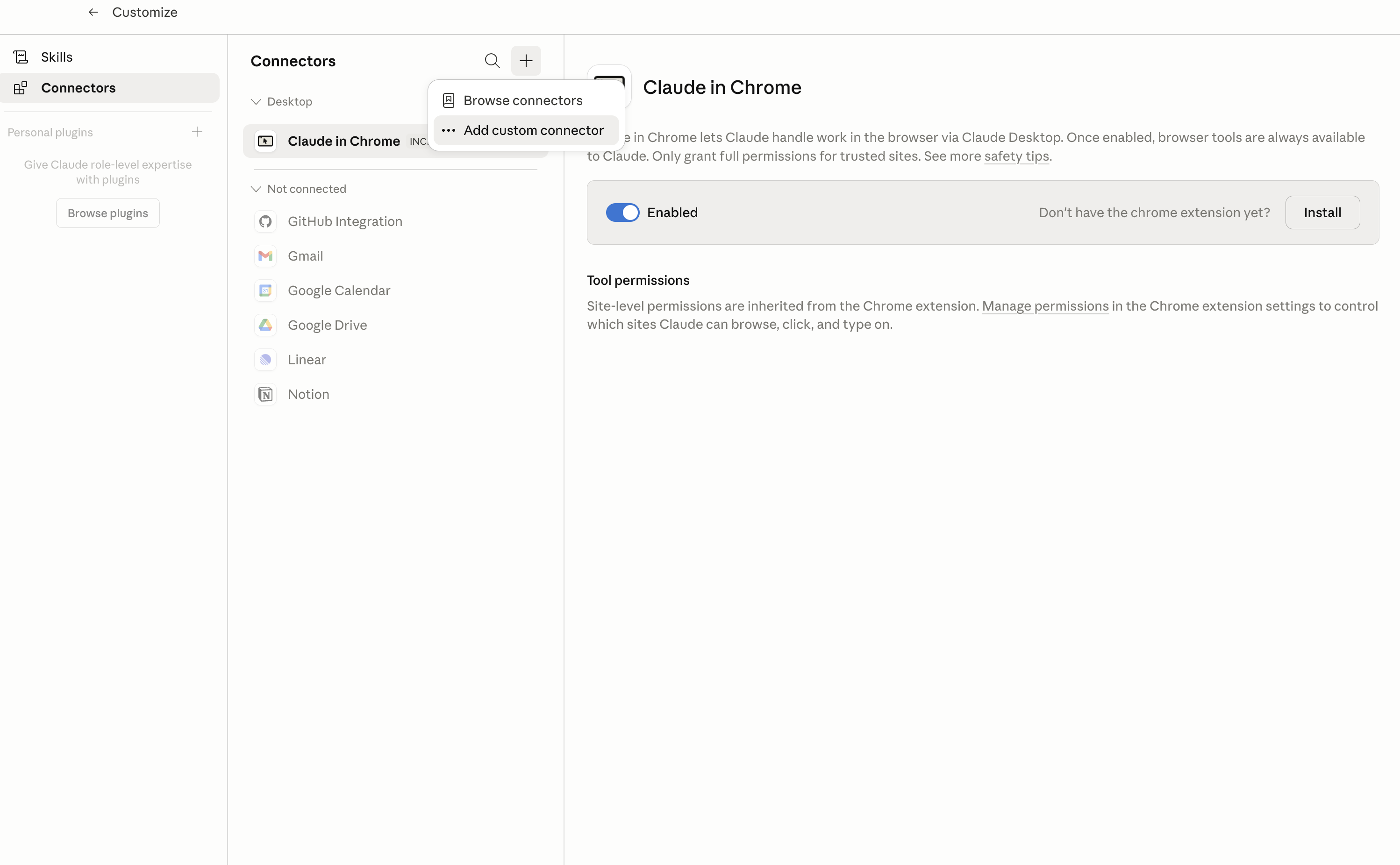
In Claude Desktop, click Customize in the left sidebar, then select Connectors and click the + icon at the top.

Claude Desktop connectors screen with Add custom connector selected

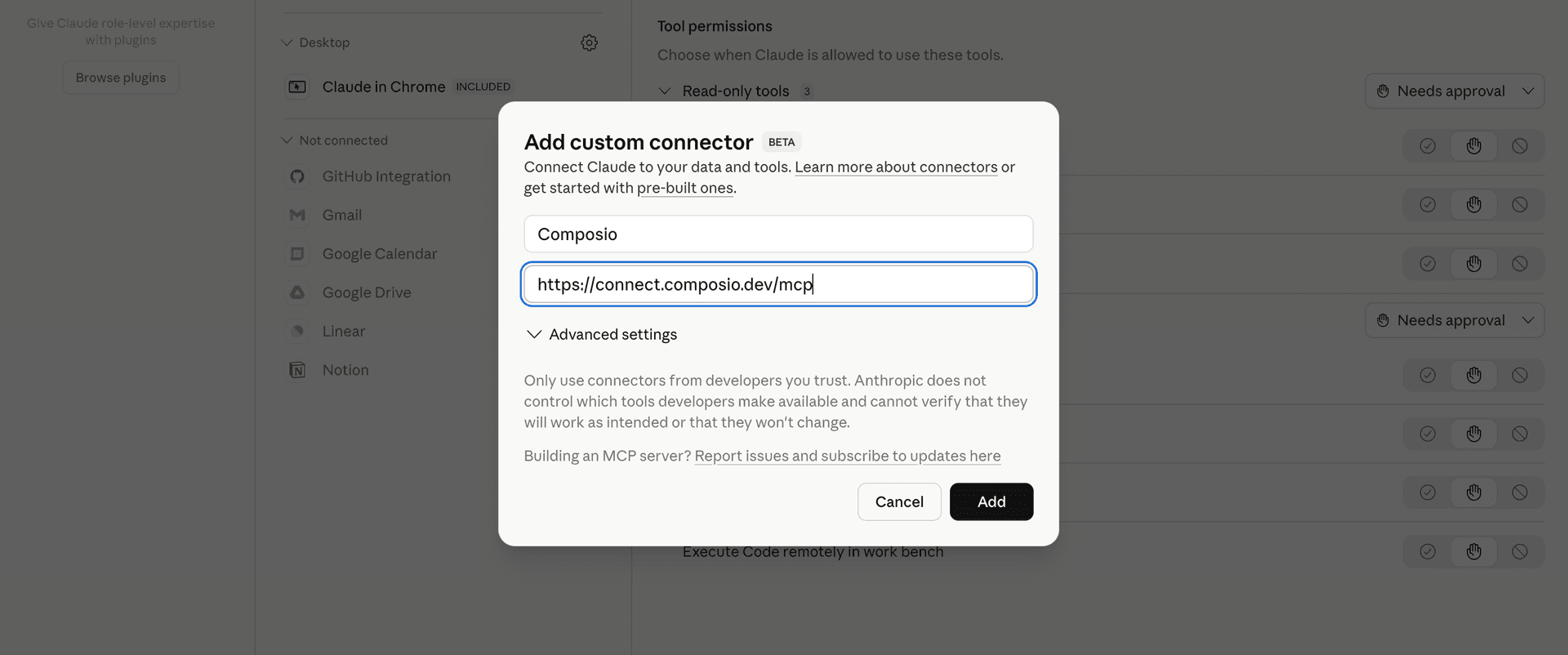
Click Add custom connector and paste in the Composio MCP server URL:

bash
https://connect.composio.dev/mcp
Add custom connector dialog with Composio MCP server URL

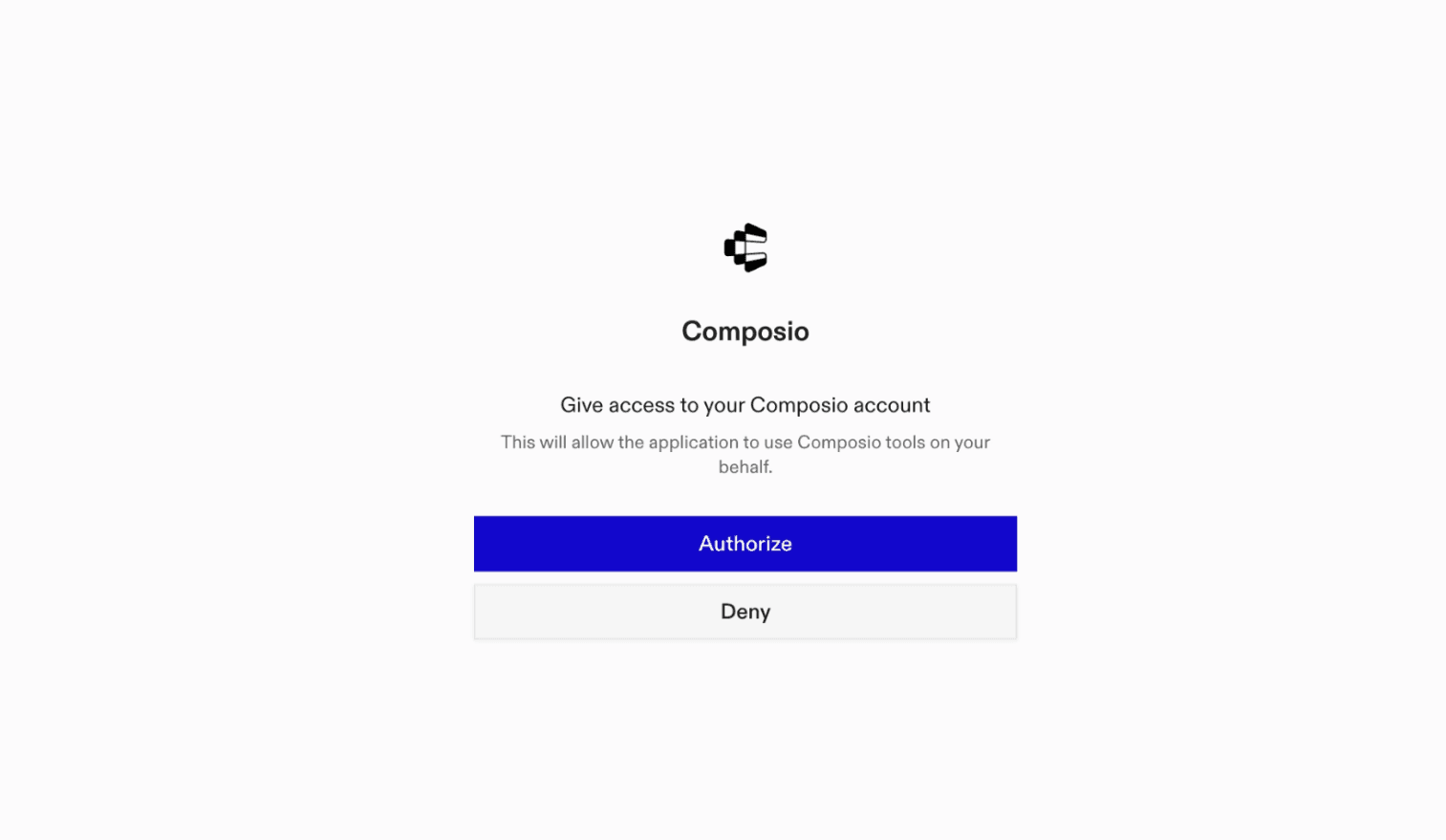
2. Authorize in your browser

Click Connect. You'll be redirected to a browser window where you can authorize Composio to continue.

Composio authorization screen for Claude Web, Desktop, and Cowork

3. Connect your Aviato account

Back in Claude, ask it to connect to Aviato or give it any Aviato-related task.

For example, ask Claude to:

  • "Find investors for a growing fintech"
  • "Enrich company profiles with funding data"
  • "Discover contacts at target companies"

It will prompt you to authenticate and authorize access.

That's it. Composio's tools are now available in Claude, and your Aviato account is ready to use.

What is the Aviato Claude Connector, and what's possible with it?

The Aviato MCP server is an implementation of the Model Context Protocol that connects your AI agent and assistants like Claude, Cursor, etc directly to your Aviato account. It provides structured and secure access to company and person intelligence, so your agent can search profiles, enrich business and professional data, research relationships and investments, and discover contact details on your behalf.

  • Company and people research: Have your agent search companies, people, and locations, then filter results using profile, employment, education, and geographic criteria.
  • Detailed profile enrichment: Let the agent gather company identity, industries, headcount, products, jobs, financials, legal details, social metrics, web traffic, and supported person information.
  • Relationships and investment analysis: Direct your agent to investigate founders, employees, acquisitions, funding rounds, inbound and outbound investments, fund investments, and personal vesting records.
  • Contact discovery: Instruct your agent to retrieve available email and phone records for people, reveal stored email addresses, or match personal email addresses using their hashes.
  • Market maps and data exports: Have your agent generate and check similar-company market maps, review available exports, access export files, and check the connected team's Aviato credit balance.

Troubleshooting

1. Why does Claude not use the Composio connector for Aviato?

The connector can show as connected, but Claude must use it in each Aviato conversation.

  • Click + at the lower left of the chat, or type /.
  • Hover Connectors.
  • Turn on Composio.
  • Ask Claude to connect to Aviato again.

2. Why does Claude show an MCP server error before Aviato connects?

Claude can show Couldn't reach the MCP server or Authorization with the MCP server failed when you add the connector for Aviato.

  • Check that the connector URL is https://connect.composio.dev/mcp.
  • Connectors run from Anthropic's cloud, so your device network is usually not the problem.
  • Add the connector again from Customize > Connectors, then ask Claude to connect Aviato.
  • If it fails again, send the error and the ofid_ reference id to support@composio.dev.

3. Why does the Aviato authorization link not work?

The Composio connector is one server. Your Aviato account connects separately when Claude asks for it.

  • If the browser does not open, or the link expires, ask Claude to retry the Aviato connection.
  • Composio creates a fresh Aviato authorization link.
  • Open that link in your browser and finish the Aviato sign-in.

4. Why do Aviato actions fail after they worked before?

The Aviato connection can expire or lose permission.

  • Ask Claude to inspect the Aviato connection.
  • If the connection is unhealthy, disconnect it when Claude prompts you.
  • Reconnect the Aviato account and retry the action.
  • If Claude shows a permission prompt, approve it before Claude changes data in Aviato.
  • If the action still fails with a permission error, check that the connected account has that permission in Aviato itself.

5. How do I switch to a different Aviato account?

Claude can manage the Aviato connection for you.

  • Ask Claude to disconnect or delete the current Aviato account.
  • Ask Claude to connect Aviato again.
  • Open the new Composio authorization link for Aviato.
  • Sign in with the other Aviato account in the browser.
  • After the account connects, ask Claude to retry the Aviato task.

6. Why is my Aviato connection missing in Claude Desktop or on a Team plan?

The connector belongs to your Claude account, so your Aviato connection works in Claude Web, Desktop, and Cowork.

  • In Claude Desktop, open Customize > Connectors.
  • Next to Composio, click ⋮ and click Clear cache.
  • If Aviato tools still do not appear, click ⋮, disconnect, remove the connector, and add it again.
  • On Team or Enterprise, an Owner or Primary Owner must enable the connector before you can connect Aviato.
TOOLS

Supported Tools

Every Aviato action and event your agent gets out of the box.

Bulk Enrich Companies

Enrich one to 100 companies in one request.

Bulk Enrich People

Enrich one to 20 people in one request.

Bulk Reveal Person Emails

Reveal stored email records for one to 100 people.

Enrich Company

Look up one company's general profile, including identity, URLs, industries, headcount, products, jobs, and available relationship data.

Enrich Company Financials

Get a company's financial information, including funding, market data, and estimated annual revenue.

Enrich Company Legal Data

Get a company's legal identifiers and registered name.

Enrich Company Social Metrics

Get a company's social audience counts, history, and growth metrics.

Enrich Company Web Traffic

Get a company's web traffic history, sources, and visitor geography.

Enrich Person

Look up one person by a supported identifier.

Filter People

Filter people with predefined profile, location, education, and employment fields, one page at a time.

Generate Market Map

Start asynchronous generation of a similar-company market map.

Get Credit Balance

Return the connected Aviato team's current credit balance and, when available, its balance immediately after the latest top-up.

Get Export Chunk Download URL

Mint a short-lived presigned URL for exactly one Aviato export chunk without fetching it.

Get Export Download URLs

Mint one short-lived presigned URL per matching chunk in an Aviato export without fetching any URL.

Get Image Token

Generate a token for loading company or person images from Aviato's image servers.

Get Market Map

Poll one supplied Aviato market map ID once.

Get Person Contact Info

Call Aviato's generic contact-info compatibility endpoint for one person's stored email records.

Get Person Email Hashes

Return SHA-256 hashes of one person's personal email addresses for matching.

List Company Acquisitions

Return one page of companies acquired by a company.

List Company Employees

Return one page of employees and work history for a company.

List Company Founders

Return one page of a company's founders.

List Company Funding Rounds

Return one page of a company's equity financing rounds and their company or person investors.

List Company Fund Investments

Return one page of investment fund vehicles in which a company invested, including available company and person investor relationships.

List Company Inbound Investments

Return one page of investments made into a company, including available company or person investor details.

List Company Outbound Investments

Return one page of investments a company made into other companies.

List Company Raised Funds

Return one page of named investment fund vehicles raised by a company, with amount, date, and available company or person investors; these are not the company's equity financing rounds.

List Export Chunks

List all chunk names in one Aviato export, optionally filtered by team, table, or deletion state.

List Exports

List all data-export metadata available to the connected Aviato account or selected team.

List Person Company Investments

Return one page of companies in which a person invested, with documented investment details.

List Person Founded Companies

Return one page of companies founded by a person.

List Person Fund Investments

Return one page of funds in which a person invested.

List Person Vestings

Return one page of a person's vesting records.

Reveal Person Emails

Use Aviato's explicit email endpoint to reveal stored email records for one person, optionally filtered by personal, work, or student context.

Reveal Person Phones

Reveal stored phone records for one person.

Search Companies

Search companies with Aviato's JSON DSL and return one bounded page.

Search Locations

Find Aviato geocoded location IDs for company or person search filters.

Search People

Search people with Aviato's JSON DSL and return one bounded page.

FAQ

Frequently asked questions

With a standalone Aviato MCP server, the agents and LLMs can only access a fixed set of Aviato tools tied to that server. However, with the Composio Tool Router, agents can dynamically load tools from Aviato and many other apps based on the task at hand, all through a single MCP endpoint.

Yes, you can. Claude Cowork fully supports MCP integration. You get structured tool calling, message history handling, and model orchestration while Tool Router takes care of discovering and serving the right Aviato tools.

Yes, absolutely. You can configure which Aviato scopes and actions are allowed when connecting your account to Composio. You can also bring your own OAuth credentials or API configuration so you keep full control over what the agent can do.

All sensitive data such as tokens, keys, and configuration is fully encrypted at rest and in transit. Composio is SOC 2 Type 2 compliant and follows strict security practices so your Aviato data and credentials are handled as safely as possible.

Start with Aviato.It takes 30 seconds.

Managed auth, hosted MCP servers, and every Aviato tool your agent needs.Free to start.

Start building