How to connect AllModels to Claude

Connect Claude Web, Desktop and Cowork to AllModels MCP. Convert product announcements to natural speech, transcribe customer support call recordings, and more using natural language, with authentication handled for you.

AllModels logoAllModels
Api Key

AllModels is a unified API for text-to-speech, speech-to-text, realtime voice, and voice cloning across AI providers. It gives developers one consistent way to build and manage voice features.

40 Tools

Introduction

Claude is Anthropic's AI assistant, available on the web, in the desktop app, and on mobile. Cowork is its agent for knowledge work, and it runs on all of those surfaces too. Connected to your apps, Claude can work with your files and services to accomplish complex tasks on your behalf.

This guide walks you through the easiest and most secure way to connect your AllModels account to Claude via Composio Connect, enabling it to convert product announcements to natural speech, transcribe customer support call recordings, create a cloned voice for notifications, and more such actions on your behalf without compromising your account security.

Setup is the same on Claude Web, Desktop, and Cowork, and you only need to do it once. The connector is tied to your account, so it's available in all three.

For exact tool slugs and parameter tables, see the tool catalog in the Composio docs.

Also integrate AllModels with

Connecting AllModels to Claude Web, Desktop, and Cowork

Two ways to add the Composio connector. Pick whichever you prefer.

1. Add with one click

Click the button. Claude opens with the Composio connector filled in. Click Add, then go to step 2.

Add to Claude

Add manually

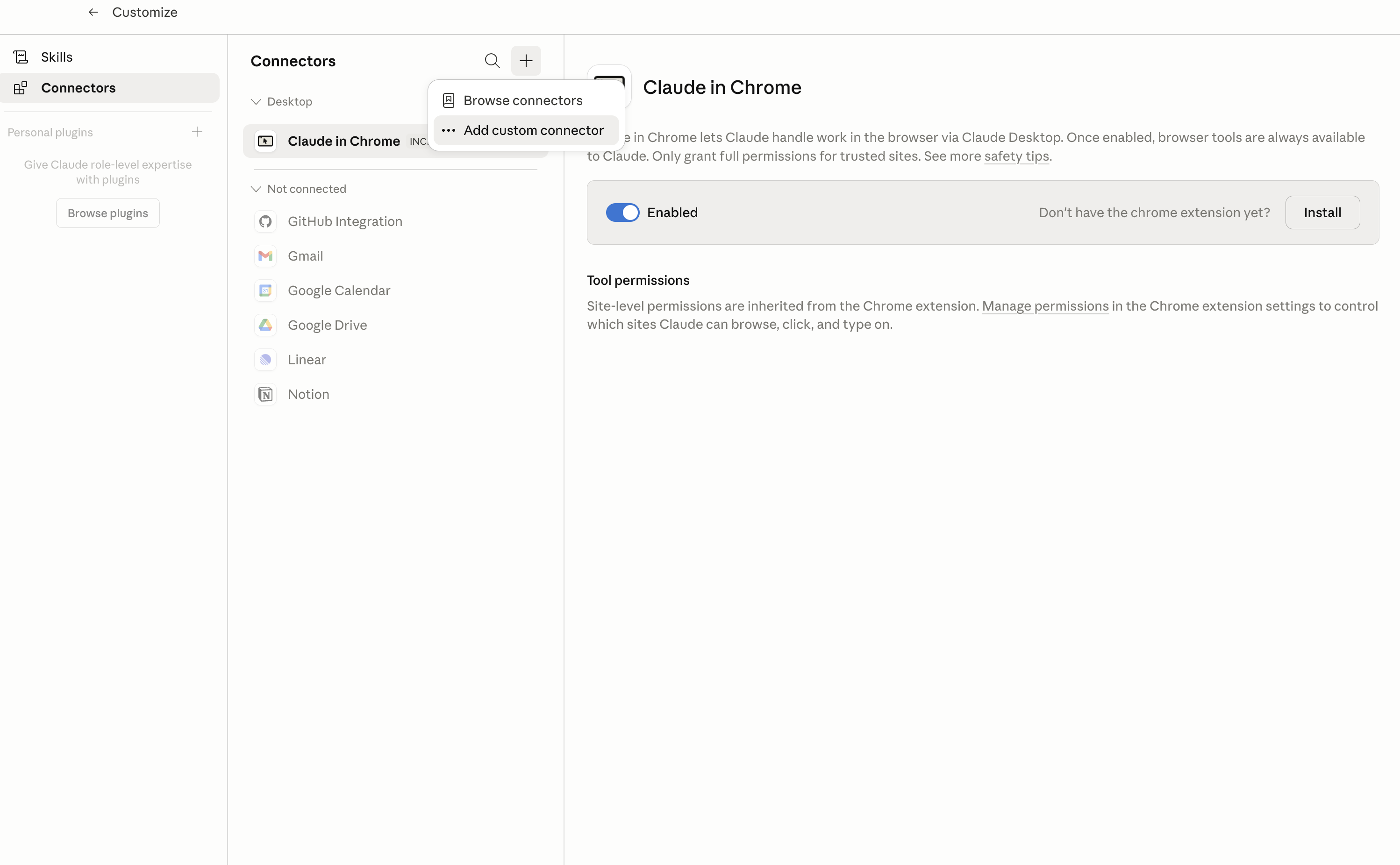
In Claude Desktop, click Customize in the left sidebar, then select Connectors and click the + icon at the top.

Claude Desktop connectors screen with Add custom connector selected

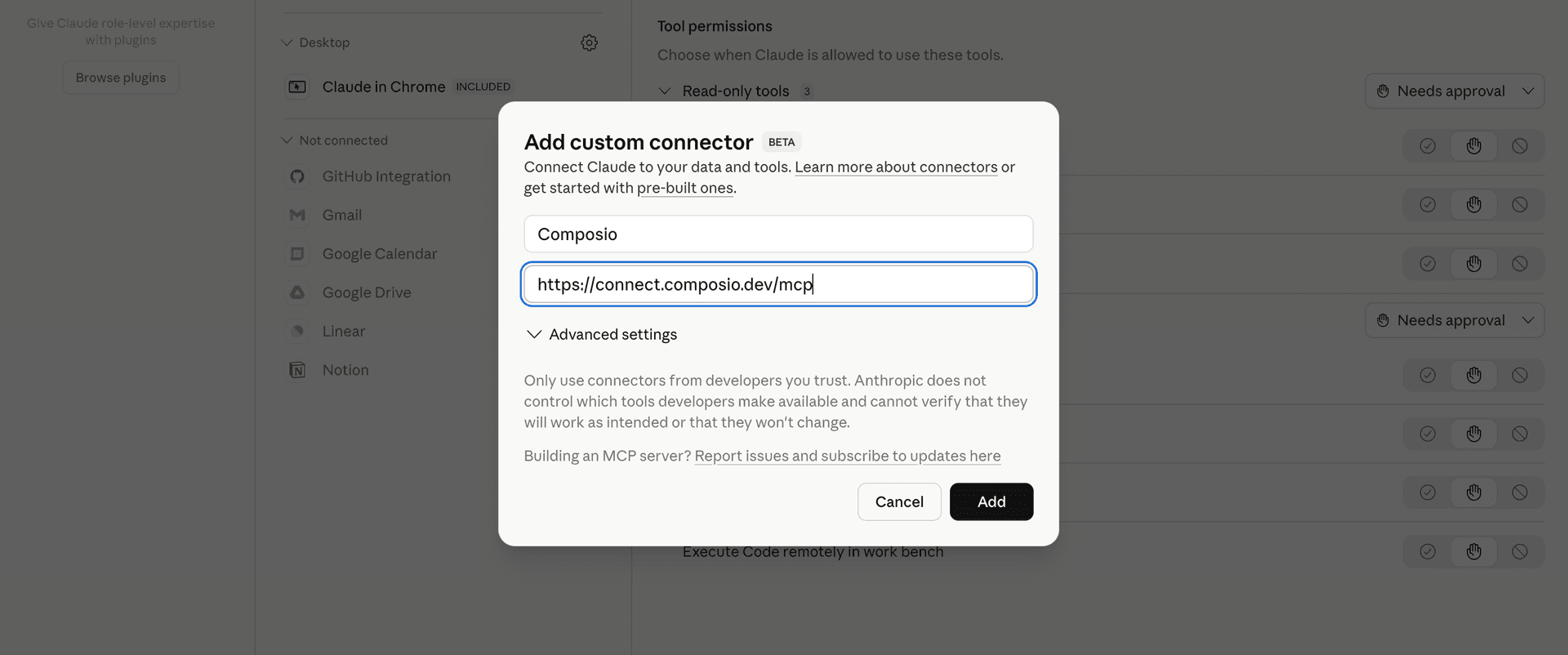
Click Add custom connector and paste in the Composio MCP server URL:

bash
https://connect.composio.dev/mcp
Add custom connector dialog with Composio MCP server URL

2. Authorize in your browser

Click Connect. You'll be redirected to a browser window where you can authorize Composio to continue.

Composio authorization screen for Claude Web, Desktop, and Cowork

3. Connect your AllModels account

Back in Claude, ask it to connect to AllModels or give it any AllModels-related task.

For example, ask Claude to:

  • "Convert product announcements to natural speech"
  • "Transcribe customer support call recordings"
  • "Create a cloned voice for notifications"

It will prompt you to authenticate and authorize access.

That's it. Composio's tools are now available in Claude, and your AllModels account is ready to use.

What is the AllModels Claude Connector, and what's possible with it?

The AllModels MCP server is an implementation of the Model Context Protocol that connects your AI agent and assistants like Claude, Cursor, etc directly to your AllModels account. It provides structured and secure access to unified text-to-speech, speech-to-text, realtime voice, voice cloning, and account tools, so your agent can generate speech, transcribe audio, find models and voices, manage voice and realtime configurations, and review account activity on your behalf.

  • Speech generation and transcription: Have your agent turn text into audio with OpenAI-compatible or ElevenLabs-compatible tools, or transcribe uploaded audio into text and timing data.
  • Voice and model discovery: Let the agent search public voices, browse provider voices, and list available speech models with their supported capabilities and pricing.
  • Voice cloning management: Direct your agent to create, inspect, list, download samples for, or delete organization-owned cloned voices.
  • Realtime voice configuration: Instruct your agent to create, update, inspect, list, or delete realtime profiles and Speech Engines for conversational audio workflows.
  • Account monitoring: Have your agent check API health, balance, usage, activity, transactions, and available credits, or create a top-up payment link when funds need to be added.

Troubleshooting

1. Why does Claude not use the Composio connector for AllModels?

The connector can show as connected, but Claude must use it in each AllModels conversation.

  • Click + at the lower left of the chat, or type /.
  • Hover Connectors.
  • Turn on Composio.
  • Ask Claude to connect to AllModels again.

2. Why does Claude show an MCP server error before AllModels connects?

Claude can show Couldn't reach the MCP server or Authorization with the MCP server failed when you add the connector for AllModels.

  • Check that the connector URL is https://connect.composio.dev/mcp.
  • Connectors run from Anthropic's cloud, so your device network is usually not the problem.
  • Add the connector again from Customize > Connectors, then ask Claude to connect AllModels.
  • If it fails again, send the error and the ofid_ reference id to support@composio.dev.

3. Why does the AllModels authorization link not work?

The Composio connector is one server. Your AllModels account connects separately when Claude asks for it.

  • If the browser does not open, or the link expires, ask Claude to retry the AllModels connection.
  • Composio creates a fresh AllModels authorization link.
  • Open that link in your browser and finish the AllModels sign-in.

4. Why do AllModels actions fail after they worked before?

The AllModels connection can expire or lose permission.

  • Ask Claude to inspect the AllModels connection.
  • If the connection is unhealthy, disconnect it when Claude prompts you.
  • Reconnect the AllModels account and retry the action.
  • If Claude shows a permission prompt, approve it before Claude changes data in AllModels.
  • If the action still fails with a permission error, check that the connected account has that permission in AllModels itself.

5. How do I switch to a different AllModels account?

Claude can manage the AllModels connection for you.

  • Ask Claude to disconnect or delete the current AllModels account.
  • Ask Claude to connect AllModels again.
  • Open the new Composio authorization link for AllModels.
  • Sign in with the other AllModels account in the browser.
  • After the account connects, ask Claude to retry the AllModels task.

6. Why is my AllModels connection missing in Claude Desktop or on a Team plan?

The connector belongs to your Claude account, so your AllModels connection works in Claude Web, Desktop, and Cowork.

  • In Claude Desktop, open Customize > Connectors.
  • Next to Composio, click ⋮ and click Clear cache.
  • If AllModels tools still do not appear, click ⋮, disconnect, remove the connector, and add it again.
  • On Team or Enterprise, an Owner or Primary Owner must enable the connector before you can connect AllModels.
TOOLS

Supported Tools

Every AllModels action and event your agent gets out of the box.

Add SDK Voice

Clone one voice through the ElevenLabs voices.add compatibility endpoint.

Create Custom Voice

Clone a voice from an uploaded recording.

Create Realtime Client Secret

Create a short-lived, single-use client secret and direct WebSocket URL from exactly one saved profile ID or complete inline profile.

Create Realtime Profile

Create a reusable Realtime speech pipeline or direct speech-to-speech profile with model routing, audio, conversation, client, lifecycle, limits, and tags.

Create Speech Engine

Create a reusable Speech Engine that connects client audio to speech-to-text, an application WebSocket, and synthesized responses.

Create Speech Engine Signed URL

Create a short-lived, single-use WebSocket URL that lets one client connect to an existing Speech Engine without receiving the account API key.

Create Top-Up Link

Create an expiring payment checkout link for adding a specified USD amount to the connected AllModels account.

Delete Custom Voice

Permanently delete an organization-owned cloned voice by voice_id.

Delete Realtime Profile

Permanently delete a saved Realtime profile by profile_id.

Delete SDK Voice

Permanently delete an organization-owned cloned voice through the ElevenLabs voices.delete compatibility endpoint.

Delete Speech Engine

Permanently delete a Speech Engine so it can no longer issue new signed conversation URLs.

Download Custom Voice Sample

Download the audio sample authorized by a short-lived custom-voice cloning token.

Generate OpenAI Speech

Generate speech through AllModels' OpenAI-compatible endpoint.

Generate SDK Speech

Generate a complete audio file through AllModels' ElevenLabs-compatible textToSpeech.convert endpoint.

Get Account Balance

Return the connected account's paid and spendable credits, USD balance, availability state, and monthly-billing fields when present.

Get Account Usage

Return daily API-key usage and aggregate request, credit, and USD cost totals for a range of at most 90 days, optionally filtered by provider, model, or capability.

Get Custom Voice

Return one organization-owned cloned voice, its readiness status, supported models, and provider status by voice_id.

Get OpenAI Credits

Return available account funds in the OpenRouter-compatible credits envelope used by OpenAI-style clients.

Get Provider Skill

Return the provider-specific Markdown guide for steering TTS delivery through AllModels.

Get Realtime Profile

Return one saved pipeline or speech-to-speech Realtime profile by its profile_id, including the complete nested configuration.

Get SDK Voice

Return one organization-owned cloned voice through the ElevenLabs voices.get compatibility endpoint.

Get Speech Engine

Return one Speech Engine configuration by its speech_engine_id.

Check API Health

Check whether the AllModels API and its LLM dependency are available, including nullable deployment commit identifiers.

List Account Activity

List individual API requests made with the connected API key, newest first, with time, provider, model, capability, and status filters plus an opaque continuation cursor.

List Account Transactions

List organization credit events such as top-ups, grants, refunds, adjustments, and expirations, returning one page and an opaque continuation cursor.

List Custom Voices

List the organization's cloned voices across projects, newest first by default, returning one cursor-controlled page.

List Models

List available TTS, STT, and speech-to-speech models with aliases, provider capabilities, endpoints, instruction support, and pricing.

List Providers

List providers keyed by provider ID with their default models and voices, supported TTS/STT models, formats, capabilities, and pricing.

List Realtime Profiles

List saved Realtime profiles with name search, sort direction, and one cursor-controlled page.

List SDK Voices

List voices from one TTS provider in the ElevenLabs voices.get_all compatibility envelope.

List Speech Engines

List permanent Speech Engines with name search, sort controls, and one cursor-controlled page.

Search SDK Voices

List voices for one text-to-speech provider in the ElevenLabs SDK search compatibility envelope, optionally limiting the single returned page.

Search Voices

Search the public voice catalogue by text, model, provider, language, category, labels, and sort order, returning one cursor-controlled page.

Start Agent Signup

Send a six-digit AllModels access code to an account owner's email address.

Stream SDK Speech

Generate speech through the ElevenLabs-compatible streaming HTTP endpoint and return the produced audio as a downloadable file.

Transcribe OpenAI Audio

Transcribe an uploaded audio file through AllModels' OpenAI-compatible endpoint and preserve JSON, text, subtitle, or SSE output.

Transcribe SDK Audio

Transcribe an uploaded audio file through AllModels' ElevenLabs-compatible endpoint and return text, language, and available word or character timing.

Update Realtime Profile

Patch selected fields of a saved pipeline or speech-to-speech Realtime profile.

Update Speech Engine

Partially update an existing AllModels Speech Engine.

Verify Agent Signup

Verify an emailed six-digit AllModels signup code using the same email address that requested it.

FAQ

Frequently asked questions

Start with AllModels.It takes 30 seconds.

Managed auth, hosted MCP servers, and every AllModels tool your agent needs.Free to start.

Start building