How to connect Airbridge MCP to Claude

Connect Claude Web, Desktop and Cowork to Airbridge MCP. Compare airbridge revenue across top apps, review retention trends for last quarter, and more using natural language, with authentication handled for you.

Airbridge MCP logoAirbridge MCP
Dcr Oauth

Airbridge is a mobile measurement platform for attribution, user engagement, retention, and revenue analytics. It helps mobile teams understand campaign performance and improve app growth with trusted data.

48 Tools

Introduction

Claude is Anthropic's AI assistant, available on the web, in the desktop app, and on mobile. Cowork is its agent for knowledge work, and it runs on all of those surfaces too. Connected to your apps, Claude can work with your files and services to accomplish complex tasks on your behalf.

This guide walks you through the easiest and most secure way to connect your Airbridge account to Claude via Composio Connect, enabling it to compare Airbridge revenue across top apps, review retention trends for last quarter, generate tracking link for spring campaign, and more such actions on your behalf without compromising your account security.

Setup is the same on Claude Web, Desktop, and Cowork, and you only need to do it once. The connector is tied to your account, so it's available in all three.

For exact tool slugs and parameter tables, see the tool catalog in the Composio docs.

Also integrate Airbridge MCP with

Connecting Airbridge to Claude Web, Desktop, and Cowork

Two ways to add the Composio connector. Pick whichever you prefer.

1. Add with one click

Click the button. Claude opens with the Composio connector filled in. Click Add, then go to step 2.

Add to Claude

Add manually

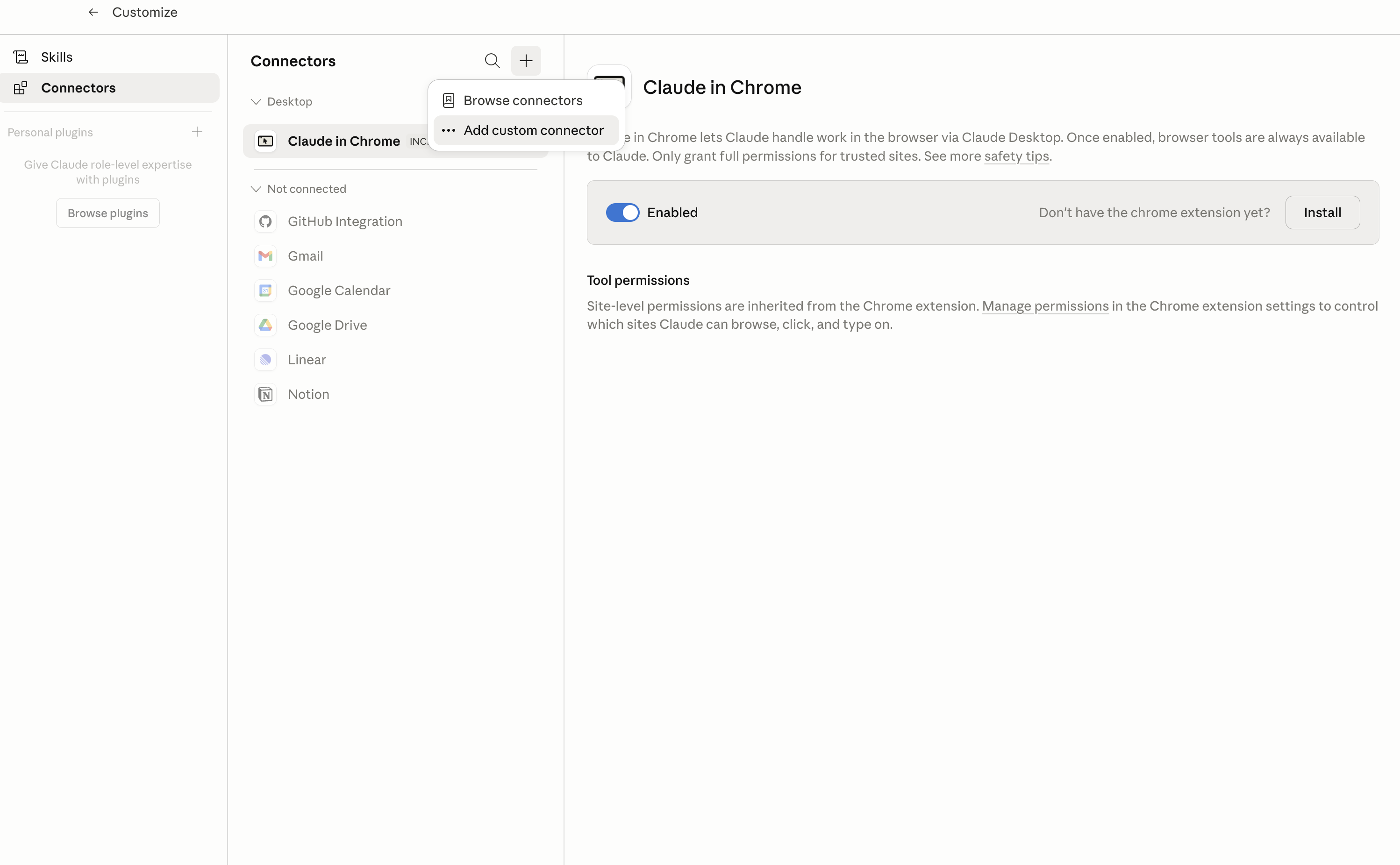
In Claude Desktop, click Customize in the left sidebar, then select Connectors and click the + icon at the top.

Claude Desktop connectors screen with Add custom connector selected

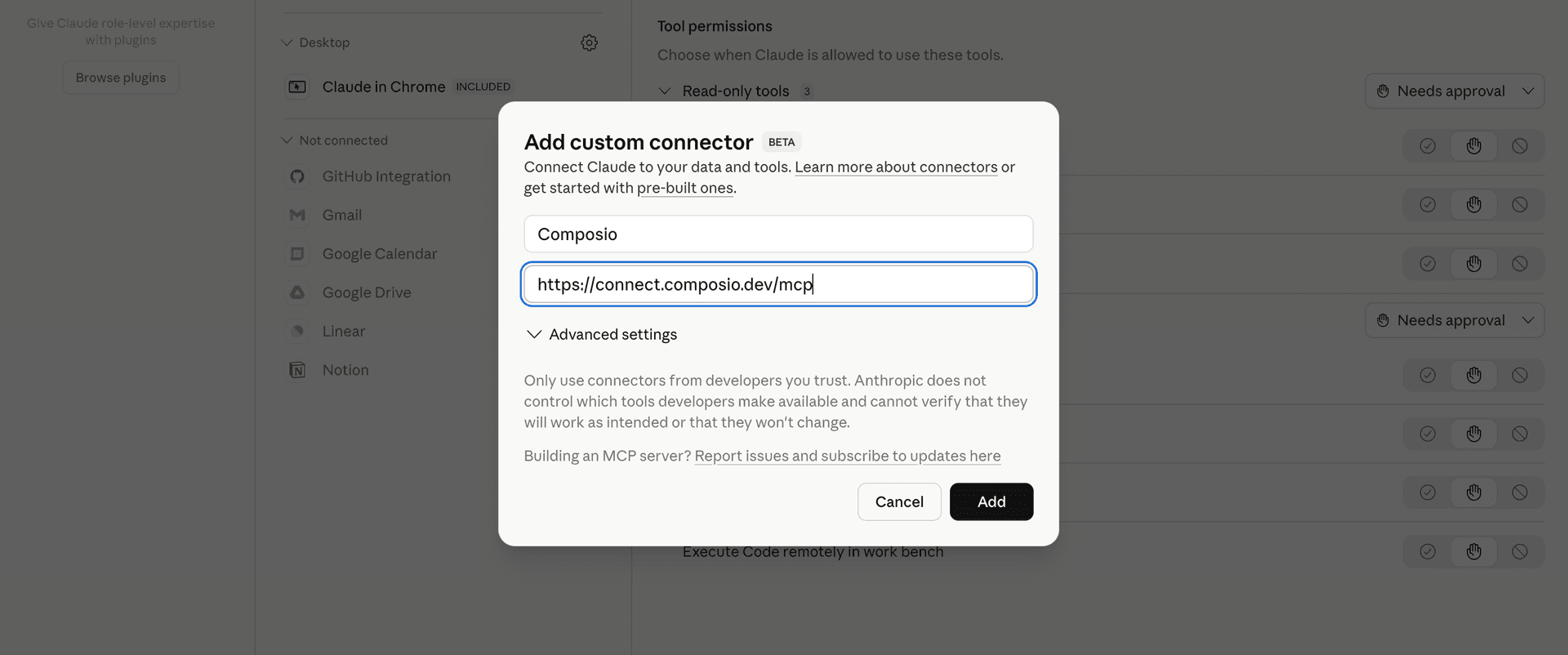
Click Add custom connector and paste in the Composio MCP server URL:

bash
https://connect.composio.dev/mcp
Add custom connector dialog with Composio MCP server URL

2. Authorize in your browser

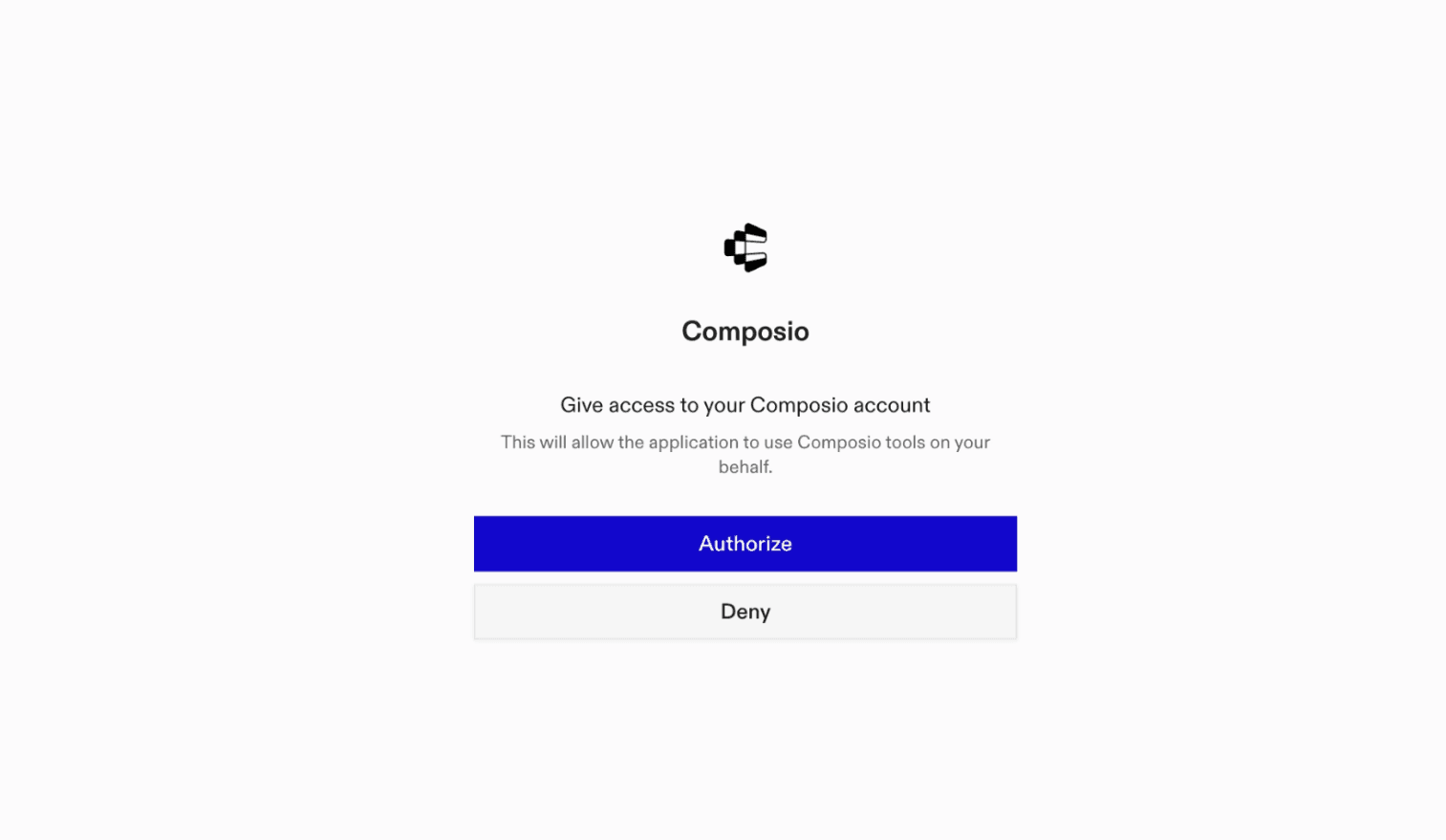
Click Connect. You'll be redirected to a browser window where you can authorize Composio to continue.

Composio authorization screen for Claude Web, Desktop, and Cowork

3. Connect your Airbridge account

Back in Claude, ask it to connect to Airbridge or give it any Airbridge-related task.

For example, ask Claude to:

  • "Compare Airbridge revenue across top apps"
  • "Review retention trends for last quarter"
  • "Generate tracking link for spring campaign"

It will prompt you to authenticate and authorize access.

That's it. Composio's tools are now available in Claude, and your Airbridge account is ready to use.

What is the Airbridge Claude Connector, and what's possible with it?

The Airbridge MCP server is an implementation of the Model Context Protocol that connects your AI agent and assistants like Claude, Cursor, etc directly to your Airbridge account. It provides structured and secure access to attribution reports, app and organization details, tracking links, deeplink settings, raw data exports, and setup guidance, so your agent can analyze mobile performance, manage apps and tracking links, inspect deeplink configuration, and guide Airbridge onboarding on your behalf.

  • Mobile attribution reporting: Have your agent retrieve active users, actuals, retention, and revenue reports, then use the available report metrics and grouping options to investigate campaign and app performance.
  • App and organization management: Let the agent view your profile and organization details, list or select accessible apps, create new apps, and accept pending organization invitations.
  • Tracking links and deeplinks: Direct your agent to create, list, and inspect tracking links, or retrieve Android, iOS, and URI scheme deeplink settings for your apps.
  • Raw data and event checks: Instruct your agent to export Airbridge raw data, check whether SDK events have arrived in the real-time log, and review your event taxonomy.
  • Onboarding and Airbridge guidance: Have your agent generate an onboarding playbook, search dashboard pages, find help articles, retrieve specific guides, and load available Airbridge Pilot skills.

Troubleshooting

1. Why does Claude not use the Composio connector for Airbridge?

The connector can show as connected, but Claude must use it in each Airbridge conversation.

  • Click + at the lower left of the chat, or type /.
  • Hover Connectors.
  • Turn on Composio.
  • Ask Claude to connect to Airbridge again.

2. Why does Claude show an MCP server error before Airbridge connects?

Claude can show Couldn't reach the MCP server or Authorization with the MCP server failed when you add the connector for Airbridge.

  • Check that the connector URL is https://connect.composio.dev/mcp.
  • Connectors run from Anthropic's cloud, so your device network is usually not the problem.
  • Add the connector again from Customize > Connectors, then ask Claude to connect Airbridge.
  • If it fails again, send the error and the ofid_ reference id to support@composio.dev.

3. Why does the Airbridge authorization link not work?

The Composio connector is one server. Your Airbridge account connects separately when Claude asks for it.

  • If the browser does not open, or the link expires, ask Claude to retry the Airbridge connection.
  • Composio creates a fresh Airbridge authorization link.
  • Open that link in your browser and finish the Airbridge sign-in.

4. Why do Airbridge actions fail after they worked before?

The Airbridge connection can expire or lose permission.

  • Ask Claude to inspect the Airbridge connection.
  • If the connection is unhealthy, disconnect it when Claude prompts you.
  • Reconnect the Airbridge account and retry the action.
  • If Claude shows a permission prompt, approve it before Claude changes data in Airbridge.
  • If the action still fails with a permission error, check that the connected account has that permission in Airbridge itself.

5. How do I switch to a different Airbridge account?

Claude can manage the Airbridge connection for you.

  • Ask Claude to disconnect or delete the current Airbridge account.
  • Ask Claude to connect Airbridge again.
  • Open the new Composio authorization link for Airbridge.
  • Sign in with the other Airbridge account in the browser.
  • After the account connects, ask Claude to retry the Airbridge task.

6. Why is my Airbridge connection missing in Claude Desktop or on a Team plan?

The connector belongs to your Claude account, so your Airbridge connection works in Claude Web, Desktop, and Cowork.

  • In Claude Desktop, open Customize > Connectors.
  • Next to Composio, click ⋮ and click Clear cache.
  • If Airbridge tools still do not appear, click ⋮, disconnect, remove the connector, and add it again.
  • On Team or Enterprise, an Owner or Primary Owner must enable the connector before you can connect Airbridge.
TOOLS

Supported Tools

Every Airbridge MCP action and event your agent gets out of the box.

Accept invitation

Accepts one of the user's pending invitations to an Airbridge organization: the user joins it with the invited role and gets access to the apps the invitation grants.

Check realtime events

Checks whether events from the app or web SDK have reached Airbridge, using the dashboard's Real-time Log (Raw Data > Real-time Log).

Create app

Creates a new Airbridge app and takes care of its organization: the one given in organization, or by default the most recently created organization the user can create apps in, or - when the account has none - a new Core plan organization named after the company in the user's profile.

Create tracking link

Creates a tracking link (short URL and QR code URL) for an app, the same way the Airbridge SDK's createTrackingLink does.

Get active users group by metadata

Lists available Active Users report groupbys.

Get active users metrics metadata

Lists available Active Users report metrics.

Get active users report

Retrieves an Active Users report.

Get actuals group by metadata

Lists available Actuals report groupbys.

Get actuals metrics metadata

Lists available Actuals report metrics.

Get actuals report

Retrieves an Actuals report.

Get app info

Retrieves Airbridge app details.

Get deeplink android

Retrieves Android HTTP deeplink (App Link) settings.

Get deeplink ios

Retrieves iOS HTTP deeplink (Universal Link) settings.

Get deeplink uri schemes

Retrieves Android and iOS deeplink URI schemes.

Get event taxonomy

Get an Airbridge event taxonomy sample or reference list as a markdown table.

Get guide

Retrieves the content of a specific article in the Airbridge Help Center.

Get organization info

Retrieves organization details, including the product plan (productPlanCode), free trial status and the current contract's usage rate.

Get pilot skill

Load one Airbridge Pilot skill's full instructions by its command.

Get profile

Return the Airbridge account this connection is signed in as.

Get raw export url

Exports raw data and provides a CSV download link.

Get retention events metadata

Lists start events and return events available in the Retention report.

Get retention group by metadata

Lists available Retention report groupbys.

Get retention measurement options

Lists measurement options available in the Retention report.

Get retention report

Retrieves a Retention report.

Get retention types metadata

Lists retention types available in the Retention report.

Get revenue events metadata

Lists start events and revenue events available in the Revenue report.

Get revenue group by metadata

Lists available Revenue report groupbys.

Get revenue metrics metadata

Lists available Revenue report metrics and sub-metrics.

Get revenue report

Retrieves a Revenue report.

Get saved report config

Gets a single saved report configuration by ID.

Get tracking link

Retrieves details of a specific tracking link.

List guides

Lists articles in the Airbridge Help Center.

List organization apps

Lists Airbridge apps.

List pilot skills

List the Airbridge Pilot skills available to the current user.

List saved report configs

Lists all saved report configurations for an app.

List tracking links

Lists tracking links.

Search app store

Searches for apps in the app stores by keyword.

Search dashboard pages

Searches the Airbridge dashboard by keyword.

Select app

Lists accessible apps.

Setup onboarding

Generate the end-to-end Airbridge onboarding playbook for a new or empty account.

Setup sdk deeplink

Generate an Airbridge SDK deeplink setup prompt for the specified platform.

Setup sdk event

Generate an Airbridge SDK in-app event tracking setup prompt for the specified platform.

Setup sdk install

Generate an Airbridge SDK installation prompt for the specified platform.

Setup sdk troubleshooting

Generate an Airbridge SDK troubleshooting prompt for the specified platform.

Update app platforms

Updates app platform details (Android, iOS, Website) registered in Airbridge.

Update deeplink android

Updates Android HTTP deeplink (App Link) settings.

Update deeplink ios

Updates iOS HTTP deeplink (Universal Link) settings.

Update deeplink uri schemes

Updates Android and iOS deeplink URI schemes.

FRAMEWORKS

How to build Airbridge MCP Agent with another framework

FAQ

Frequently asked questions

Start with Airbridge MCP.It takes 30 seconds.

Managed auth, hosted MCP servers, and every Airbridge MCP tool your agent needs.Free to start.

Start building