How to connect Agent37 to Claude

Connect Claude Web, Desktop and Cowork to Agent37 MCP. Create a managed sandbox for testing, schedule a recurring agent37 agent run, and more using natural language, with authentication handled for you.

Agent37 logoAgent37
Api Key

Agent37 is a control API for managed agent sandboxes, templates, networking, and execution. It gives teams built-in scheduling, observability, budgets, and workspace administration.

60 Tools

Introduction

Claude is Anthropic's AI assistant, available on the web, in the desktop app, and on mobile. Cowork is its agent for knowledge work, and it runs on all of those surfaces too. Connected to your apps, Claude can work with your files and services to accomplish complex tasks on your behalf.

This guide walks you through the easiest and most secure way to connect your Agent37 account to Claude via Composio Connect, enabling it to create a managed sandbox for testing, schedule a recurring Agent37 agent run, review recent sandbox execution logs, and more such actions on your behalf without compromising your account security.

Setup is the same on Claude Web, Desktop, and Cowork, and you only need to do it once. The connector is tied to your account, so it's available in all three.

For exact tool slugs and parameter tables, see the tool catalog in the Composio docs.

Also integrate Agent37 with

Connecting Agent37 to Claude Web, Desktop, and Cowork

Two ways to add the Composio connector. Pick whichever you prefer.

1. Add with one click

Click the button. Claude opens with the Composio connector filled in. Click Add, then go to step 2.

Add to Claude

Add manually

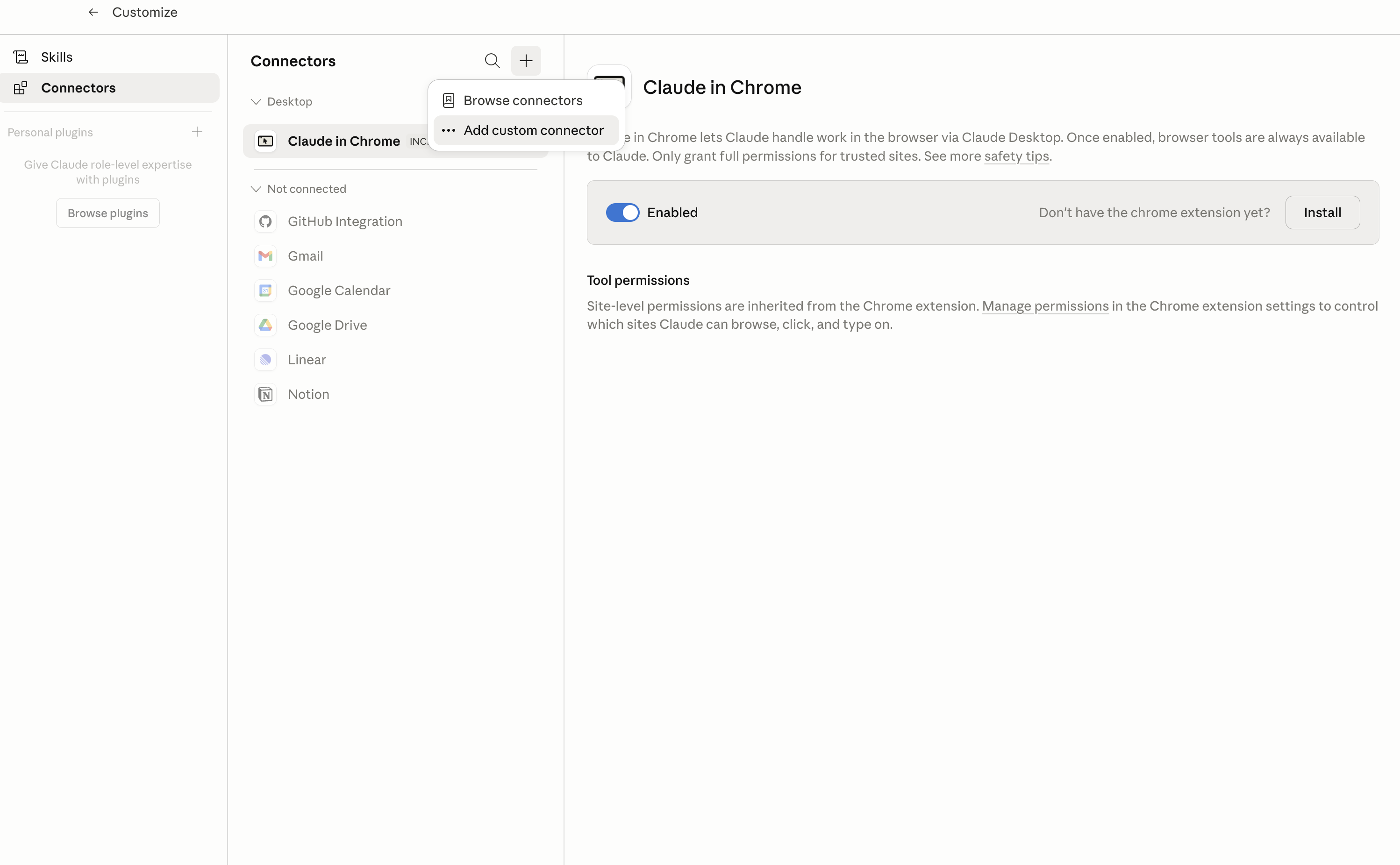
In Claude Desktop, click Customize in the left sidebar, then select Connectors and click the + icon at the top.

Claude Desktop connectors screen with Add custom connector selected

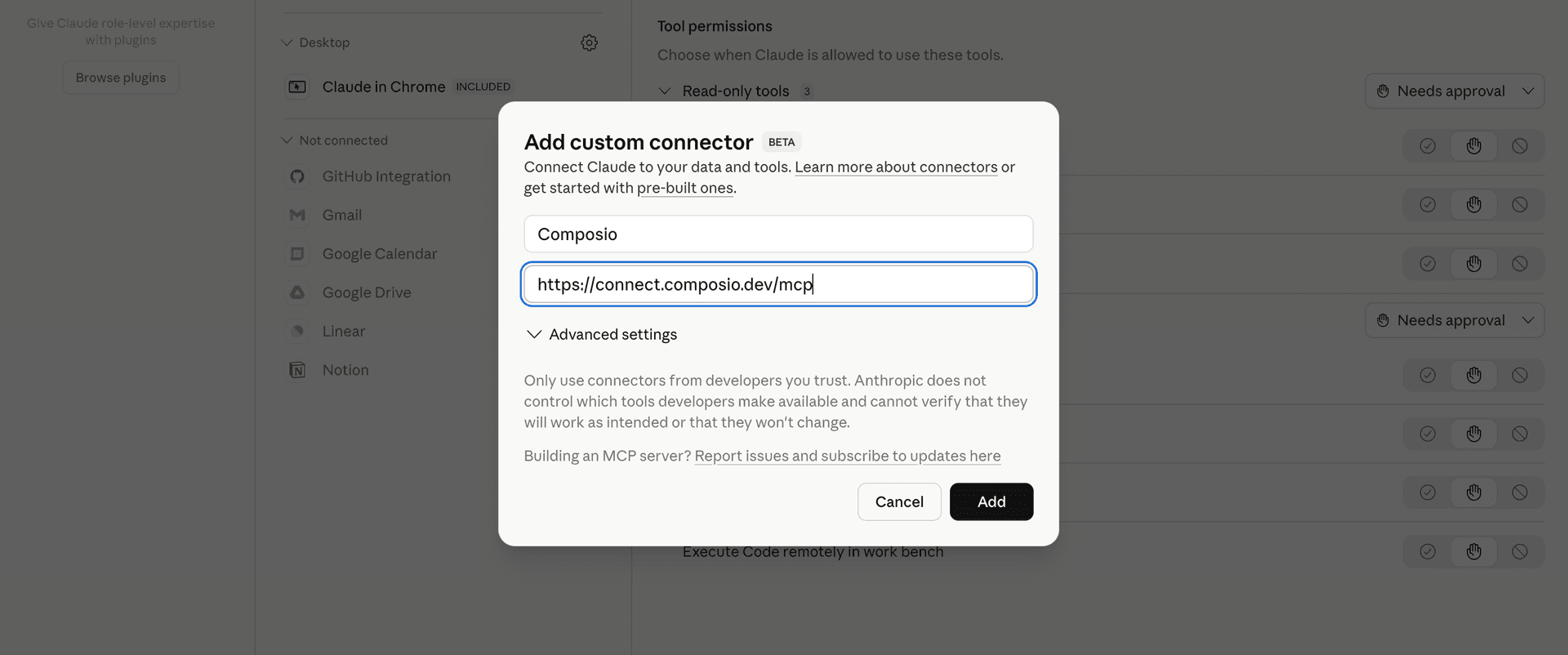
Click Add custom connector and paste in the Composio MCP server URL:

bash
https://connect.composio.dev/mcp
Add custom connector dialog with Composio MCP server URL

2. Authorize in your browser

Click Connect. You'll be redirected to a browser window where you can authorize Composio to continue.

Composio authorization screen for Claude Web, Desktop, and Cowork

3. Connect your Agent37 account

Back in Claude, ask it to connect to Agent37 or give it any Agent37-related task.

For example, ask Claude to:

  • "Create a managed sandbox for testing"
  • "Schedule a recurring Agent37 agent run"
  • "Review recent sandbox execution logs"

It will prompt you to authenticate and authorize access.

That's it. Composio's tools are now available in Claude, and your Agent37 account is ready to use.

What is the Agent37 Claude Connector, and what's possible with it?

The Agent37 MCP server is an implementation of the Model Context Protocol that connects your AI agent and assistants like Claude, Cursor, etc directly to your Agent37 account. It provides structured and secure access to managed sandboxes, templates, execution, scheduling, observability, billing, and workspace administration, so your agent can create and manage instances, run commands, schedule recurring prompts, monitor usage, and administer integrations on your behalf.

  • Sandbox and instance management: Have your agent create, list, inspect, fork, back up, and delete persistent Agent37 instances from available templates.
  • Command execution and access: Let the agent run shell commands in an instance, start background processes, and create or remove public ports and time-limited browser URLs.
  • Templates and build workflows: Direct your agent to create templates, start template builds, check build status, and read build logs while preparing reusable sandboxes.
  • Scheduling and observability: Instruct your agent to create, review, and remove recurring prompts, inspect their runs, and track instance events, budgets, and monthly usage.
  • Workspace administration and integrations: Have your agent invite or remove members, browse available integration toolkits, connect or disconnect app accounts, manage domains, and review billing details.

Troubleshooting

1. Why does Claude not use the Composio connector for Agent37?

The connector can show as connected, but Claude must use it in each Agent37 conversation.

  • Click + at the lower left of the chat, or type /.
  • Hover Connectors.
  • Turn on Composio.
  • Ask Claude to connect to Agent37 again.

2. Why does Claude show an MCP server error before Agent37 connects?

Claude can show Couldn't reach the MCP server or Authorization with the MCP server failed when you add the connector for Agent37.

  • Check that the connector URL is https://connect.composio.dev/mcp.
  • Connectors run from Anthropic's cloud, so your device network is usually not the problem.
  • Add the connector again from Customize > Connectors, then ask Claude to connect Agent37.
  • If it fails again, send the error and the ofid_ reference id to support@composio.dev.

3. Why does the Agent37 authorization link not work?

The Composio connector is one server. Your Agent37 account connects separately when Claude asks for it.

  • If the browser does not open, or the link expires, ask Claude to retry the Agent37 connection.
  • Composio creates a fresh Agent37 authorization link.
  • Open that link in your browser and finish the Agent37 sign-in.

4. Why do Agent37 actions fail after they worked before?

The Agent37 connection can expire or lose permission.

  • Ask Claude to inspect the Agent37 connection.
  • If the connection is unhealthy, disconnect it when Claude prompts you.
  • Reconnect the Agent37 account and retry the action.
  • If Claude shows a permission prompt, approve it before Claude changes data in Agent37.
  • If the action still fails with a permission error, check that the connected account has that permission in Agent37 itself.

5. How do I switch to a different Agent37 account?

Claude can manage the Agent37 connection for you.

  • Ask Claude to disconnect or delete the current Agent37 account.
  • Ask Claude to connect Agent37 again.
  • Open the new Composio authorization link for Agent37.
  • Sign in with the other Agent37 account in the browser.
  • After the account connects, ask Claude to retry the Agent37 task.

6. Why is my Agent37 connection missing in Claude Desktop or on a Team plan?

The connector belongs to your Claude account, so your Agent37 connection works in Claude Web, Desktop, and Cowork.

  • In Claude Desktop, open Customize > Connectors.
  • Next to Composio, click ⋮ and click Clear cache.
  • If Agent37 tools still do not appear, click ⋮, disconnect, remove the connector, and add it again.
  • On Team or Enterprise, an Owner or Primary Owner must enable the connector before you can connect Agent37.
TOOLS

Supported Tools

Every Agent37 action and event your agent gets out of the box.

Connect Integration

Start a managed OAuth connection for one toolkit on an Agent37 instance.

Create Billing Top Up

Create a Stripe Checkout URL to fund the connected Agent37 workspace with a real payment.

Create Cron

Schedule a recurring Agent37 prompt on an instance using a five-field cron expression and IANA timezone.

Create Instance

Create a persistent Agent37 sandbox from a template.

Create Instance Backup

Create a live, crash-consistent manual backup without pausing the instance.

Create Public Port

Permanently expose one instance port at an unauthenticated HTTPS URL until the mapping is deleted.

Create Signed URL

Create a time-limited authenticated browser URL for one port on an Agent37 instance without making the port permanently public.

Create Template

Register a workspace template by copying and privately pinning a linux/amd64 registry image.

Create Template Build

Create an Agent37 cloud-build record and a one-hour presigned URL for uploading the gzipped build context.

Delete Cron

Permanently delete one recurring Agent37 schedule from an instance.

Delete Domain

Permanently remove a custom domain, stop all routing under it within seconds, and release its full nameserver delegation from Agent37 DNS hosting.

Delete Instance

Permanently delete one Agent37 instance and its retained disk, stopping its billing.

Delete Member

Destructively remove a person from the connected Agent37 workspace or revoke a pending invitation.

Delete Public Port

Permanently delete one public-port mapping and revoke its unauthenticated URL within seconds.

Delete SSH Key

Revoke one SSH key from every instance in the workspace.

Delete Template

Permanently delete a workspace template.

Disconnect Integration

Permanently remove one connected app account from an Agent37 instance.

Execute Command

Run a shell command inside an instance, either waiting for stdout, stderr, and exit code or starting it in the background.

Fork Instance

Create an independent instance by copying a source instance's image and disk.

Get Billing

Read the connected workspace's wallet balance, numeric billing tier, memory and instance limits, automatic refill rule, and payment status.

Get Cron

Get the complete configuration of one recurring schedule on an instance.

Get Domain

Read one custom domain's status and full nameserver delegation.

Get Instance

Get the configuration, resource allocation, URLs, and current lifecycle state of one instance.

Get Instance Budget

Read one instance's managed-service monthly cap, consumption, remaining allowance, and one-time credit balance in provider-native micros.

Get Instance Events

Read an Agent37 instance's start, sleep, wake, and stop history over an optional inclusive date window of at most 90 days.

Get Instance Usage

Read one UTC month's managed-service spend for an Agent37 instance, broken down across language models, search, Composio, and paid tools.

Get Template

Get one Agent37 template or pinned template revision, including its image, installed agents, entrypoint, defaults, and workspace revision history.

Get Template Build

Get a template build's current status, timestamps, failure details, and published template result.

Get Template Build Logs

Read an incremental chunk of a template build's Docker output and return the next byte offset for tailing, together with current build status and failure details.

Get Workspace Usage

Read Agent37 workspace spend over an inclusive date window, with daily, instance, model, and integration breakdowns.

Invite Member

Send an email invitation to join the connected Agent37 workspace as an admin or user.

List Cron Runs

List the latest 50 firings of one Agent37 cron, newest first, including whether each turn started, its session ID, and any skip reason.

List Crons

List all recurring Agent37 schedules on an instance, oldest first.

List Domains

List the workspace's custom domains and the nameservers each dedicated domain must fully delegate to Agent37.

List Instance Backups

List all retained automatic and manual restore points for an instance, newest first, including IDs, timestamps, and compressed sizes.

List Instances

List all instances in the connected workspace, newest first, including their IDs, configuration, URLs, resource allocation, and lifecycle state.

List Integration Connections

List app accounts attached to an Agent37 instance, optionally for one toolkit.

List Integration Toolkits

Browse one cursor-paginated page of apps that can be connected to an Agent37 instance.

List Members

List all people in the connected Agent37 workspace and every pending email invitation, including IDs suitable for removal or invitation revocation.

List Public Ports

List an instance's permanent public HTTPS mappings.

List SSH Keys

Audit up to 20 SSH public-key fingerprints registered for workspace-wide access, newest first.

List Templates

List system and workspace templates that can be used to create an instance.

Read Instance Logs

Read recent container output and compact runtime health for an instance without waking it.

Read Instance Metrics

Read recent CPU, memory, and disk history and configured resource limits for an instance without waking it.

Register Domain

Register a dedicated custom domain for the workspace.

Register SSH Key

Register one OpenSSH public key for workspace-wide shell access.

Resize Instance

Change a running instance's CPU, memory, or disk while retaining its ID, URLs, and files.

Restore Instance Backup

Destructively replace an instance's current disk data with a retained backup.

Run Cron Now

Trigger one Agent37 cron immediately without changing its recurring schedule.

Send Feedback

Send external feedback to the Agent37 team about a bug, feature request, or documentation gap.

Set Instance Budget

Replace an instance's monthly managed-service spending ceiling, effective immediately and for future UTC months.

Set Instance Power State

Start, stop, sleep, or restart an instance.

Sign Up Workspace

Create a separate Agent37 workspace, empty wallet, owner claim invitation, and full workspace API key.

Start Template Build

Start a template build after its gzipped context has been uploaded.

Top Up Instance Budget

Irreversibly add one-time managed-service spending headroom to an instance.

Update Cron

Change a recurring schedule's prompt, timing, agent, profile, name, timezone, or enabled state.

Update Instance Image

Apply a template image to an instance while preserving its mounted disk.

Update Instance Settings

Update an instance's name, metadata, environment, auto-sleep, idle timeout, or outbound network policy without changing its image or compute size.

Update Template

Update a workspace template's name, image, description, default port, or entrypoint.

Verify Domain

Check and nudge verification after replacing a registered dedicated domain's nameservers with those returned by REGISTER_DOMAIN.

FRAMEWORKS

How to build Agent37 MCP Agent with another framework

FAQ

Frequently asked questions

Start with Agent37.It takes 30 seconds.

Managed auth, hosted MCP servers, and every Agent37 tool your agent needs.Free to start.

Start building