How to connect AdMakeAI MCP to Claude

Connect Claude Web, Desktop and Cowork to AdMakeAI MCP. Research competitor ads in meta ad library, generate three ugc videos for product launch, and more using natural language, with authentication handled for you.

AdMakeAI MCP logoAdMakeAI MCP
Dcr Oauth

AdMakeAI MCP is a hosted marketing service for researching competitor ads and creating ad content. It connects Meta ad uploads and analytics in one MCP server.

60 Tools

Introduction

Claude is Anthropic's AI assistant, available on the web, in the desktop app, and on mobile. Cowork is its agent for knowledge work, and it runs on all of those surfaces too. Connected to your apps, Claude can work with your files and services to accomplish complex tasks on your behalf.

This guide walks you through the easiest and most secure way to connect your AdMakeAI account to Claude via Composio Connect, enabling it to research competitor ads in Meta Ad Library, generate three UGC videos for product launch, upload Meta ads and review performance, and more such actions on your behalf without compromising your account security.

Setup is the same on Claude Web, Desktop, and Cowork, and you only need to do it once. The connector is tied to your account, so it's available in all three.

For exact tool slugs and parameter tables, see the tool catalog in the Composio docs.

Also integrate AdMakeAI MCP with

Connecting AdMakeAI to Claude Web, Desktop, and Cowork

Two ways to add the Composio connector. Pick whichever you prefer.

1. Add with one click

Click the button. Claude opens with the Composio connector filled in. Click Add, then go to step 2.

Add to Claude

Add manually

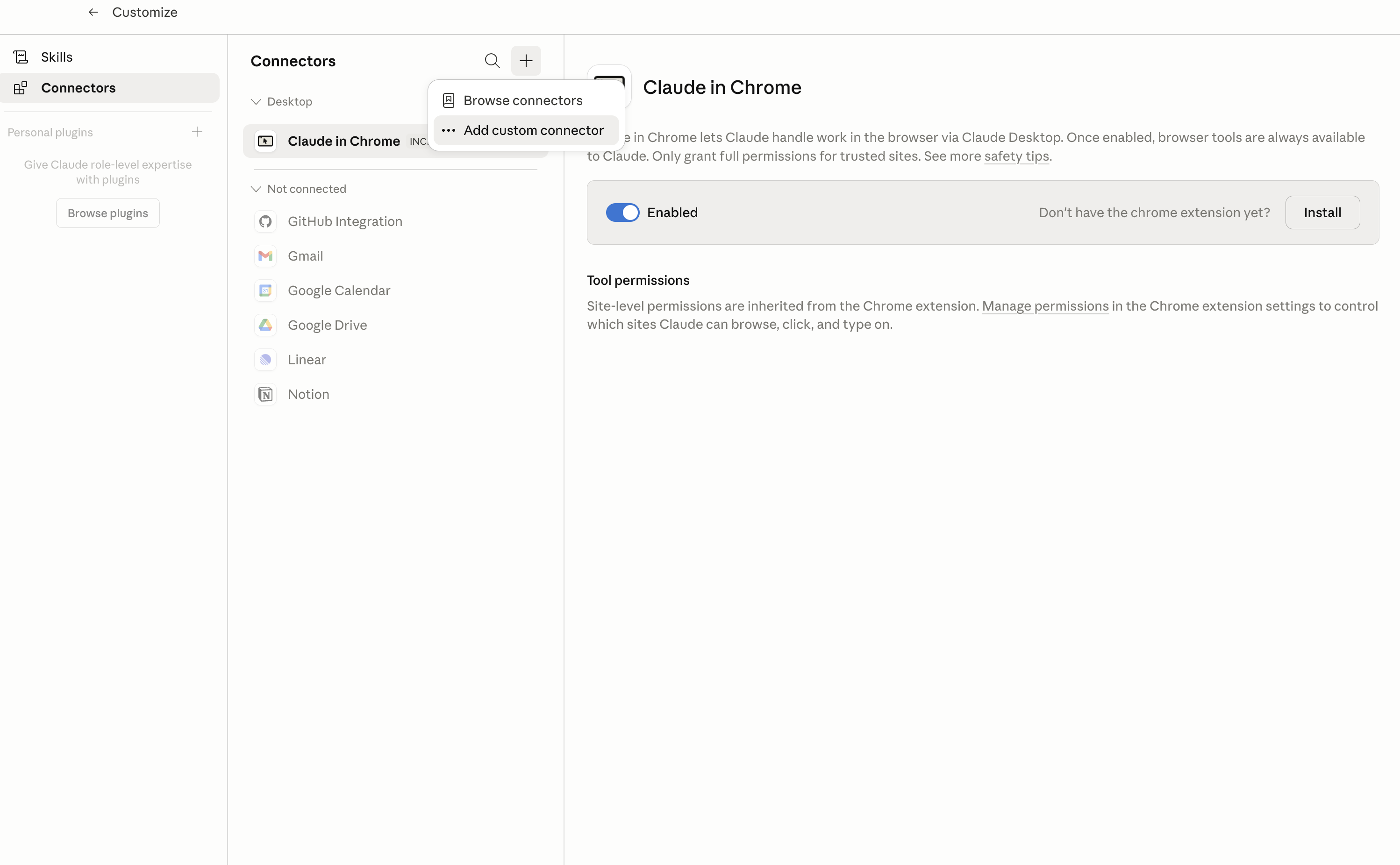
In Claude Desktop, click Customize in the left sidebar, then select Connectors and click the + icon at the top.

Claude Desktop connectors screen with Add custom connector selected

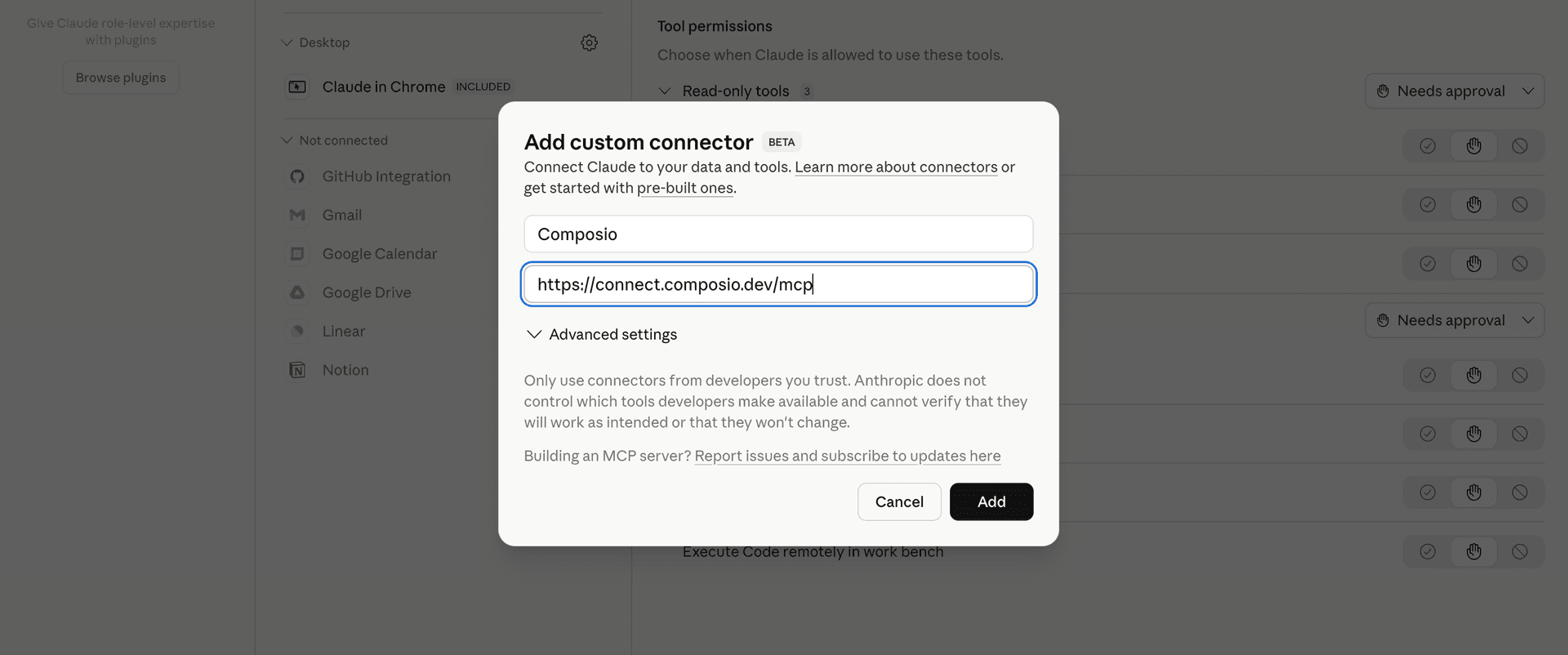
Click Add custom connector and paste in the Composio MCP server URL:

bash
https://connect.composio.dev/mcp
Add custom connector dialog with Composio MCP server URL

2. Authorize in your browser

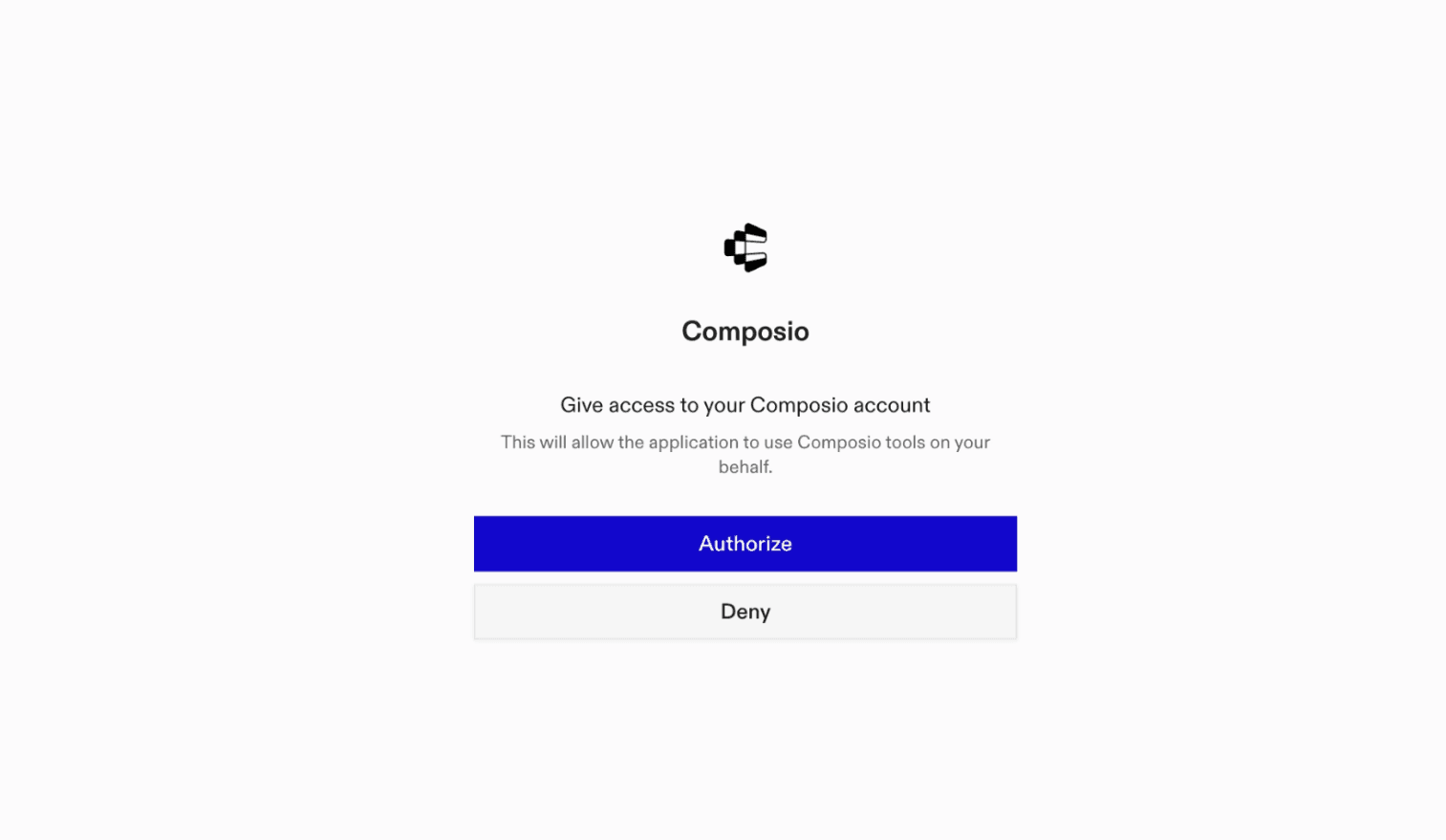
Click Connect. You'll be redirected to a browser window where you can authorize Composio to continue.

Composio authorization screen for Claude Web, Desktop, and Cowork

3. Connect your AdMakeAI account

Back in Claude, ask it to connect to AdMakeAI or give it any AdMakeAI-related task.

For example, ask Claude to:

  • "Research competitor ads in Meta Ad Library"
  • "Generate three UGC videos for product launch"
  • "Upload Meta ads and review performance"

It will prompt you to authenticate and authorize access.

That's it. Composio's tools are now available in Claude, and your AdMakeAI account is ready to use.

What is the AdMakeAI Claude Connector, and what's possible with it?

The AdMakeAI MCP server is an implementation of the Model Context Protocol that connects your AI agent and assistants like Claude, Cursor, etc directly to your AdMakeAI account. It provides structured and secure access to competitor ad research, ad creative generation, ad copywriting, and Meta campaign tools, so your agent can research competing brands, generate ad images, write Facebook and Instagram copy, and prepare or upload Meta campaign assets on your behalf.

  • Competitor ad research: Have your agent find Facebook advertiser pages, add competitors to research projects, scrape their live ads, review creative details, filter results, and save useful ads as inspiration.
  • Ad image generation: Let the agent create finished ad images from prompts, edit existing creatives, check generation status, search past generations, and organize favorites.
  • Ad sets and creative variations: Direct your agent to create ad sets with a shared brief, suggest creative directions, generate batches of variations, and update the brief or format for another round.
  • Facebook and Instagram ad copy: Instruct your agent to write headlines, primary text, descriptions, calls to action, and hook angles for an ad image using different messaging styles.
  • Meta campaign preparation and uploads: Have your agent review connected Facebook ad accounts and Pages, create or read campaign drafts, resolve reusable ad assets, and upload generated creatives to Meta campaigns or ad sets.

Troubleshooting

1. Why does Claude not use the Composio connector for AdMakeAI?

The connector can show as connected, but Claude must use it in each AdMakeAI conversation.

  • Click + at the lower left of the chat, or type /.
  • Hover Connectors.
  • Turn on Composio.
  • Ask Claude to connect to AdMakeAI again.

2. Why does Claude show an MCP server error before AdMakeAI connects?

Claude can show Couldn't reach the MCP server or Authorization with the MCP server failed when you add the connector for AdMakeAI.

  • Check that the connector URL is https://connect.composio.dev/mcp.
  • Connectors run from Anthropic's cloud, so your device network is usually not the problem.
  • Add the connector again from Customize > Connectors, then ask Claude to connect AdMakeAI.
  • If it fails again, send the error and the ofid_ reference id to support@composio.dev.

3. Why does the AdMakeAI authorization link not work?

The Composio connector is one server. Your AdMakeAI account connects separately when Claude asks for it.

  • If the browser does not open, or the link expires, ask Claude to retry the AdMakeAI connection.
  • Composio creates a fresh AdMakeAI authorization link.
  • Open that link in your browser and finish the AdMakeAI sign-in.

4. Why do AdMakeAI actions fail after they worked before?

The AdMakeAI connection can expire or lose permission.

  • Ask Claude to inspect the AdMakeAI connection.
  • If the connection is unhealthy, disconnect it when Claude prompts you.
  • Reconnect the AdMakeAI account and retry the action.
  • If Claude shows a permission prompt, approve it before Claude changes data in AdMakeAI.
  • If the action still fails with a permission error, check that the connected account has that permission in AdMakeAI itself.

5. How do I switch to a different AdMakeAI account?

Claude can manage the AdMakeAI connection for you.

  • Ask Claude to disconnect or delete the current AdMakeAI account.
  • Ask Claude to connect AdMakeAI again.
  • Open the new Composio authorization link for AdMakeAI.
  • Sign in with the other AdMakeAI account in the browser.
  • After the account connects, ask Claude to retry the AdMakeAI task.

6. Why is my AdMakeAI connection missing in Claude Desktop or on a Team plan?

The connector belongs to your Claude account, so your AdMakeAI connection works in Claude Web, Desktop, and Cowork.

  • In Claude Desktop, open Customize > Connectors.
  • Next to Composio, click ⋮ and click Clear cache.
  • If AdMakeAI tools still do not appear, click ⋮, disconnect, remove the connector, and add it again.
  • On Team or Enterprise, an Owner or Primary Owner must enable the connector before you can connect AdMakeAI.
TOOLS

Supported Tools

Every AdMakeAI MCP action and event your agent gets out of the box.

Ad copy generation generate

[write] Write Facebook/Instagram ad copy for an ad image URL: headline, primary text, description, CTA, and hook angle.

Ad copy generation get messaging styles

List the ad-copy messaging styles (clickbait, professional, UGC, direct response, storytelling, ...) accepted by adCopyGeneration.generate.

Ad generation create

[write] Queue a FINISHED AD image render.

Ad generation edit

[write] Queue an image-to-image edit and return immediately.

Ad generation generate image

[write] Queue an image render from a VERBATIM prompt.

Ad generation get by id

Get the status, prompt, and resulting image URLs of a single ad generation by ID.

Ad generation get recent

Get the user's most recent ad generations (default limit 12).

Ad generation list

Paginated list of the user's ad generations, newest first.

Ad generation list pending

List the user's currently-pending ad generations.

Ad generation search all

Full-text search across the user's ad generations by prompt.

Ad generation toggle favorite

[write] Star or unstar one of the user's ad generations.

Ad research add competitors

[write] Add competitors to a project by name (optionally with website URL) and kick off ad scraping for them.

Ad research get ad details

Get one scraped competitor ad in full: creative URLs, ad text, headline, run dates, and platform placements.

Ad research get company ads

Get the ads a Facebook Page is currently running, from the Meta Ad Library, by pageId (from adResearch.searchCompanies).

Ad research get competitor preview

Preview the ads already scraped for a single competitor.

Ad research get project

Get one project with its full brand brief, competitors, research jobs, and scraped-ad counts.

Ad research get saved inspirations

List the competitor ads saved as inspiration for a project, with their inspiration IDs.

Ad research get scraped ads

Browse the competitor ads scraped into a project, with sorting (relevance, longest_running, newest) and media-type/keyword filters.

Ad research list projects

List the user's projects (brands).

Ad research poll status

Poll a project's research status: pipeline stage, running scrape jobs, competitor and saved-ad counts.

Ad research save inspiration

[write] Save a scraped competitor ad to a project as inspiration.

Ad research scrape competitor

[write] Re-scrape one competitor's live Facebook ads into the project.

Ad research search companies

Resolve a brand name to its Facebook advertiser Page (id, name, category, follower counts).

Ad set create

[write] Create an ad set: a project + shared brief + ad type + quality + aspect ratio that many variations are generated from.

Ad set generate batch

[write] Generate a batch of ad variations from one ad set + per-variation instructions.

Ad set get

Get an ad set by ID, including its general instructions.

Ad set get generations

List all ad generations belonging to an ad set.

Ad set list

Paginated list of the user's ad sets.

Ad set suggest directions

[write] Ask the model for distinct creative directions (angles/hooks) for an ad set, to feed back in as per-variation instructions.

Ad set update

[write] Update an ad set's brief, ad type, quality, aspect ratio, or reference images before generating another batch.

Facebook campaign draft get agent draft

Read a saved agent-created Facebook campaign draft by draft ID before pushing.

Facebook campaign draft push agent draft

[DANGER: live action] Push a saved agent-created Facebook campaign draft to Meta as draft campaigns/ad sets/ads.

Facebook campaign draft push draft campaign

[DANGER: live action] Create Meta draft campaigns/ad sets/ads from explicit campaign data, ad sets, ad copy, and image URLs.

Facebook campaign draft source assets

Resolve previously-uploaded Meta ads into reusable creative assets for a campaign draft.

Facebook connection list

List the user's connected Facebook ad accounts and Pages, with their cached identity info.

Facebook upload get

Get the upload state and Meta IDs of a single uploaded ad.

Facebook upload get ad sets

List Meta ad sets under a given campaign.

Facebook upload get campaigns

List Meta campaigns for a specific connected ad account (cache-first; refresh from Meta if cold).

Facebook upload list

List previously-uploaded ads, filterable by ad account and state.

Facebook upload request

[DANGER: live action] Enqueue an upload of an AdMakeAI-generated ad creative to a Meta ad account / campaign / ad set.

Facebook upload run preflight

Validate an ad-creative + ad-account pair for Meta upload (image dimensions, copy length, etc.) without uploading.

Project create first

[write] Create the account's FIRST project from the brand's website URL: reads the site and fills in the brand brief and logo in about 10-15 seconds.

Project get assets

List a project's stored assets (product photos, logos) with their URLs, for use as reference images.

Project update brief

[write] Update a project's brand brief (product summary, target audience, value proposition, industry, keywords).

Upload get user images

List the user's previously uploaded source images, newest first, with pagination.

Upload upload image base64

[write] Upload a JPEG, PNG, or WebP image from base64 bytes into AdMakeAI storage.

User get credits

Get the authenticated user's current credit balance only.

User me

Get the authenticated user's profile, plan, and credit balance.

Video generation get status

Get the status and output URL of a single video generation by ID.

Video generation list

Paginated list of the user's completed UGC video ads.

Video generation list pending

List the user's currently-rendering video generations.

Video generation start

[write] Queue UGC-style video ad generation for a project (script, voice, and render).

Zernio analytics account overview

Get total ad-account spend and performance (spend, impressions, clicks, CTR, CPC, conversions, ROAS) for a date range like last_30_days or last_month, with previous-period comparison.

Zernio analytics get ad

Get a single Meta ad's metadata and creative.

Zernio analytics get ad analytics

Get day-by-day analytics (spend, CTR, CPC, conversions) for a single Meta ad.

Zernio analytics get ad comments

List public comments on the boosted post behind a Meta ad (Facebook or Instagram placement).

Zernio analytics list ads

List Meta ads under a campaign or ad set with performance metrics.

Zernio analytics list campaigns

List Meta campaigns with rolled-up performance metrics.

Zernio analytics timeline

Get time-series performance metrics for an ad account.

Zernio analytics tree

Get the campaign → ad-set → ad hierarchy for an ad account.

FRAMEWORKS

How to build AdMakeAI MCP Agent with another framework

FAQ

Frequently asked questions

Start with AdMakeAI MCP.It takes 30 seconds.

Managed auth, hosted MCP servers, and every AdMakeAI MCP tool your agent needs.Free to start.

Start building