How to connect 21st MCP to Claude

Connect Claude Web, Desktop and Cowork to 21st MCP. Find shadcn cards for analytics dashboards, save three landing page templates, and more using natural language, with authentication handled for you.

21st MCP logo21st MCP
Dcr Oauth

21st MCP is a hosted design resource service for React/shadcn components, themes, templates, and SVG logos. It gives teams a fast way to discover, organize, and reuse polished interface assets.

51 Tools

Introduction

Claude is Anthropic's AI assistant, available on the web, in the desktop app, and on mobile. Cowork is its agent for knowledge work, and it runs on all of those surfaces too. Connected to your apps, Claude can work with your files and services to accomplish complex tasks on your behalf.

This guide walks you through the easiest and most secure way to connect your 21st account to Claude via Composio Connect, enabling it to find shadcn cards for analytics dashboards, save three landing page templates, find SVG logos for fintech apps, and more such actions on your behalf without compromising your account security.

Setup is the same on Claude Web, Desktop, and Cowork, and you only need to do it once. The connector is tied to your account, so it's available in all three.

For exact tool slugs and parameter tables, see the tool catalog in the Composio docs.

Also integrate 21st MCP with

Connecting 21st to Claude Web, Desktop, and Cowork

Two ways to add the Composio connector. Pick whichever you prefer.

1. Add with one click

Click the button. Claude opens with the Composio connector filled in. Click Add, then go to step 2.

Add to Claude

Add manually

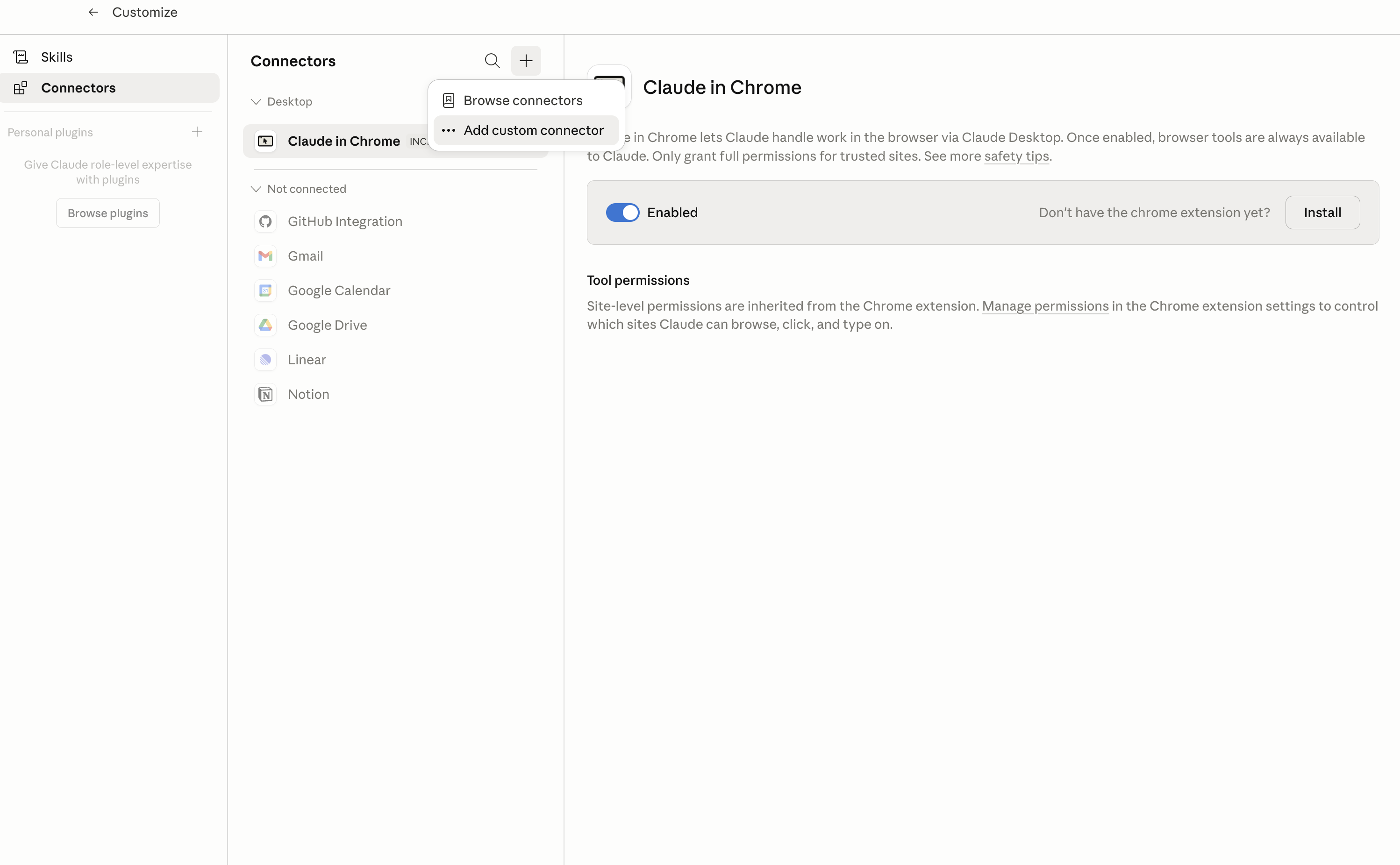
In Claude Desktop, click Customize in the left sidebar, then select Connectors and click the + icon at the top.

Claude Desktop connectors screen with Add custom connector selected

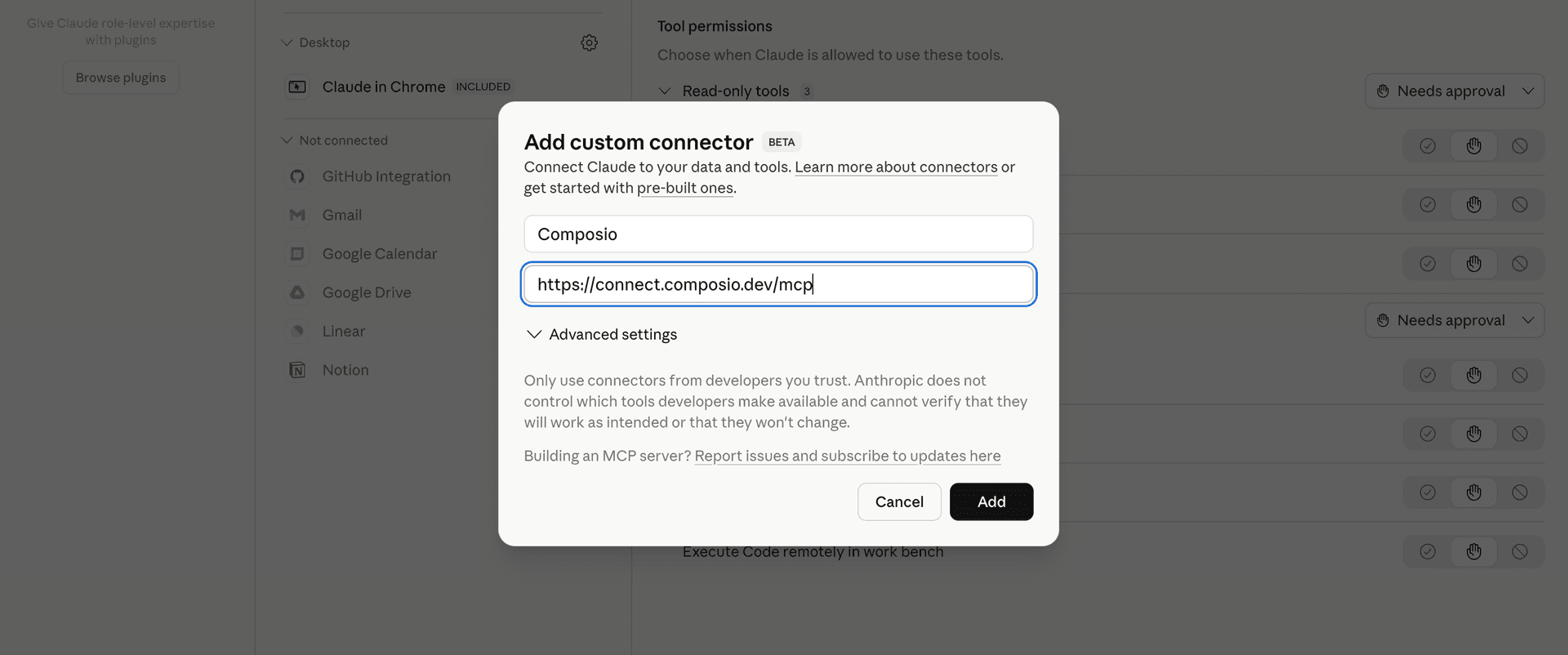
Click Add custom connector and paste in the Composio MCP server URL:

bash
https://connect.composio.dev/mcp
Add custom connector dialog with Composio MCP server URL

2. Authorize in your browser

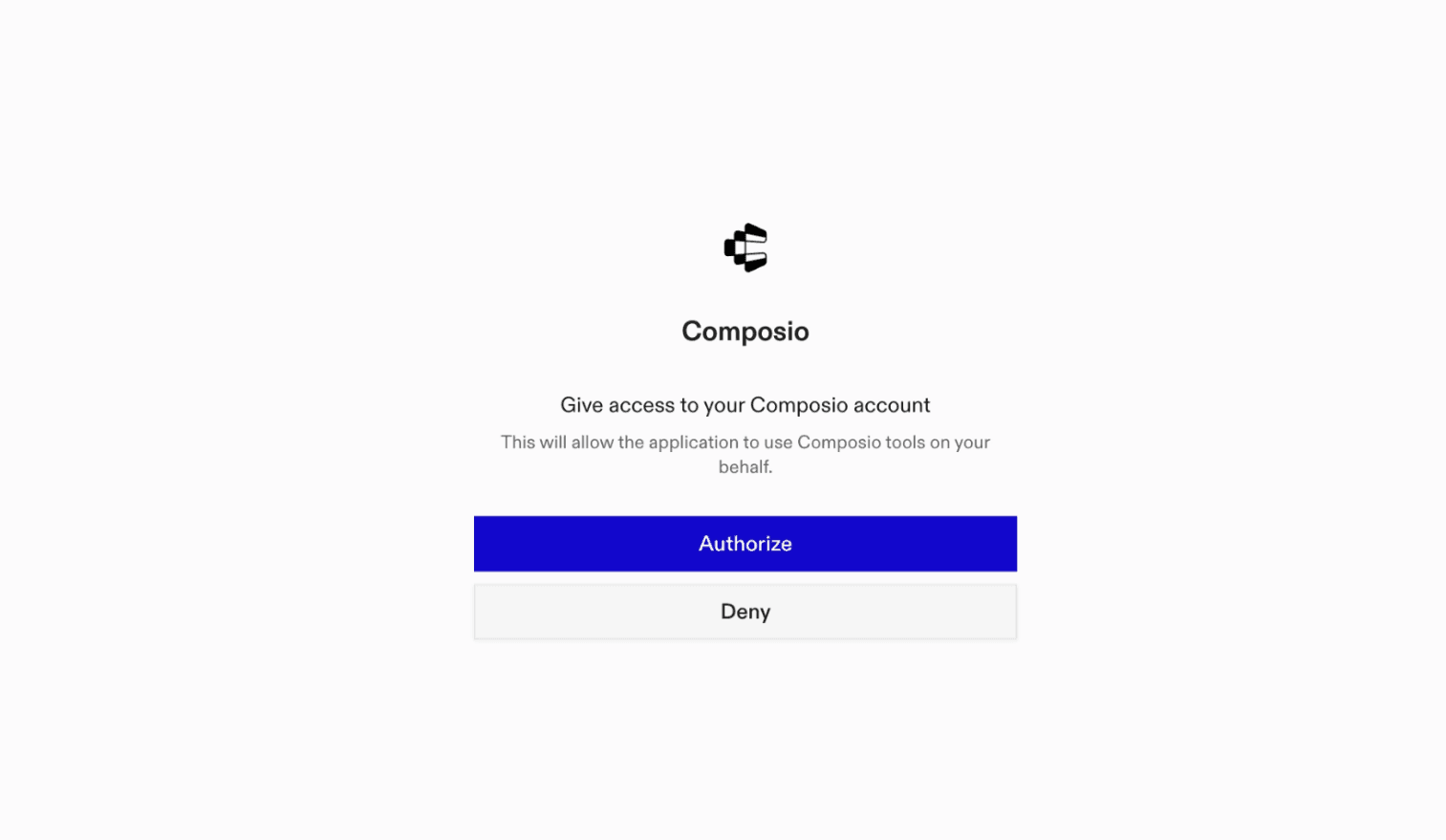
Click Connect. You'll be redirected to a browser window where you can authorize Composio to continue.

Composio authorization screen for Claude Web, Desktop, and Cowork

3. Connect your 21st account

Back in Claude, ask it to connect to 21st or give it any 21st-related task.

For example, ask Claude to:

  • "Find shadcn cards for analytics dashboards"
  • "Save three landing page templates"
  • "Find SVG logos for fintech apps"

It will prompt you to authenticate and authorize access.

That's it. Composio's tools are now available in Claude, and your 21st account is ready to use.

What is the 21st Claude Connector, and what's possible with it?

The 21st MCP server is an implementation of the Model Context Protocol that connects your AI agent and assistants like Claude, Cursor, etc directly to your 21st account. It provides structured and secure access to 21st.dev components, themes, templates, logos, bookmarks, team libraries, AI takes, video projects, and your published items, so your agent can search, retrieve, organize, edit, and manage them on your behalf.

  • Find components and design resources: Instruct your agent to search 21st.dev for React and shadcn components, themes, templates, and SVG logos, then retrieve component code, demos, install commands, dependencies, or complete theme CSS.
  • Organize saved resources: Have your agent bookmark components, themes, and templates, create and manage personal bookmark lists, or browse items saved to those lists.
  • Work with team libraries: Let the agent list your teams, shared lists, libraries, and team components so you can find shared UI resources across your workspaces.
  • Manage published work: Direct your agent to edit, submit, resubmit, unpublish, or delete components, themes, and templates that you published to 21st.dev, and update your public profile.
  • Edit AI takes and videos: Instruct your agent to retrieve and edit owned 21st AI Sketch or Code takes, review their notes and changes, record outcomes, check generation jobs, and apply editing operations to videos.

Troubleshooting

1. Why does Claude not use the Composio connector for 21st?

The connector can show as connected, but Claude must use it in each 21st conversation.

  • Click + at the lower left of the chat, or type /.
  • Hover Connectors.
  • Turn on Composio.
  • Ask Claude to connect to 21st again.

2. Why does Claude show an MCP server error before 21st connects?

Claude can show Couldn't reach the MCP server or Authorization with the MCP server failed when you add the connector for 21st.

  • Check that the connector URL is https://connect.composio.dev/mcp.
  • Connectors run from Anthropic's cloud, so your device network is usually not the problem.
  • Add the connector again from Customize > Connectors, then ask Claude to connect 21st.
  • If it fails again, send the error and the ofid_ reference id to support@composio.dev.

3. Why does the 21st authorization link not work?

The Composio connector is one server. Your 21st account connects separately when Claude asks for it.

  • If the browser does not open, or the link expires, ask Claude to retry the 21st connection.
  • Composio creates a fresh 21st authorization link.
  • Open that link in your browser and finish the 21st sign-in.

4. Why do 21st actions fail after they worked before?

The 21st connection can expire or lose permission.

  • Ask Claude to inspect the 21st connection.
  • If the connection is unhealthy, disconnect it when Claude prompts you.
  • Reconnect the 21st account and retry the action.
  • If Claude shows a permission prompt, approve it before Claude changes data in 21st.
  • If the action still fails with a permission error, check that the connected account has that permission in 21st itself.

5. How do I switch to a different 21st account?

Claude can manage the 21st connection for you.

  • Ask Claude to disconnect or delete the current 21st account.
  • Ask Claude to connect 21st again.
  • Open the new Composio authorization link for 21st.
  • Sign in with the other 21st account in the browser.
  • After the account connects, ask Claude to retry the 21st task.

6. Why is my 21st connection missing in Claude Desktop or on a Team plan?

The connector belongs to your Claude account, so your 21st connection works in Claude Web, Desktop, and Cowork.

  • In Claude Desktop, open Customize > Connectors.
  • Next to Composio, click ⋮ and click Clear cache.
  • If 21st tools still do not appear, click ⋮, disconnect, remove the connector, and add it again.
  • On Team or Enterprise, an Owner or Primary Owner must enable the connector before you can connect 21st.
TOOLS

Supported Tools

Every 21st MCP action and event your agent gets out of the box.

Add to list

Add (or with remove:true, remove) a component/theme/template to one of the caller's bookmark lists.

Bookmark

Add (or with remove:true, delete) a bookmark - the 'heart'/save - for a component, theme, or template on the signed-in account.

Create bookmark list

Create a new personal named bookmark list on the signed-in account.

Delete component

Remove YOUR OWN component from the 21st.dev marketplace (sets visibility to private).

Delete template

Permanently delete a template YOU published to 21st.dev.

Delete theme

Remove YOUR OWN theme from the 21st.dev community listing (unpublishes it).

Edit component

Update visibility, description, or tags on a component YOU published to 21st.dev.

Edit profile

Replace the caller's own 21st.dev public profile board (the bento layout at 21st.dev/@you).

Edit take

Apply free deterministic edits to an owned Sketch or Code take using stable target IDs from get_take.structure.

Edit template

Update listing fields (name, description, price, preview/video/payment urls, tags) on a template YOU published to 21st.dev.

Edit theme

Update the name, tags, or visibility of a theme YOU published to 21st.dev.

Get bookmark list

List the items (components, themes, templates) inside one of the caller's bookmark lists, as the uniform search metadata shape.

Get changes

Read saved edits, notes and a change plan since a 1-based version, or since:'pulled' for the last actual retrieval.

Get component

Retrieve the full code for one component result: the component source AND its demo (usage example) together, plus the install command and registry dependencies.

Get generation

List the takes of a 21st AI Sketch or Code generation you own.

Get generation job

Poll a background job returned by `iterate_generation`.

Get inspiration

Search 21st for metadata-only components, themes, and templates, then rerank them against a project's Design Context.

Get notes

Read user-sent notes and the change plan for an owned take.

Get profile

Read the caller's own 21st.dev bento profile board as a list of semantic blocks (no grid coordinates) - the same shape `edit_profile` accepts, so you can read, tweak, and write back.

Get take

Fetch one owned Sketch or Code take, optionally an exact version, for integration into your project.

Get theme

Retrieve a 21st.dev theme's full CSS (the :root / .dark tokens ready to drop into a Tailwind/shadcn app), plus its name and page url.

Get usage

Check the caller's component retrieval tier/quota and aiGenerationEnabled.

List bookmark lists

List the signed-in user's personal named bookmark lists (id, name, item count).

List bookmarks

List the signed-in user's bookmarked 21st.dev items (components, themes, templates) as metadata - the same uniform shape as `search`, and also FREE.

List team components

List the components in a team's library, as the uniform search metadata shape.

List team libraries

List the LIBRARIES (registries / UI kits) inside one team, with component counts.

List team lists

List a team's SHARED bookmark lists (id, name, item count) - collections owned by the team, distinct from the team's libraries and from your personal lists (list_bookmark_lists).

List teams

List the teams (workspaces) the signed-in user belongs to, each with how many libraries and shared lists it has.

Record inspiration feedback

Record whether the user accepted or rejected a get_inspiration result.

Record take outcome

Record what happened to a 21st AI take the caller retrieved with get_take: landed (built and kept close to the draft), adapted (kept parts), or abandoned (not used; give a reason).

Remove component from catalog

Remove a Featured component from the catalog while keeping it Published on its profile and direct URL.

Resubmit component

Resubmit a Published component after requested changes.

Search

Search the 21st.dev catalog across ALL entity types - React/shadcn components, themes, and templates - returning lightweight metadata ONLY (name, description, preview image, author, url/install, id, and price for templates).

Search logo

Search brand and UI SVG logos by name (e.g.

Search picker

Identical to `search` (same params, same result shape) but renders an inline picker UI on hosts that support it, so the user can visually browse and pick a result.

Send feedback

Send the user's own feedback about 21st.

Submit component

Submit a Published component for catalog review.

Update note

Set the status of note ids from get_notes: in_progress, done, or wont_do.

Upload profile media

Upload an image (base64) to the caller's own 21st.dev media storage and get back a first-party url to use as an `image` block's `mediaUrl` in edit_profile.

Video apply ops

Edit a video through the same operations as the editor.

Video create project

Create an editable video.

Video export

Export the saved video at rev through the existing renderer and plan quota.

Video export status

Get the authorized project's exports and progress.

Video finalize asset

Verify a completed PUT and add the owned asset to the project through CAS at baseRev.

Video get doc

Read the compact video document, rev and the user's current editor selection/frame.

Video list blocks

List video blocks by job, visual language, energy, screenshot needs, kind and size, including defaults, props schema, timing and poster URLs.

Video propose variants

Propose against baseRev without changing the video.

Video search blocks

Search video blocks by name, tags, job, visual language and category.

Video snapshot

Render a real PNG of frame N at the given project rev and size.

Video upload asset

Request a presigned PUT for a local logo, screenshot, video or audio.

Withdraw component

Withdraw a component that is currently In review.

FRAMEWORKS

How to build 21st MCP Agent with another framework

FAQ

Frequently asked questions

Start with 21st MCP.It takes 30 seconds.

Managed auth, hosted MCP servers, and every 21st MCP tool your agent needs.Free to start.

Start building