




If you use OpenClaw, you likely work with multiple tools, and switching between them can quickly disrupt your workflow. Emails, conversations, code, files, and customer data often stay spread across different platforms, so work can start to feel a bit disconnected.
OpenClaw integrations bring these tools into a more connected flow. An update in one app can carry over to another, and information stays in sync as work moves forward. This reduces redundant steps and keeps things moving without constant back-and-forth.
Let us look at some of the most useful OpenClaw integrations across key categories and how they fit into your workflow.

OpenClaw + Composio Integration
Before getting into specific integrations, it helps to understand how OpenClaw connects with all these tools.
Composio acts as the integration layer behind OpenClaw and supports 1000+ tools across communication, development, productivity, and more. Access to this large set of apps comes through a single system, so everything feels more connected from the start.
OpenClaw integrates with Composio to manage these connections consistently, keeping each integration structured similarly. Different setups or patterns across tools are reduced, so working across them feels more straightforward.
How to Connect OpenClaw with Composio Integrations
Getting OpenClaw connected with Composio takes a few simple steps. Once set up, integrations start working through a single flow.
Step 1: Install the Composio plugin
Install the Composio plugin inside OpenClaw to begin the setup.
openclaw plugins install @composio/openclaw-pluginStep 2: Get your Composio API key
Log in to the Composio dashboard and copy your API key. This key links your OpenClaw setup to your Composio account.
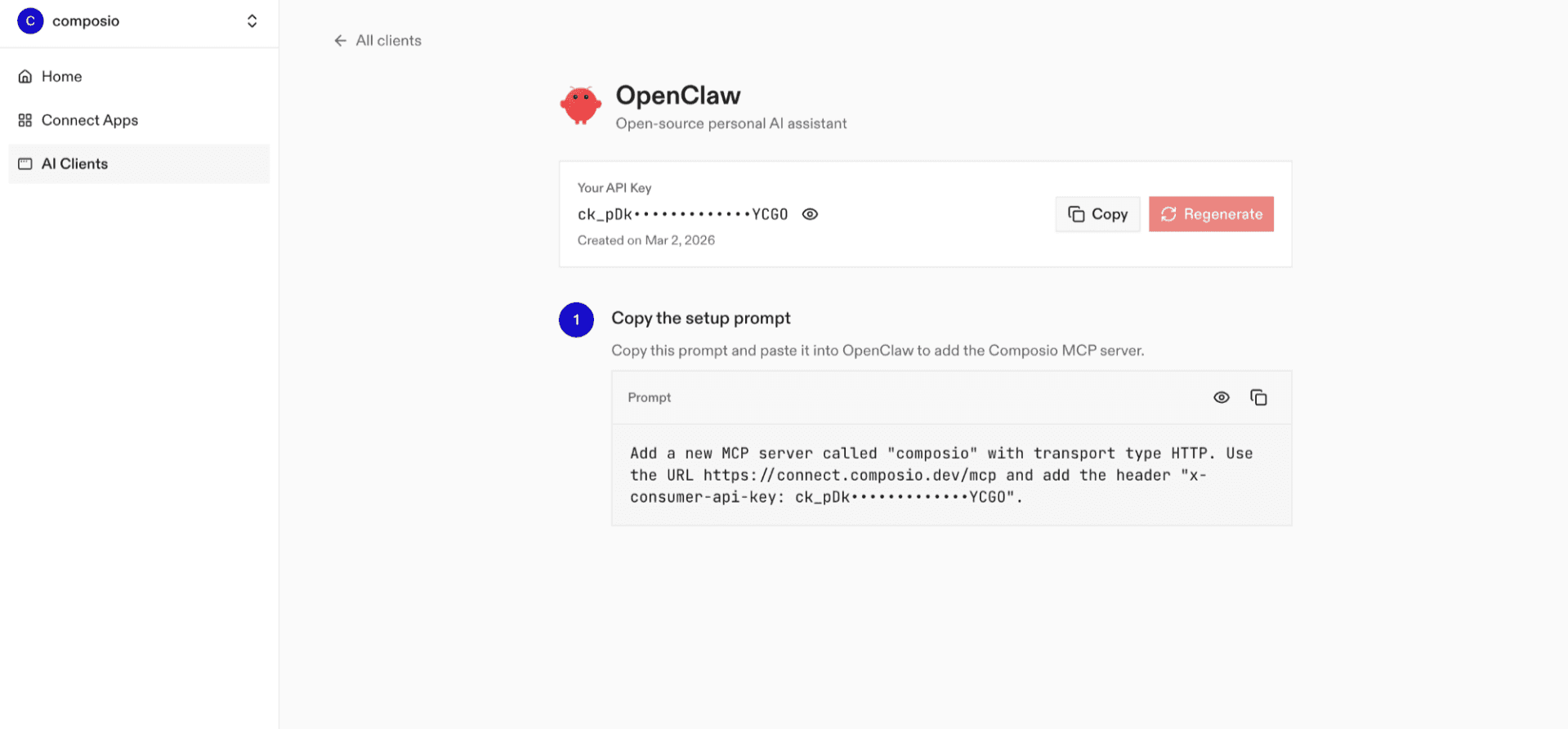
Step 3: Add the API key to OpenClaw
Set the API key in your OpenClaw configuration.
openclaw config set plugins.entries.composio.config.consumerKey "ck_your_key_here"Step 4: Restart OpenClaw
Restart the OpenClaw gateway to apply the changes.
openclaw gateway restartStep 5: Authenticate your tools
When you start using tools, OpenClaw prompts authentication through Composio. Connect the apps you need, and they become available in your workflows.
After completing these steps, OpenClaw can access and trigger actions across all connected tools through Composio, setting up the foundation for your integrations.
Next, we will look at some of the most useful OpenClaw integrations across key categories.
📧 Email and Communication
Communication tools are where most work naturally starts and continues through the day. Conversations, emails, and quick updates keep things moving, but they can also get scattered across different apps.
Connecting these tools with OpenClaw keeps everything closer to your workflow. Updates can move along with the work, and conversations stay tied to the actions they relate to, which keeps things clearer as tasks progress.
1. Gmail
Emails often mark the start of a task or follow-up. Connect Gmail to your workflow, and incoming messages can turn into tasks, updates, or next steps. Important threads stay linked to ongoing activities and keep everything visible and organised.
2. Slack
Many business decisions are made in Slack. When connected to OpenClaw using Composio, the messages can directly trigger actions across your workflow. Discussions in channels can update tasks, notify team members, or move work forward as conversations progress.
3. Microsoft Outlook
Outlook is a big part of daily communication for many teams, especially for ongoing conversations and follow-ups. Emails can tie into tasks and updates, which keep important interactions easy to follow as work moves ahead. OpenClaw keeps these updates aligned across your workflow.
4. Microsoft Teams
Teams is often where collaboration happens across chats and meetings. When linked with OpenClaw, updates and actions appear alongside conversations, keeping discussions and task progress closely connected.
🛠️ Dev Tools
Development work moves across code, issues, and collaboration. Keeping these tools aligned with OpenClaw keeps progress visible and reduces the need to manually track updates across platforms.
1. GitHub
OpenClaw brings GitHub activity into your workflow, where code changes, pull requests, and issues stay visible as work moves forward. Teams often switch between repositories and task trackers to stay up to date.
Repository activity can be directly tied to tasks and progress, and development updates remain clear as changes occur.
2. GitLab
GitLab brings together code, pipelines, and collaboration in one space. OpenClaw brings build activity, commits, and issue updates into your workflow, and these updates shape how progress is tracked. These updates continue through your workflow via pipeline activity and code changes, making progress easier to follow.
3. Bitbucket
Bitbucket supports teams working across repositories and code reviews, where feedback and changes happen continuously. Tracking these alongside tasks can get scattered. Pull requests and repository updates can remain tied to your workflow to keep code changes and reviews visible as work progresses.
4. Jira
Jira is widely used for managing issues, sprints, and development tasks. Progress depends on how clearly updates across tickets are tracked.
Changes in ticket status and task updates can flow through your workflow, helping maintain clear, aligned progress across tasks.
🎬 Media
Media and file management often sit across storage platforms, asset libraries, and content channels. Files move through different stages, such as creation, review, and publishing, and tracking these changes across tools can take extra effort.
1. TikTok
TikTok is used for creating and sharing short-form video content. Content updates, uploads, and engagement often tie closely to campaigns and timelines. OpenClaw connects video activity with your workflow, and updates around content and publishing stay aligned with ongoing tasks.
2. Instagram
Instagram plays a key role in visual content and social engagement. Posts, reels, and updates often connect with marketing and content planning. Content activity can reflect across your workflow, and updates around publishing and engagement stay aligned with your plans.

3. X (Twitter)
X is widely used for real-time updates and audience engagement. Posts, replies, and interactions often connect with campaigns and communication strategies.
Activity on X can tie into your workflow, and updates stay aligned with ongoing content and outreach efforts.
4. YouTube
YouTube is used to host and manage video content. Uploads, edits, and performance tracking all play a role in content workflows. Video activity can span your workflow and provide better visibility into publishing timelines and how content performs within your overall process.

⚙️ Productivity
Productivity tools sit at the centre of planning, tracking, and organising work. Tasks, notes, and schedules often live in separate apps, making alignment take extra effort.
1. Notion
Notion is widely used for notes, documentation, and planning. Teams rely on it to organize ideas, track tasks, and manage internal knowledge. OpenClaw brings updates from Notion into your workflow, so changes in pages, tasks, or databases stay visible alongside ongoing work. This gives better clarity on how plans connect to execution.
2. Trello
Trello organizes work through boards, lists, and cards. Tasks move across stages, and tracking these changes across tools can become fragmented. Card updates and task movements can reflect in your workflow, and progress across boards stays aligned with other activities and updates.
3. Asana
Asana helps teams manage tasks, deadlines, and project timelines. Work often spans multiple teams and requires clear visibility into progress.
Task updates, status changes, and assignments can be linked to your workflow, making progress across projects easier to follow.
4. Google Calendar
Google Calendar manages schedules, meetings, and reminders. Events often tie directly to tasks, deadlines, and team coordination.
Calendar events and updates can reflect in your workflow, and schedules stay aligned with tasks across teams.
💼 Sales and CRM
Sales and CRM tools manage leads, customer interactions, and deal progress. Data often moves across multiple stages, and tracking updates across tools can take extra effort.
1. Salesforce
Salesforce is widely used to manage leads, accounts, and sales pipelines. Teams rely on it to track interactions and move deals through different stages. OpenClaw brings updates from Salesforce into your workflow, and changes in leads, deal stages, or customer data stay visible alongside related tasks and activities.
2. HubSpot
HubSpot supports marketing, sales, and customer engagement on a single platform. Campaigns, leads, and interactions often closely connect to ongoing work.
Updates across contacts, deals, and campaigns can reflect in your workflow, and activity across teams stays aligned as progress develops.
3. Pipedrive
Pipedrive focuses on managing deals and tracking sales pipelines. Each stage of a deal requires visibility and timely updates.
Deal updates and activity can connect to your workflow, and progress across the pipeline becomes easier to track and follow.
4. Zoho Bigin
Zoho Bigin manages customer data, interactions, and sales processes across teams. Information often needs to stay aligned across multiple touchpoints.
Updates to leads, contacts, and deals can reflect in your workflow, and customer data remains aligned with ongoing tasks and activities.
Conclusion
Work rarely stays in one tool, and information continues to move across platforms as tasks progress. OpenClaw integrations through Composio connect these tools, so updates and actions stay aligned across systems. This reduces repeated effort and adds more structure to workflows.
Across communication, development, media, productivity, and sales, integrations improve visibility and coordination. The result is a simpler way to manage work, with tools working together in a connected flow.

 Get started



