




I have spent four years working across marketing and growth, testing channels, building campaigns, and evaluating which tools create genuine leverage.
AI has made content production faster, but the deeper shift is from tools that generate to tools that execute. Modern platforms can research markets, build prototypes, connect applications, launch workflows, and measure visibility across traditional and AI search.
The fundamentals have not changed. Positioning, customer insight, distribution, judgment, and trust still determine whether marketing works. AI simply helps capable teams move from insight to execution faster.
I evaluated these tools through hands-on testing, product research, pricing, reviews, and practitioner feedback, focusing on practical outcomes rather than impressive demonstrations. Also, how small business-friendly these are.
They largely fall into the following categories
Workflow automation
Social Media (scheduling, analytics)
Asset creation (banners, websites, slides, etc)
Analytics (Product and SEO)
CRM
The Shortlist
Tool | Best for | The outcome enables | Ideal user |
|---|---|---|---|
Composio | Connecting Claude, Codex to business applications | Turn Claude, Codex, and Cowork into agents that can take authenticated action | Technical marketers, operators, and agent builders |
Manus | Delegating long, multi-step digital tasks | Produce research, websites, documents, presentations, and analysis with less supervision | Founders, researchers, and generalists |
Lovable | Building apps and campaign utilities from prompts | Move from an idea to a working prototype or internal tool quickly | Growth teams, founders, and non-technical builders |
Flint | Building landing pages with AI | Ship landing pages and test quickly | Growth teams, early stage founders, and PMs |
HubSpot Breeze | AI inside CRM and marketing operations | Create, enrich, automate, qualify, and report from one customer platform | Growing B2B and service businesses |
Canva | Fast visual production | Produce and adapt branded campaign assets without a large design team | Almost every small or mid-sized marketing team. Small businesses, content teams. |
Buffer | Social media scheduling analytics, and workflow automation | Automate posting on TikTok, Instagram, YouTube, etc. | Small businesses, Solo entrepreneurs, social media teams |
PostHog | Product and behavioral analytics | Understand activation, conversion, retention, experiments, and user friction | Product-led companies and technical growth teams |
Profound | Visibility in AI-generated answers | Measure and improve how a brand appears in ChatGPT, Gemini, and other answer engines | SEO, content, PR, and enterprise brand teams |
Ahrefs | SEO and competitive research | Find demand, diagnose websites, study competitors, and grow search visibility | SEO professionals, publishers, and content teams |
Creatify | High-volume video-ad testing | Turn product information into multiple social video ads rapidly | E-commerce brands and performance marketers |
Klaviyo | E-commerce retention and lifecycle marketing | Personalise email, SMS, and customer journeys using behavioural data | B2C and e-commerce brands |
Ratings note: G2 and Capterra scores below were checked on June 8, 2026. Scores and review counts change over time.
How I Evaluated These Tools
I did not evaluate these tools based only on how impressive their AI features appeared in a demonstration. I looked at whether each product could improve a real marketing workflow and produce a measurable business outcome.
My assessment considered six factors:
Practical usefulness: Does it solve a recurring marketing problem or simply generate more content?
Quality of output: Is the work accurate, usable, and consistent enough to reduce manual effort?
Ease of adoption: Can a marketer use it without extensive technical support or a long implementation process?
Workflow integration: Does it connect with the applications, data, and processes a team already uses?
Pricing and scalability: Is the entry price reasonable, and how does the cost change as usage, contacts, credits, or team members increase?
Independent feedback: What do practitioners report on Reddit, LinkedIn, X, G2, and Capterra after using the product?
I also considered each tool’s limitations. AI products can perform well in controlled demonstrations but become less reliable when workflows involve unusual data, complex permissions, or repeated execution at scale.
This is not a laboratory ranking or a claim that every product was tested under identical conditions. It combines my experience in marketing and growth with product research, demonstrations, documentation, customer reviews, and discussions with practitioners. I prioritised tools that help marketers research, create, execute, measure, or improve work, rather than products that use AI mainly as a promotional label.
12 Best AI Marketing Apps and Tools in 2026 (free + paid)
1. Composio: The connection layer for action-taking AI agents
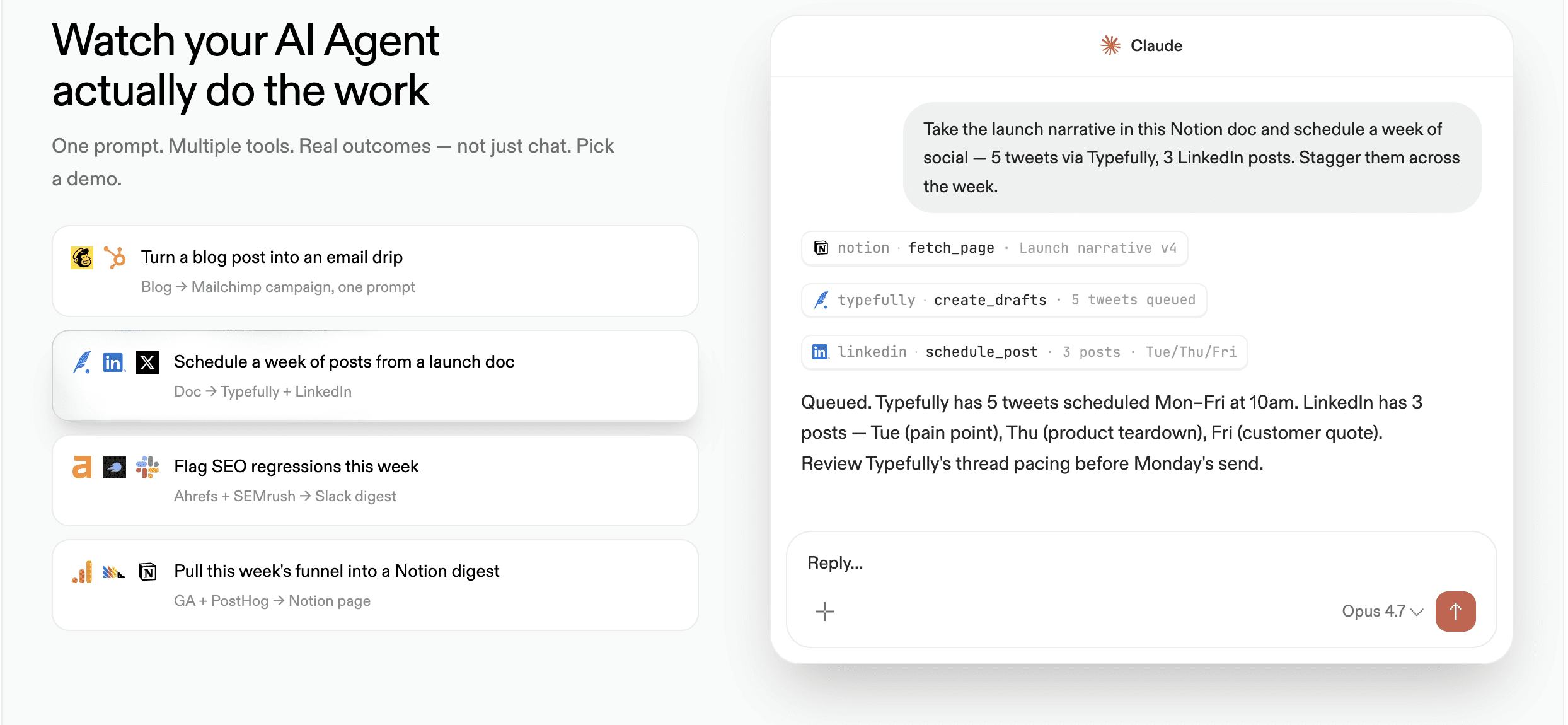
Composio gives AI agents access to more than 1,000 applications while handling tool discovery, delegated authentication, per-user connections, and execution.
The interesting use case is not simply connecting another chatbot to Gmail. It is giving tools such as Claude, Codex, Claude Cowork, or a custom agent the ability to identify the correct action and execute it across systems.
Composio becomes extremely valuable when an AI workflow needs to leave the chat window. Drafting an email is easy; finding the right contact, checking CRM context in Salesforce or HubSpot, creating a document in Google Docs, sending the email, and logging the action are where integration infrastructure matters.
The setup still needs careful permissions and testing, but it can remove a large amount of custom API work.
What you can do with it
Connect Claude/Codex/custom agents to authenticated actions across 1,000+ apps.
Enrich and research leads (company data, intent signals, CRM context) at scale.
Summarize Slack threads and turn them into tickets, notes, or follow-up tasks.
Create/update CRM records (e.g., HubSpot), log activities, and keep systems in sync.
Generate artefacts (issues, reports, docs) and automatically move data between tools.
Pricing
Free: Up to 20,000 tool calls per year, intended for testing and small personal agents.
Paid: Starts at $29 per month for approximately 200,000 tool calls per year.
Organisation: Starts at $229 per month for approximately 2 million annual tool calls, with higher limits and team-oriented controls.
Enterprise: Custom pricing for large volumes, support, security, and contractual requirements.
Composio meters successful tool executions rather than charging separately for every connected application. Authentication and connected accounts are included in the platform model, but model-provider charges, such as Claude or OpenAI API usage, remain separate.
Reviews by people
An independent Reddit thread about using Composio as a single MCP gateway contains both sides of the experience. Some developers praise its tool router and context management; others raise concerns about missing integrations, pricing, and ecosystem dependence.
A LinkedIn practitioner described the Claude Code plugin as a major time-saver compared with configuring MCP servers individually.
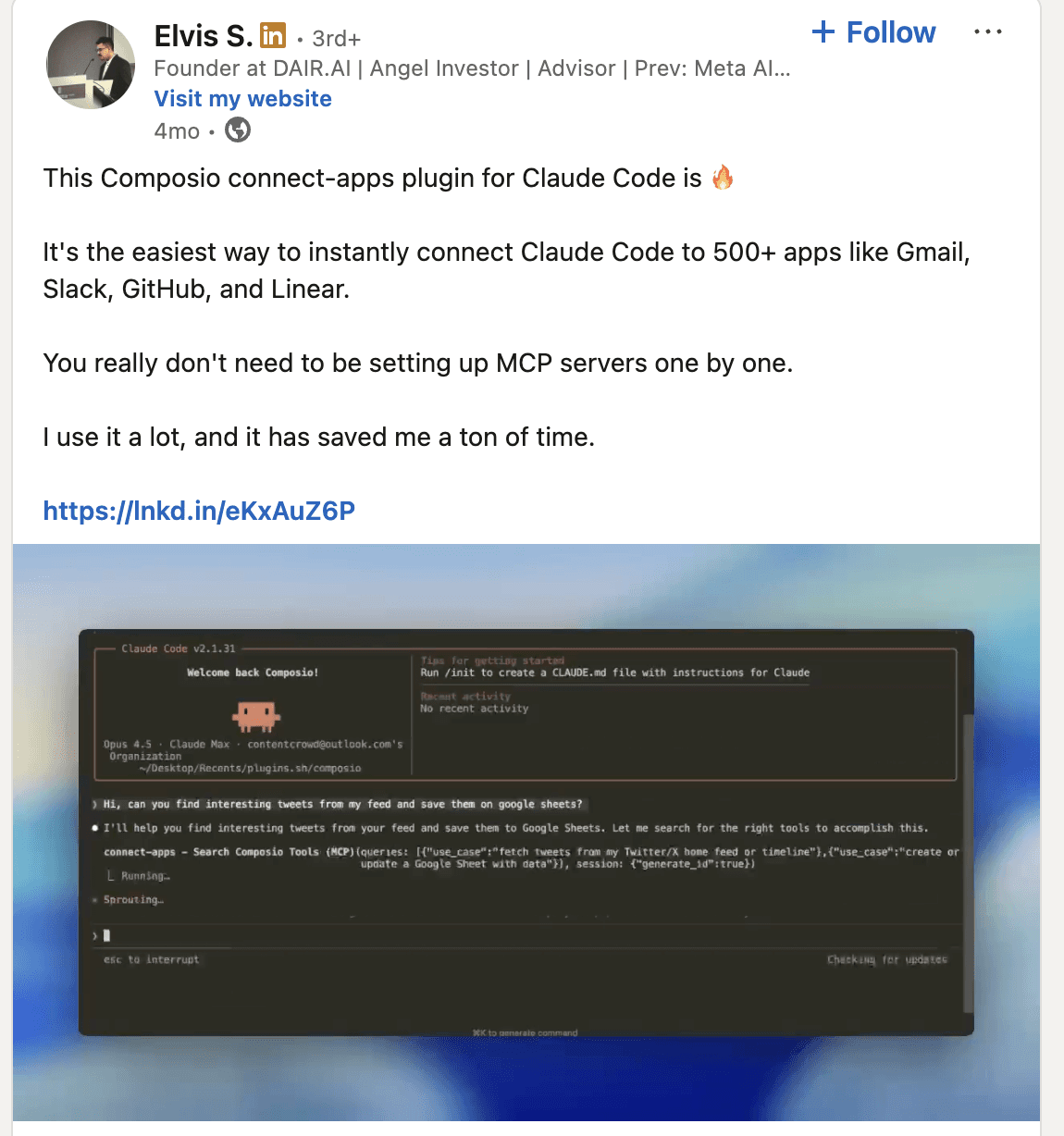
Social threads: Reddit: Experiences with Composio as a one-stop MCP?
Who is it ideal for?
Technical growth teams, agencies building internal automation, operations teams, developers, and anyone using Claude, Codex, or Cowork for workflows that cross multiple applications.
2 . VEED: AI video creation and editing for marketing teams
What it does and my experience so far
VEED combines generative video models with a browser-based editor, giving marketers a single workflow for creating and refining video content. Teams can start from text, images, or existing footage and then add captions, voiceovers, branding, and other edits without moving between separate tools.
Its AI video generator is particularly useful for marketers who need to produce social clips, video ads, tutorials, or campaign assets quickly while retaining control over the final edit.
What you can do with it
Generate videos from text prompts or images.
Create social media clips and video ads.
Add AI voiceovers, avatars, captions, and subtitles.
Combine AI-generated footage with existing video.
Add branding, text, music, and other edits in the same workflow.
Who is it ideal for?
Content marketers, social media teams, agencies, and small marketing teams that need to create and edit video campaigns without a traditional production workflow.
3. Manus: A general-purpose autonomous agent
What it does and my experience so far
Manus operates in its own cloud computer with web access, a persistent file system, browser automation, and the ability to install software. Instead of stopping at an answer, it can work through a task and return a finished report, spreadsheet, presentation, website, or other artefact.
My assessment is that Manus is strongest for bounded research and production assignments where the desired deliverable is clear. It is more ambitious than a conventional chatbot, but it should not be treated as an unsupervised employee. Complex development projects can become expensive, and independent users frequently report inconsistent execution and high credit consumption. I would review checkpoints and outputs before trusting them with consequential work.
What you can do with it
Run end-to-end market/competitor research and return a structured report.
Complete multi-step browser tasks (form fills, scraping, submissions) with checkpoints.
Clean, transform, and analyse datasets, then deliver spreadsheets or summaries.
Produce deliverables like decks, docs, and simple websites from a clear brief.
Automate repetitive “open web + do steps + compile output” workflows.
Reviews by people
Reddit feedback is sharply divided. Some users describe Manus as excellent for research and useful for clearing long-delayed tasks. Others report failed development work, poor support, and credits being consumed during unsuccessful retries. The recurring lesson is to use it for well-scoped tasks and to verify completion rather than trusting the success message.
Social threads: Reddit: Manus users discuss reliability, credits, and support | Reddit: Credits consumed during failed tasks
Who is it ideal for?
Founders, analysts, researchers, consultants, and generalists who need finished digital deliverables and are willing to supervise cost and quality.
Sources: Manus documentation | Manus Agent Skills | Reddit user-experience discussion | App Store ratings
4. Lovable: Prompt-to-product building for marketers
What it does and my experience so far
Lovable turns written instructions, screenshots, and documents into working web applications and websites. Users can iterate conversationally, edit the generated interface, connect services such as Supabase and GitHub, and deploy the result.
What interests me as a marketer is not the promise that everyone is suddenly a software engineer. It is the reduced distance between an idea and a testable experience. A growth team can create a calculator, interactive lead magnet, campaign microsite, lightweight dashboard, onboarding concept, or internal utility before asking engineering to invest in a full build. Complex business logic and production security still deserve technical review.
What you can do with it
Build campaign microsites, landing pages, and interactive experiences from prompts.
Ship calculators, quizzes, lead magnets, and other conversion utilities quickly.
Prototype internal tools and lightweight dashboards for ops and reporting.
Connect a backend (e.g., Supabase) and iterate UI/logic conversationally.
Deploy fast experiments to validate an idea before an engineering sprint.
Reviews by people
G2 reviewers repeatedly praise the speed from concept to working prototype and the accessibility for non-developers. Common complaints concern credit consumption, prompt sensitivity, timeouts, and the manual refinement required for specialised logic.
One detailed Reddit account describes taking a Lovable-built SaaS into production with paying users, while still needing Cursor for more complex engineering work. Another discussion makes the important distinction between generating an application and completing everything required to launch and operate it reliably.
Social threads: Reddit: Building a production SaaS with Lovable | Reddit: The hidden work beyond building the app
G2 and Capterra
G2: 4.6/5 from 269 reviews
Capterra: Not Available
Who is it ideal for?
Startup founders, growth marketers, product marketers, agencies, and non-technical operators who want to test an idea before committing engineering resources.
Sources: Lovable | Lovable reviews on G2
5. Flint: AI landing pages for every ad and audience
What it does and my experience so far
Flint analyzes your existing website, learns its design system, and generates production-ready landing pages for specific ads, keywords, industries, competitors, or target accounts.
From what I have seen so far, Flint is more useful than a generic AI website builder when you already have an established brand. Its real advantage is producing many consistent campaign pages without repeatedly waiting for designers, developers, or an agency. However, it is less suitable for creating a brand-new website from scratch, and its credit-based pricing could become expensive at scale.
What you can do with it
You can create:
Keyword-specific Google Ads landing pages
Comparison and alternative pages
Personalized ABM microsites
Industry and use-case pages
SEO and GEO content pages
Gated reports and lead-capture pages
Personalized pages from Claude, Clay, CRMs, and GTM workflows through its API and MCP integration
The outcome is faster campaign execution and a closer match between what an advertisement promises and what visitors see after clicking.
Reviews by people
“What used to take weeks waiting for design and engineering now happens in minutes.”
— Rani Kubersky, Marketing Manager at Graphite
Graphite reports that Flint pages increased Google Ads conversions by more than 50%, reduced customer acquisition costs by 50%, and influenced seven-figure ARR. These figures come from a Flint customer case study and should be treated as vendor-published results.
Connor Nowinski, COO at 11x, said Flint allowed the company to replace weeks of agency waiting with an afternoon of internal work. The company reportedly created 20 industry pages in a single session and achieved a conversion rate three times higher on certain campaign pages.
Social thread: Connor Nowinski and 11x discussing Flint
Early feedback is not entirely positive. One Product Hunt user reported that one site was blocked during onboarding while another remained stuck for a week, suggesting that the initial design-system import may still require manual support.
Who is it ideal for?
B2B SaaS growth teams, paid acquisition marketers, demand-generation teams, and lean startups that need numerous campaign pages but lack dedicated design and engineering capacity. It is especially relevant for teams running Google Ads, ABM, comparison-page SEO, or industry-specific campaigns.
Sources: flint.com
6. HubSpot Breeze: AI grounded in customer and CRM data
What it does and my experience so far
Breeze is HubSpot's AI layer across marketing, sales, service, content, and operations. It includes embedded assistance, data enrichment, content generation, customer-facing and internal agents, workflow automation, lead research, and reporting.
The advantage is context. A general-purpose model can draft a follow-up, but Breeze can work with the contact record, previous interactions, campaign activity, and pipeline data already inside HubSpot. My take is that Breeze is most persuasive when it reduces CRM administration or turns messy customer information into a usable next action. The product family can feel fragmented, and advanced capabilities may require higher subscriptions or HubSpot credits.
What you can do with it
Generate and repurpose marketing content inside the HubSpot workflow.
Enrich and clean CRM records so teams work from better data.
Summarize calls, emails, and notes into next steps and follow-ups.
Build automations/workflows for routing, scoring, and lifecycle actions.
Answer internal/customer questions using CRM context and activity history.
Reviews by people
In one Reddit discussion, a HubSpot user described using Breeze to summarize unstructured event notes, enrich customer context, and prepare follow-ups, reporting meaningful time savings at a low per-summary credit cost. Other users described the split between Breeze Assistant, Customer Agent, and Studio as confusing.
Social threads: Reddit: Using Breeze for operations and CRM workflows | Reddit: Confusion around the Breeze product family
G2 and Capterra
HubSpot Marketing Hub on G2: 4.4/5 from 14,619 reviews
HubSpot Marketing Hub on Capterra: 4.5/5 from 6,207 reviews
Who is it ideal for?
Companies already using HubSpot, growing B2B teams, service businesses, and marketers who want CRM, automation, content, and reporting in one environment.
Sources: HubSpot Breeze | HubSpot Breeze documentation | Reddit operations discussion | G2 | Capterra
7. Canva: The default visual-production layer for modern marketing
What it does and my experience so far
Canva combines templates, brand management, image and video editing, collaboration, presentations, documents, and the Magic Studio suite of AI tools. Teams can generate drafts, resize campaigns, remove backgrounds, create visual assets, and adapt designs across channels.
In my experience, Canva's real strength is not that it replaces a senior designer. It is that it prevents every routine asset from becoming a design request. It makes speed and consistency available to the whole team. The trade-off is that template-led work can become visually repetitive, and advanced designers may miss the precision of professional creative software.
What you can do with it
Produce on-brand social creatives, display ads, and campaign variants fast.
Create lead magnets, one-pagers, and sales collateral from templates.
Generate and edit images/video (background removal, resizing, captions) for distribution.
Maintain brand kits and reusable templates so teams can self-serve safely.
Export channel-ready assets in multiple formats and sizes with minimal rework.
Reviews by people
Recent G2 reviewers emphasise that Canva lets field and marketing teams adapt master assets without design support. They also note limited advanced control, increasingly crowded interfaces, and the risk of designs looking too template-based.
Reddit users report that Magic Layers, Magic Edit, background generation, auto-captioning, and Magic Eraser save meaningful production time. Professional designers are more sceptical of generic image output and limited precision, which supports treating Canva as a speed and self-service tool rather than a complete replacement for specialist design software.
Social threads: Reddit: Regular use of Canva's AI tools | Reddit: A designer questions Canva AI's limitations
G2 and Capterra
G2: 4.7/5 from 7,323 reviews
Capterra: 4.7/5 from 13,179 reviews
Who is it ideal for?
Small businesses, content teams, social marketers, agencies, educators, founders, and larger organisations that need controlled self-service design.
Sources: Canva Magic Studio | G2 | Capterra
8. Buffer: Affordable social media management for lean teams
What it does and my experience so far
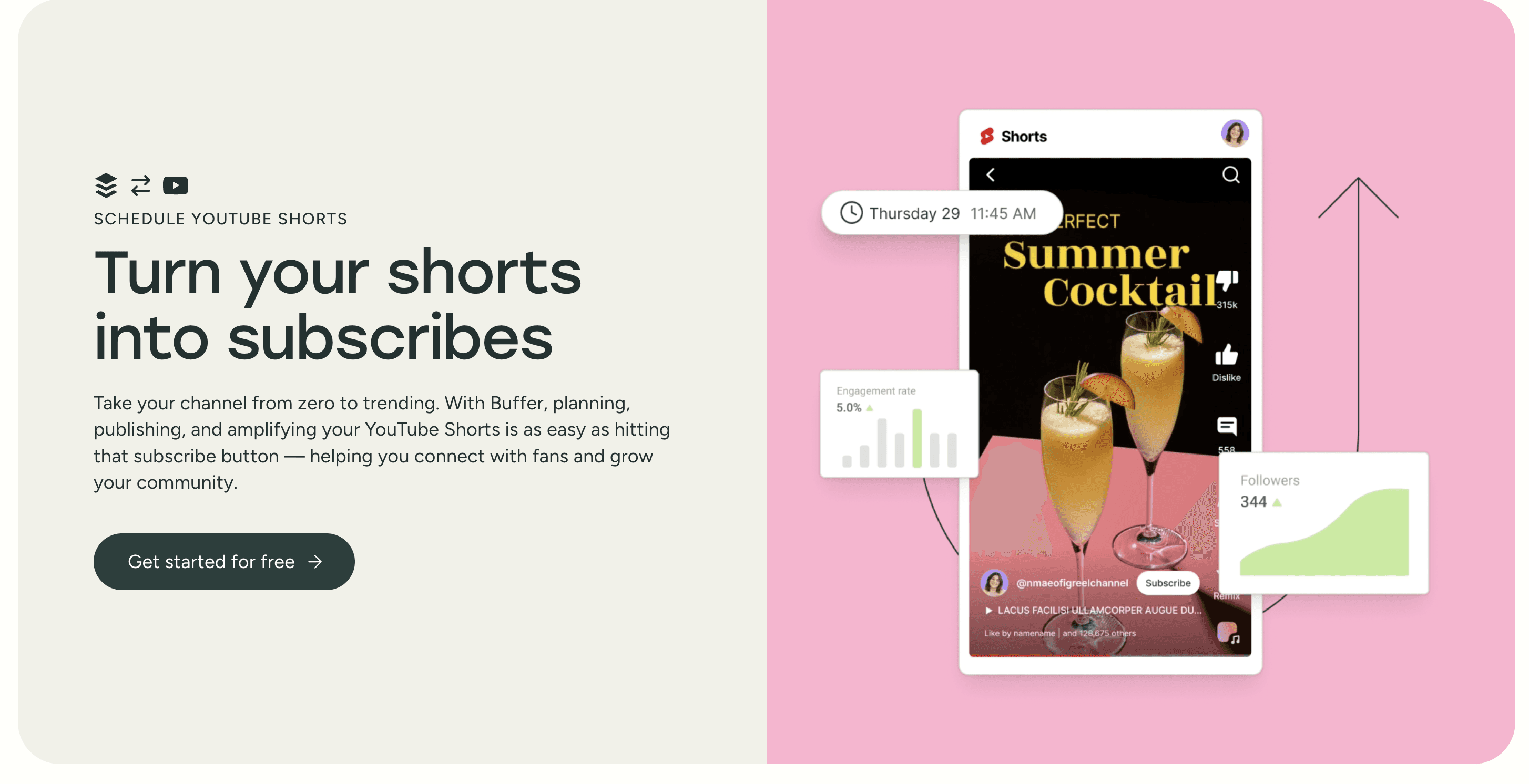
Buffer combines social media planning, content creation, publishing, engagement, and analytics into a single workspace. Its AI Assistant can draft posts, rewrite copy, generate variations, and adapt ideas for different platforms.
I think Buffer solves a common small-business problem: publishing consistently without turning social media into a daily administrative task. It is approachable and affordable, although it lacks the advanced social listening and reporting offered by enterprise platforms.
What you can do with it
Plan and schedule posts, store content ideas, repurpose copy with AI, respond to comments, identify effective posting times, review performance, and create a link-in-bio page.
Pricing
Free: Three channels, ten scheduled posts per channel, one user, an AI Assistant, basic analytics, and a community inbox.
Essentials: $6 per channel monthly or $5 with annual billing. Includes unlimited scheduling, advanced analytics, and additional publishing tools.
Team: $12 per channel monthly or $10 with annual billing. Adds unlimited users, approval workflows, and access controls.
Reviews by people
Users commonly praise Buffer’s straightforward interface, reliable scheduling, and affordability. Criticism usually concerns occasional publishing glitches and less sophisticated analytics than more expensive competitors.
G2 and Capterra
G2: 4.3/5 from 1,038 reviews
Capterra: 4.5/5 from 1,491 reviews
Who is it ideal for?
Small businesses, solo marketers, creators, local businesses, nonprofits, and lean teams are managing several social channels.
Website: buffer.com
9. PostHog: Product behaviour as a marketing signal
What it does and my experience so far
PostHog combines web and product analytics, funnels, retention analysis, session replay, feature flags, experiments, surveys, data tools, and AI product observability.
I include PostHog because modern growth cannot stop at acquisition. Marketers need to know what happens after the click: where activation fails, which behaviours predict retention, which features create value, and whether an experiment improves the customer journey. PostHog is powerful because a team can move from a metric to the corresponding session recordings and investigate why it happened. It is more technical than conventional marketing analytics and benefits from thoughtful event design.
What you can do with it
Track acquisition-to-activation funnels and pinpoint where users drop off.
Use session replay to see real friction and fix onboarding fast.
Run experiments/feature flags to test growth ideas safely and measure impact.
Analyse cohorts and retention to find behaviours that predict long-term value.
Connect product usage signals to lifecycle messaging, segmentation, and targeting.
Reviews by people
G2 users frequently praise the integrated session replay, analytics, experimentation, straightforward installation, and generous free tier. They also describe a meaningful learning curve and an interface that can feel overwhelming because the platform covers so much.
Reddit discussion reflects the same trade-off. Some teams report replacing Google Analytics, Mixpanel, Hotjar, Segment, and other reporting tools with PostHog while staying within the free tier. Others strongly criticise the newer interface and recommend using PostHog for short-cycle product feedback rather than treating it as a complete data warehouse.
Social threads: Reddit: A team's experience replacing multiple analytics tools | Reddit: Is PostHog too good to be true? | Reddit: Debate over PostHog's interface
G2 and Capterra
G2: 4.5/5 from 1,045 reviews
Capterra: Not Available
Who is it ideal for?
Product-led SaaS companies, technical founders, product marketers, growth engineers, and teams that need to connect campaign acquisition with product usage.
Sources: PostHog | Product analytics | G2
10. Profound: Marketing for the AI-search customer journey
What it does and my experience so far
Profound tracks how brands appear across ChatGPT, Gemini, Claude, Perplexity, Copilot, Google AI experiences, and other answer engines. It measures prompts, citations, visibility, competitor presence, and sentiment, while its agents can help turn those insights into content and workflows.
Profound addresses a real measurement gap. Buyers increasingly ask AI systems for recommendations before visiting a conventional search results page. Traditional rank tracking cannot tell a brand whether it was recommended, how it was described, or which sources influenced the answer. The field is still young, so teams should avoid pretending every visibility change has clean revenue attribution.
What you can do with it
Measure how your brand appears across ChatGPT/Gemini/Claude/Perplexity answers.
Track prompts, sentiment, and competitor presence to quantify “AI share of voice.”
Identify the citations/sources that influence your answers so you can improve their authority.
Discover missing topic coverage and prioritize content that shifts answer outcomes.
Monitor hallucinations or misstatements and create workflows to correct them.
Reviews by people
Recent G2 reviewers highlight Profound's citation tracking, visibility reports, access to underlying prompts and responses, and usefulness for explaining AEO to clients or leadership. Reviewers also note that the new metrics require interpretation and work best alongside a strong SEO and content strategy.
Reddit practitioners describe Profound as one of the more serious tools in the category, but generally position it toward enterprise users. Sceptics question whether prompt tracking proves commercial impact and warn that no monitoring platform can magically improve AI visibility without stronger content, positioning, and third-party evidence.
Social threads: Reddit: SEO practitioners discuss using Profound | Reddit: Comparing Profound with AI-visibility alternatives | Reddit: Criticism of prompt-tracking tools
G2 and Capterra
G2: 4.5/5 from 959 reviews
Capterra: Not Available
Who is it ideal for?
Enterprise brands, SEO teams, content strategists, communications teams, agencies, and companies whose customers use AI assistants for product research.
Sources: Profound | G2 reviews | Current G2 seller profile
11. Ahrefs: Search intelligence with a growing AI-visibility layer
What it does and my experience so far
Ahrefs is an SEO and competitive intelligence platform covering keyword research, backlinks, website audits, competitor analysis, content opportunities, paid search research, and AI search visibility.
I still see Ahrefs as one of the most dependable tools for understanding how demand is expressed through search and how competitors earn visibility. Its backlink and keyword datasets make it more than an AI writing assistant. The AI additions are useful, but the core value remains the underlying data. The recurring drawback is price, especially when useful limits or historical data require a higher plan.
What you can do with it
Discover keyword demand and topic opportunities with reliable search datasets.
Audit technical SEO issues and prioritise fixes that unlock crawling/ranking.
Analyse competitors’ traffic, content strategy, and backlink profiles.
Find link opportunities and track backlink growth/health over time.
Monitor visibility (including early AI-search signals) and plan content investments.
Reviews by people
G2 and Capterra reviewers consistently praise Ahrefs for backlink analysis, keyword research, competitor intelligence, and an approachable interface. Pricing and plan limitations are the most repeated complaints.
In a recent Reddit discussion, SEO practitioners described Ahrefs data as reliable and useful when treated as directional rather than absolute. A separate, more critical thread focuses heavily on pricing and restricted access to features.
Social threads: Reddit: Current practitioner experience with Ahrefs | Reddit: Pricing and feature-access criticism
G2 and Capterra
G2: 4.5/5 from 699 reviews
Capterra: 4.7/5 from 583 reviews
Who is it ideal for?
SEO professionals, content teams, agencies, publishers, affiliate businesses, and companies for which organic discovery is a meaningful acquisition channel.
Sources: Ahrefs | G2 | Capterra
12. Jasper: Brand-governed AI content operations
What it does and my experience so far
Jasper has expanded from AI copywriting into a marketing workspace that includes specialised agents, repeatable content pipelines, brand voice, style, and visual guidelines, knowledge bases, governance, campaign workflows, and SEO/AEO/GEO support.
My take is that Jasper makes more sense for an organisation than for someone who only needs occasional writing assistance. Its differentiation is the layer around the model: brand context, repeatable workflows, governance, and collaboration. That can reduce review cycles across teams. For solo marketers, a general-purpose model may offer better value, and Jasper's output still needs fact-checking and editorial judgment.
What you can do with it
Generate on-brand copy across formats (ads, emails, blogs) with governance.
Centralise brand voice, guidelines, and knowledge to reduce review cycles.
Turn briefs into repeatable workflows/pipelines for consistent output.
Repurpose long-form content into social threads, newsletters, and landing copy.
Localise campaigns across markets while maintaining style and compliance.
Reviews by people
Reddit discussions are mixed. Supporters value Brand Voice and high-volume marketing output. Critics argue that it is more expensive than general-purpose models and that vague prompts still produce generic copy. That reinforces the point that Jasper is strongest as a governed team system, not merely as a text generator.
Social threads: Reddit: Is Jasper still useful for marketing? | Reddit: Jasper's role in modern SEO workflows
G2 and Capterra
G2: 4.7/5 from 1,270 reviews
Capterra: 4.8/5 from 1,855 reviews
Who is it ideal for?
Enterprise marketing departments, agencies, franchises, regulated teams, and companies managing multiple brands, regions, or high content volumes.
Sources: Jasper | G2 | Capterra | Reddit marketing discussion
13. Creatify: Video-ad iteration at performance-marketing speed
What it does and my experience so far
Creatify turns a product URL, image, or brief into complete video ads with scripts, avatars, voice-over, supporting footage, music, and captions. It supports batch variations, custom avatars, multiple aspect ratios, ad cloning, editing, and competitor creative analysis.
The main value I see is not replacing every creator or production team. It is increasing the number of hypotheses a performance marketer can test. AI video works best as an experimentation layer: test hooks, formats, personas, and messages quickly, then invest more deeply in the concepts that show traction. Outputs still need review for pacing, brand accuracy, lip-sync, and the synthetic look that sometimes appears in avatar content.
What you can do with it
Generate many video-ad variations from a URL/brief (hooks, scripts, formats).
Produce UGC-style creatives with avatars/voiceovers for rapid testing loops.
Localise ads across languages and markets without re-shooting everything.
Refresh and remix existing winners to keep creativity from fatiguing.
Export platform-ready aspect ratios (TikTok/Reels/YouTube) in batches.
Reviews by people
One ecommerce marketer on Reddit reported that Creatify became useful after the team built a repeatable workflow around its own scripts, hooks, and product imagery. The win was same-day testing speed, not automatic outperformance or the permanent replacement of human creators.
Social thread: Reddit: Three to four months of using Creatify for Meta ads
G2: 4.8/5 from 1,403 reviews
Capterra: Not Available
Who is it ideal for?
E-commerce brands, paid-social teams, agencies, mobile apps, direct-response marketers, and companies that need a steady volume of video-ad variations.
Sources: Creatify features | G2 | Reddit hands-on discussion
14. Klaviyo: AI-powered lifecycle marketing for ecommerce
What it does and my experience so far
Klaviyo combines customer data, email, SMS, WhatsApp, mobile push, forms, reviews, analytics, service, predictive insights, and AI agents. Its AI features include generated segments and flows, personalised send times, product recommendations, predicted lifetime value, campaign creation, and customer assistance.
My view is that Klaviyo is powerful because its AI sits atop behavioural and transactional data. The question is not only what copy to send, but who should receive it, through which channel, at what point in the lifecycle, and with which product. That makes it especially effective for retention. The main concerns are the learning curve and costs that rise with profile and message volume.
What you can do with it
Build core lifecycle flows (welcome, abandon cart, post-purchase, win-back, VIP).
Create AI-assisted segments based on behaviour, engagement, and purchase history.
Personalise product recommendations and timing to lift repeat purchases.
Predict customer value and prioritise high-LTV audiences for retention efforts.
Orchestrate email/SMS/WhatsApp across the customer journey with analytics.
Reviews by people
Reddit users commonly describe Klaviyo as worthwhile for scaling stores that need deep Shopify integration, segmentation, and automation. Smaller brands question whether they use enough of the advanced functionality to justify the price. Practitioners also point out that changing email platforms will not repair poor list hygiene or weak sending practices.
Social threads: Reddit: Is Klaviyo still worth it for ecommerce brands? | Reddit: A detailed Klaviyo use-case review
G2: 4.6/5 from 1,354 reviews
Capterra: 4.6/5 from 528 reviews
Who is it ideal for?
Shopify merchants, established ecommerce teams, DTC brands, consumer businesses, and retention marketers working with meaningful customer and transaction data.
Sources: Klaviyo AI | G2 | Capterra | Reddit ecommerce discussion
What Modern AI Marketing Actually Looks Like
There is no single best AI marketing tool because these products operate at different layers of the system.
Composio connects agents to the rest of the stack. Manus delegates broad projects. Lovable turns campaign ideas into working software. HubSpot and Klaviyo act on customer data. Clay builds audiences. Canva, Jasper, and Creatify produce campaign assets. Ahrefs and Profound manage discovery across traditional and AI search. PostHog closes the loop by showing what users do after they arrive.
That is the modern marketing stack: research, create, connect, execute, measure, and grow.
The goal is not to automate every decision. It is to spend less human attention on transferring data, resizing assets, rebuilding routine reports, and repeating mechanical tasks. That creates more room for the work that has not changed: understanding the customer, choosing a position, making a strong offer, creating something distinctive, and earning trust.
After four years in marketing and growth, that is the conclusion I keep returning to. AI raises the ceiling for what a small team can execute, but it also raises the standard. When everyone can make more, the advantage belongs to the teams that know what is worth making, connect the right systems, and learn faster from the market.

 Get started




