




When an agent reads a GitHub issue or updates a customer record, something has to hold the credentials, make the call, and handle the data. Your security team wants to know where that runs and who can access it.
On Composio Cloud, we run those services in our environment and isolate each customer's credentials and data. Some teams need them to run in their own cloud account. Until now, that meant running Composio yourself and taking on the work of operating it: maintaining the runtime, updating connectors, and recovering when a service fails.
Today, we're introducing Composio BYOC. We deploy and operate Composio in your own cloud account. This post walks through the AWS reference architecture.
Your applications use a customer endpoint, credentials and operational data use customer-side storage, and provider requests originate from your environment. You control the account, network policies, approved access, and release approvals.
How a tool call works
As an example, an engineering agent retrieves a GitHub issue to help a developer investigate a bug.
Your backend points its Composio SDK or MCP client at the deployment's private endpoint and creates a session for the signed-in user. The call reaches Composio's services in your account. They find the user's GitHub connection, decrypt its token in memory, and send the request to GitHub over HTTPS. GitHub returns the issue, and the result travels back the same way to your application.
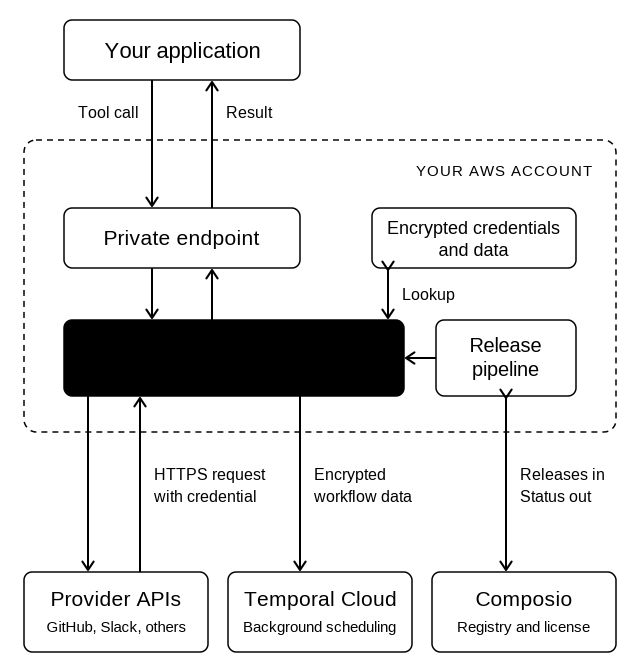
Your application does not need the GitHub token to make this call. Tokens are stored encrypted in your account, and the services that call providers decrypt them in memory. The runtime and support permissions you approve determine who can reach plaintext.
Approve every release before it runs
In the AWS reference architecture, we operate the deployment through IAM roles you approve, and every change goes through a pipeline in your account.
When a new version is ready, we request a specific release. The pipeline builds a preview of what will change and waits. Someone on your team reviews the preview and approves it. The pipeline then applies infrastructure changes, runs database migrations, rolls out the services, and checks their health. If you decline, the pipeline stops and the installed release keeps running.
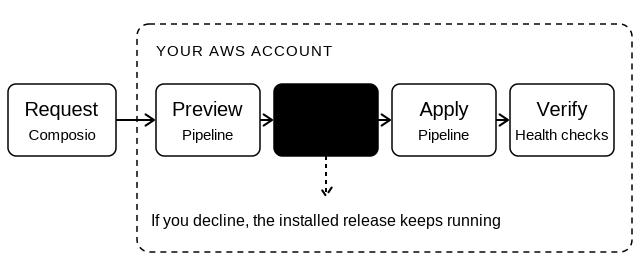
The role we use to request a release can start the pipeline and watch its progress. It cannot approve the release. Support access and diagnostic exports each need their own approval. We do not upgrade, shut down, or uninstall a deployment without your approval.
What leaves your account
BYOC is not air-gapped. The deployment connects out to providers, to Temporal Cloud, and to Composio.
Providers. Tool calls go to the provider's API over HTTPS, and the provider receives the authenticated request.
Temporal Cloud. Temporal schedules Triggers and other background work, such as keeping idle credentials alive. Workers in your cluster run the code and connect outbound, so Temporal needs no route into your VPC. Workflow inputs, results, and error details are encrypted before they leave, with keys that stay in your environment. Temporal can read non-sensitive identifiers and operational values, such as due times and retry counts. Synchronous tool calls can continue without Temporal while local dependencies and required credentials remain available, though delayed scheduled refreshes can eventually affect those calls.
Composio. The deployment pulls releases from our registry and reports license and instance status, such as the installed version and component health. You can turn that reporting off.
Logs, metrics, and traces go to the sink you choose. Each project can keep tool request and response bodies out of its logs.
Things to know
- Reference architecture. The AWS reference runs on Amazon EKS with AWS Fargate, in a dedicated AWS sub-account in a commercial region you choose.
- Network. Your applications reach the deployment over private HTTPS. If you use webhook Triggers, a public gateway you control exposes only the approved webhook paths.
- OAuth apps. You create an OAuth app with each provider and register the deployment's callback URLs and scopes. Your users' browsers must be able to reach those callbacks through your network or VPN.
- What is included. The API, SDKs, tool execution, connections, sessions, MCP, semantic tool search, and Triggers. Tool search needs an LLM and an embedding model, and both can run in your cloud.
- What is separate. Enterprise MCP Gateway and SSO are separate deployments. Workbench and self-service custom toolkits are not included. We can build custom connectors under your agreement, and we share their code with you before each deployment.
Bring Composio to your cloud
To plan a deployment in your own cloud, talk to the Composio team. We start with an architecture review of your providers, network restrictions, access policies, and recovery requirements.
The AWS reference architecture has the full design.
Get new posts in your inbox
Subscribe for the latest from the Composio blog.
Blog and newsletter updates. Privacy policy.