




A competitor changes its pricing, releases a feature or publishes a launch announcement. By the time someone on your team notices, the information may already be several weeks old.
This tutorial builds a competitor monitoring AI agent that checks those updates every Monday and sends one Slack report. It uses Hermes Agent to schedule and run the workflow, Composio to connect the applications, and Olostep to extract structured data from competitor websites.
The example tracks nine pages across Linear, Notion and Asana. You can replace them with competitors in your own market without rewriting the agent.
Source code: Competitor intelligence agent on GitHub.
How the competitor monitoring agent works
Every scheduled run follows the same sequence:
Hermes loads the list of competitor URLs and the last saved results.
Olostep scrapes the pricing, changelog and blog pages and extracts the fields defined for each page type.
The agent compares the new data with the previous snapshot. It looks for added or removed plans, price changes, releases and posts.
For up to three noteworthy updates, Olostep Answers retrieves supporting context and links.
Composio sends one summary to a designated Slack channel.
Hermes saves the latest successful page snapshots for the next run.
For three companies with three pages each, that is nine page checks per run. The agent is comparing extracted records, not asking a model to interpret two entire websites from scratch.
What the Slack report looks like
The repository's sample run is dated October 13, 2026. It compared live pages with archived copies captured between September 22 and October 6. It reported no pricing changes for Linear, Notion or Asana. It also captured Linear's Stacked pull-request changelog entry and new blog posts from Notion and Asana.
The report identifies the comparison period, gives each company a pricing status, and includes new releases or articles only when present. An optional What it means line provides contextual analysis. Pages that couldn't be checked appear under Checks, so an extraction failure doesn't look like a week with no changes.
A shortened excerpt of the recorded Slack report shows the format:
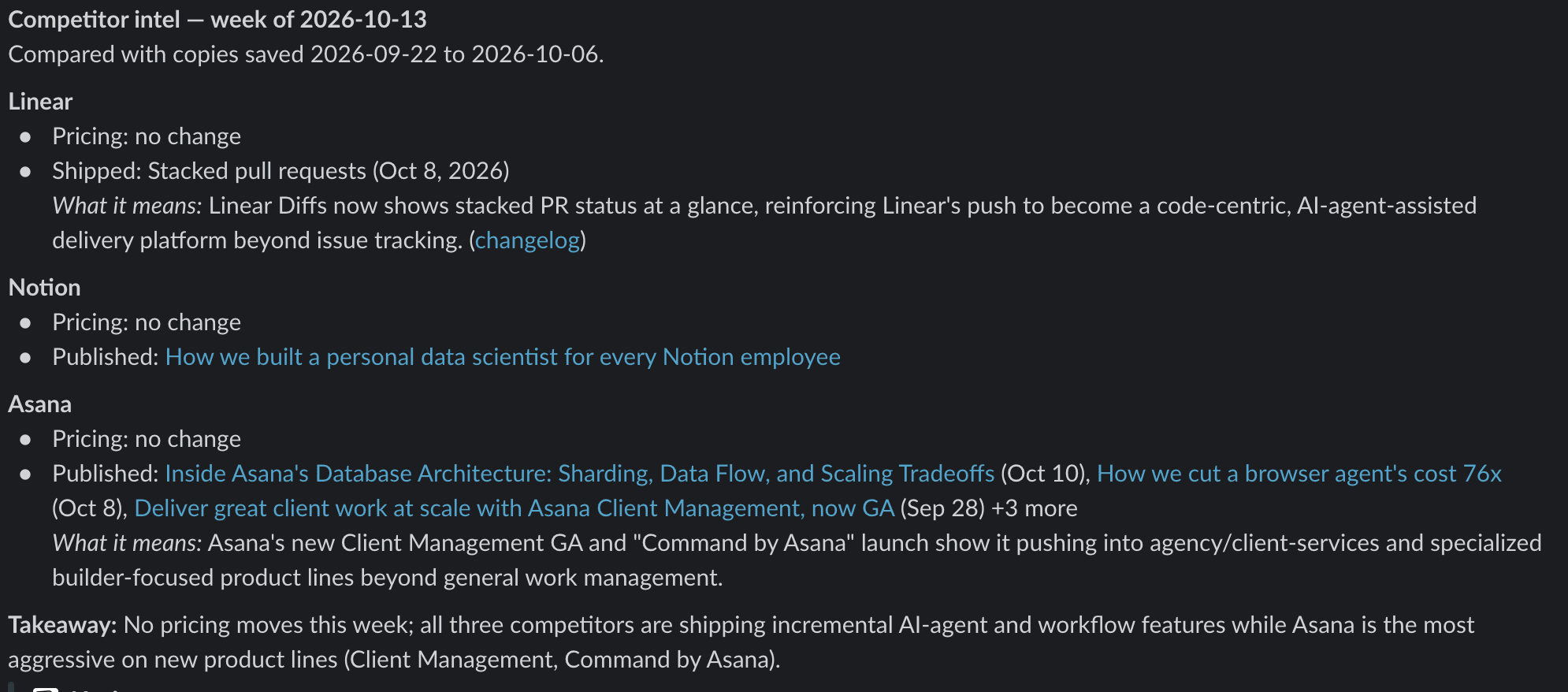
This is a condensed version of the actual sample Slack update, not a claim about today's competitor prices.
We seeded the older snapshots from archived pages to demonstrate change detection without waiting a week.
What you need
A machine or server that can run Hermes, with a configured model provider. The project was tested with Hermes v0.21.7 on macOS with Apple Silicon; the project README also lists Linux support.
A Composio account and a Connect MCP key.
An Olostep API key.
A Slack workspace with permission to post in the chosen channel.
The GitHub project, which contains the Hermes skill, extraction schemas, installation script and sample watch list.
You will run terminal commands and edit a JSON file. You do not need to write a separate scraping application.
Step 1: Install Hermes Agent
Install Hermes with the command from its official website:
curl -fsSL https://hermes-agent.nousresearch.com/install.sh | bashHermes needs a model provider. The sample project used OpenRouter; configure your preferred provider and model with:
hermes modelFollow the prompts to authenticate. For scheduled jobs, confirm that the selected model supports tool use and that the provider credentials remain available to the Hermes background service.
Step 2: Connect Composio to Hermes through MCP
Composio makes Olostep and Slack available through one MCP connection. Hermes can discover the relevant actions when it needs them instead of loading every app action into its initial context.
In the Composio dashboard, copy your Connect MCP key. Save it in ~/.hermes/.env under the variable name COMPOSIO_API_KEY. Keep the actual key out of the YAML configuration and out of version control.
Add this block to ~/.hermes/config.yaml:
mcp_servers:
  composio:
    url: "https://connect.composio.dev/mcp"
    headers:
      x-consumer-api-key: "${COMPOSIO_API_KEY}"
    connect_timeout: 60
    timeout: 180
If mcp_servers already exists, add composio underneath it rather than creating a second top-level key. Then verify the connection:
hermes mcp test composio
The check should confirm that the MCP server connects and its tools are discoverable. Do not depend on a fixed number of discovered tools; the service's exposed meta-tools can change.
Step 3: Authorize Olostep and Slack
Install the Composio CLI if you want to link the accounts from the terminal:
curl -fsSL https://composio.dev/install | sh

composio login

composio link olostep

composio link slack
Enter your Olostep API key when prompted, then approve the Slack connection in your browser. Composio Connect also lets Hermes connect an app through its MCP tools. The account owner still has to complete the authorisation flow.
You can confirm the Olostep actions in the Composio Olostep toolkit. This project uses OLOSTEP_SCRAPE_PAGE for collection and OLOSTEP_ANSWER_QUESTION for follow-up research. It posts the final report with SLACK_SEND_MESSAGE.
Step 4: Choose the competitor pages to monitor
The watch list separates each company by page type. Start with pricing, changelog and blog pages because each has a distinct definition of what counts as an update.
Here is watchlist.json with Linear's three pages:
{
  "slack_channel": "competitor-intel-demo",
  "pages": [
    {
      "id": "linear-pricing",
      "company": "Linear",
      "type": "pricing",
      "url": "https://linear.app/pricing"
    },
    {
      "id": "linear-changelog",
      "company": "Linear",
      "type": "changelog",
      "url": "https://linear.app/changelog"
    },
    {
      "id": "linear-blog",
      "company": "Linear",
      "type": "blog",
      "url": "https://linear.app/now"
    }
  ]
}
The repository's complete watchlist covers Linear, Notion and Asana. Change the URLs and Slack channel to your own targets. Use stable page IDs, since the agent saves one comparison file per ID.
Step 5: Extract structured pricing and release data with Olostep
A full-page Markdown comparison is noisy. Pricing pages contain navigation, footers and layout text that can change independently of prices. Changelog pages may reorder older entries. A model comparing entire pages can spend time on irrelevant differences.
Instead, the project asks Olostep for a defined JSON structure. The pricing schema records plan names, displayed prices and headline limits. The changelog schema extracts the newest titles, dates and summaries. The blog schema extracts titles, dates and links.
The Hermes skill calls Composio's OLOSTEP_SCRAPE_PAGE action with the following shape:
{
  "url": "https://linear.app/pricing",
  "formats": ["json"],
  "country": "US",
  "wait_before_scraping": 6000,
  "extraction_schema": {
    "type": "object",
    "properties": {
      "plans": {
        "type": "array",
        "items": {
          "type": "object",
          "properties": {
            "name": { "type": "string" },
            "price": { "type": "string" },
            "key_limits": {
              "type": "array",
              "items": { "type": "string" }
            }
          }
        }
      }
    }
  }
}
These are the fields used by the project's Composio action. If you call the Olostep Scrape REST API directly, its request uses url_to_scrape and llm_extract.schema instead. Do not interchange the two payload formats.
This is what came back (limits trimmed for length):
{
  "plans": [
    {"name": "Free", "price": "$0", "key_limits": ["Unlimited members", "2 teams", "250 issues"]},
    {"name": "Basic", "price": "$10 per user/month", "key_limits": ["5 teams", "Unlimited issues"]},
    {"name": "Business", "price": "$16 per user/month", "key_limits": ["Unlimited teams", "Private teams and guests"]},
    {"name": "Enterprise", "price": "Custom", "key_limits": ["SAML and SCIM"]}
  ]
}
Two settings helped during the recorded tests. wait_before_scraping: 6000 gives JavaScript-rendered content additional time to appear. country: "US" requests the page through a US location; it does not guarantee that every site will return US-dollar prices, so the agent checks currencies before comparing them.
Step 6: Install the Hermes skill and define change rules
Clone the project if you have not already downloaded it. Then update its watch list and install the skill:
git clone https://github.com/olostep-api/competitor-intel-agent.git
cd competitor-intel-agent
# Edit watchlist.json and select your Slack channel and competitor URLs.
./install.sh
The script places the skill under ~/.hermes/skills/research/competitor-intel/ and copies the watch list and schemas to ~/.hermes/competitor-intel/. Saved snapshots are written to the state/ subdirectory.
The skill applies different comparison rules to different page types:
Pricing: Match plans by name, then detect plans added or removed and changes in displayed price. The sample intentionally ignores changes in the extracted
key_limitslist, because the model may select different headline features between runs.Changelog: Look for titles absent from the saved snapshot. Reject entries dated before the previous capture, even if the extractor did not return them last time.
Blog: Apply the same title and publication-date check to new posts.
Missing dates need a separate check. The project's skill can count an undated item only when it appears above all entries already present in the saved copy. That is a heuristic, not a verified publication timestamp.
When a substantial update is found, Hermes can ask OLOSTEP_ANSWER_QUESTION for supporting information. Keep the distinction clear in the Slack summary: a new price or release is an observed page change; claims about what that change means for a competitor's strategy are interpretation. Include source links for background claims and omit analysis when the evidence is insufficient.
Step 7: Schedule a weekly Slack report
Create a Monday 9:00 a.m. job:
hermes cron create "0 9 * * 1" \
  "Run the weekly competitor intel check by following the competitor-intel skill." \
  --name competitor-intel --skill competitor-intel --deliver local

hermes gateway install
Hermes uses the configured timezone, or the machine's local timezone if none is specified. Its gateway service must be running for scheduled jobs to fire. The --deliver local option saves Hermes' own run output locally; the skill separately posts the competitor summary to Slack through Composio.
Check the schedule and trigger a run without waiting for Monday:
hermes cron list

hermes cron run <job_id>
Copy the actual job ID from hermes cron list. The run command takes a job ID, not the display name competitor-intel. The job uses the model you selected with hermes model, unless you explicitly pin a model and provider when creating it.
Each scheduled run starts a new agent session. It therefore reads the saved JSON snapshots rather than relying on chat memory. On the first run, the agent creates a baseline and reports that it has no earlier snapshot to compare. Changes become reportable on subsequent runs.
Reproduce the archived-baseline demo
The repository has an optional script for demonstration runs. From the cloned project directory, after installing the skill and connecting Composio, run:
python3 seed-baseline.py 20261006
It attempts to find Wayback Machine snapshots on or before October 6, 2026, extract them with Olostep, and save them as comparison records. Then run the Hermes job. Archive availability and scrape success are not guaranteed. For ordinary monitoring, skip this script and let the first live run establish the baseline.
Test the agent before relying on its alerts
Our manual tests covered several failure cases that a clean demonstration would miss.
A simulated price change was introduced by editing a saved Linear snapshot from $16 to $14. On the next comparison, the agent reported the Business plan price as $14 → $16.
In another test, removing a Notion changelog entry from the saved snapshot caused the next run to flag that entry. Two consecutive runs with unchanged pages produced a no-change update. A broken URL appeared under Checks without preventing the agent from processing other pages. An instruction embedded in a test page did not cause the agent to send an extra Slack message.
Each of these safeguards came from a failure seen during testing:
Hermes must read existing state files with its file tool before overwriting them. The skill lists the state directory first, avoiding errors on the initial run.
Empty structured extraction is retried once. If it remains empty, the skill falls back to Markdown and extracts the relevant entries from that result.
A different currency triggers another scrape. One scrape of Asana's pricing came back in Canadian dollars. If the currencies still don't match after retries, the agent doesn't report or save a pricing comparison for that page and flags it under Checks.
The skill posts to Slack before saving state. That prevents a state-write failure from blocking the message, but it can also result in a repeated alert on the next run. Review the run report for delivery and save failures rather than assuming exactly-once delivery.
The source website is untrusted input. Its content must not change the agent's instructions, choose a new destination channel, or request additional tool calls. Restrict available tools and Slack permissions to what the workflow requires.
Cost and accuracy considerations
The project's README estimates 90 Olostep credits for nine structured page extractions, before retries and Answers calls. It also records $0.53–$0.69 in model cost and a four- to five-minute run time for its particular test configuration. Your numbers will vary with the watch list and model.
Structured extraction is still probabilistic. One scrape might return eight recent releases and the next might select a slightly different eight. Matching titles and checking publication dates reduces false alarms but will not catch every change. Under the sample rules, you may miss an edited existing announcement, a renamed post, or an important plan-limit change.
For decisions involving pricing or product claims, open the original linked page before acting. Keep the captured date and the relevant URL in the output so another person can verify the finding.
Extend the workflow as your watch list grows
The project starts with known URLs, but Olostep supports other ways to collect competitor data:
OLOSTEP_MAP_WEBSITEcan help discover pricing pages, release notes and relevant URLs on a competitor's site.OLOSTEP_CREATE_MONITORandOLOSTEP_LIST_MONITOR_EVENTSsupport scheduled page monitoring and recorded change events. This is an alternative to scraping every URL on each Hermes run.OLOSTEP_START_BATCHcan process larger sets of URLs when individual scrape calls become cumbersome.OLOSTEP_SEARCH_WEBcan look beyond official sites for launches or announcements that do not appear in a watched changelog.
The report destination can also change. For example, authorise a different Composio toolkit and replace SLACK_SEND_MESSAGE in the skill with the relevant Notion, Linear or email action. Configure the destination's parameters and authentication separately.
These actions are listed in the Olostep Composio toolkit. For the monitor-first approach, see Olostep's Monitors API overview. That alternative is covered in more detail in How to monitor any website for changes with Olostep; this tutorial focuses on building the Hermes–Composio workflow for multiple competitors and a weekly Slack digest.
Frequently asked questions
Can this agent monitor competitors other than Linear, Notion and Asana?
Yes. Replace the entries in watchlist.json with the competitor pages you want to track. The included schemas cover pricing, changelogs and blogs. A different page type needs its own extraction schema and comparison rule. The site must also be accessible to the scraping tool.
Does it detect every change to a competitor's website?
No. The sample focuses on pricing-plan names and prices, new changelog entries and newly published blog posts. It does not treat small copy edits, layout changes or changes to extracted feature-limit lists as reportable events.
How does the agent reduce false alarms?
It compares plan names and prices instead of raw page text, and uses titles plus publication-date cutoffs for new posts and changelog entries. Currency mismatches and extraction failures are reported as checks rather than automatically treated as real changes. This reduces false positives but cannot eliminate errors caused by incomplete or inconsistent extraction.
Can I run competitor monitoring daily instead of weekly?
Yes. Edit the Hermes cron schedule. More frequent checks increase scraping and model usage, and most competitor pages don't change daily.
Do I need to build a custom scraper or Slack bot?
No. Olostep handles web extraction, and Composio supplies the Slack action. You still need to configure credentials, choose URLs and install the Hermes skill.
The complete GitHub project includes the watch list, extraction schemas, Hermes skill and setup script. Start with a small set of pages, run the agent twice, and check the reported changes against the original sites before using its updates for competitive decisions.

 Get started



