Mercor got breached. Axios got hijacked. A wave of supply chain attacks hit in March 2026, compromising thousands of environments and putting credentials at risk across the ecosystem.
The lesson is simple: if you're running agents that touch your email, calendar, repos, and socials, now is the time to think seriously about how those connections are secured. Common setups store API keys and OAuth tokens in plaintext config files on your machine. That's one prompt injection or one compromised dependency away from exposing everything your agent can access.
Agents are incredibly powerful — but only if they can interact with the world through the right tools. Those tools need to be safe, agent-first, and production-ready. That's why Composio exists. We're the execution layer that gives your OpenClaw the tools it needs to actually get things done — securely, reliably, and without you wiring up every integration by hand.
Why your agent should never see your passwords
Far too many agent setups naively put your credentials in the agent's hands. API keys pasted into config files. Passwords shared so the agent can log in as you. Plain text, on your machine, ready to be exposed the moment something goes wrong.
Composio works differently. When you connect an app through Composio, the OAuth handshake happens on our infrastructure. We store the tokens in an encrypted vault. Your agent gets a reference ID — not the credential itself. When it needs to hit an API, the request routes through Composio. We inject the credentials on our end, execute, return the result.
Your agent never sees the token. At any point.
The fastest way to set it up:
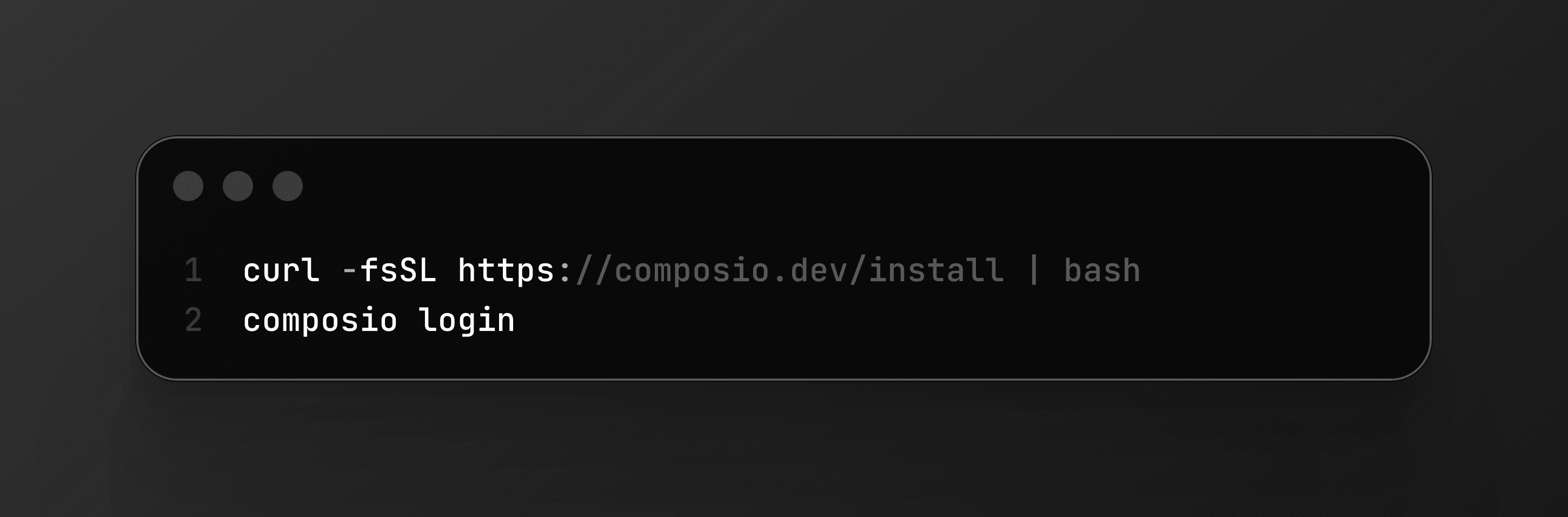
Then just ask your agent to do something — it'll handle the rest with the built-in commands. Gmail, GitHub, Slack, Notion, Linear, Jira, HubSpot, Salesforce, Google Drive. All managed, all through OAuth, no keys on your machine.
If something feels off, you revoke access from the Composio dashboard. Instantly. No digging through config files to figure out which key goes where.
People already figured this out
Security is often what leads people to Composio, but there are far more reasons they stay.
Security - an obvious and necessary beginning. Tom Osman called out the winning combination of a cracked (and secure!) product and a cracked team shipping it.
Avoiding the MCP server pileup. If you have been running OpenClaw for a while, you know how this goes. One MCP server for Gmail, another for GitHub, another for Slack. Each one with its own config, its own credentials, its own failure mode. Far too many tools in context. Mike (@grabbou) ran into exactly this and added Composio to consolidate everything into one execution layer. One place to authenticate. One place to manage. Smaller surface area for things to break.
Fast and easy setup, without manual OAuth hassle. SetupOpenClaw is a managed service that deploys and hardens OpenClaw instances for founders and exec teams. They chose Composio as their security middleware. Their pitch to clients: "Your bot never sees raw credentials." They combine Composio's OAuth layer with Docker sandboxing, firewall rules, and exec allowlists. The fact that businesses we have no relationship with are building their security story around Composio tells us something about what the market actually needs.
Fast and easy setup, without manual OAuth hassle. SetupOpenClaw is a managed service that deploys and hardens OpenClaw instances for founders and exec teams. They chose Composio as their security middleware. Their pitch to clients: skip the OAuth plumbing entirely. No registering apps, no handling token refresh, no building a revoke flow.
Tooling that scales for even the most complex use cases. Corey Haines built the Marketing Skills repo, sitting at 17,400+ stars right now. It is a full collection of agent skills for CRO, copywriting, SEO, analytics, growth engineering. The repo includes a dedicated Composio execution layer that manages tools like HubSpot, Salesforce, Meta Ads, and LinkedIn Ads through our MCP server.
How we use it
We run on this ourselves. Not as a test. As daily infrastructure.
Karan, our co-founder and CTO, has an OpenClaw agent that pulls his emails, Slack threads, and support tickets through Composio every morning, generates an audio briefing, and sends it before he drives to work. Fifteen minutes to set up on a DigitalOcean droplet. Open source: github.com/composiohq/secure-openclaw.
Shawn, our DevRel, recorded a walkthrough of the full Composio CLI flow with OpenClaw. Install the CLI, authenticate Gmail via OAuth, then build an automated workflow: OpenClaw reads a customer email, checks for billing issues, pulls the answer from a Notion FAQ page, and sends a response. Schedule it with cron and it runs every morning. No credentials stored locally at any step
Get started
Agents are only getting more access to more systems. Your inbox. Your repos. Your CRM. Your calendar. Every one of those connections is a credential that can be stolen, leaked, or misused if it is stored wrong.
You do not have to pick between capable agents and safe credentials. That is what Composio is for.
curl -fsSL https://composio.dev/install | bashHead to composio.dev/protection to secure your OpenClaw setup.
Oh also we made a fun video about protection. Check it out ↓